90
Camera mode icons
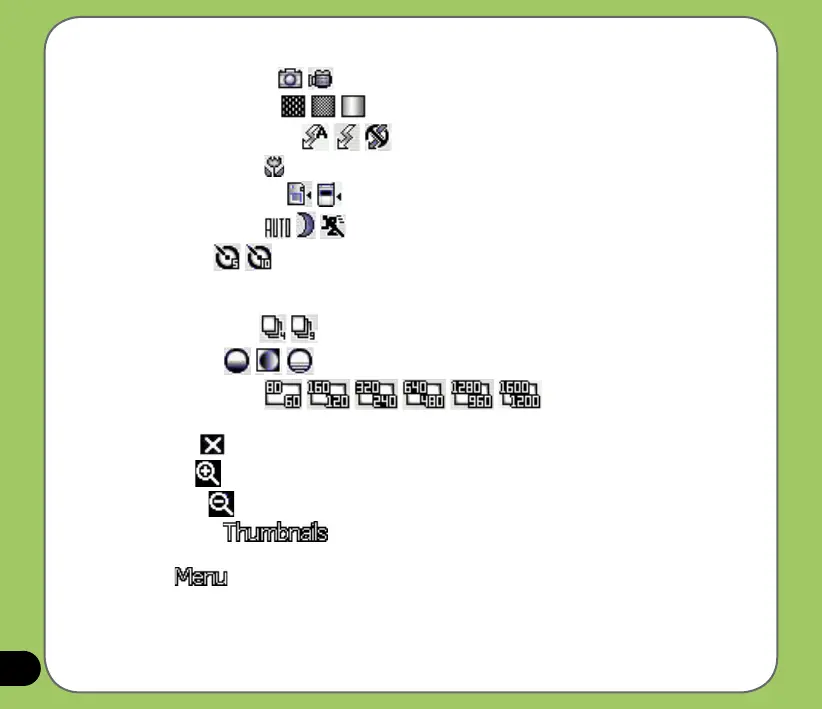
• Capture mode icon [ / ] - indicates the current capture mode.
• Picture quality icon
[ / /
]- indicates the picture quality used.
• Flash light status icon
[
/ / ] - indicates the camera ash status.
• Macro mode icon
[
] - this icon appears when the camera is in macro mode.
• Default storage icon [ / ] - indicates default storage for captured images.
• Scene mode icon
[ / / ] - indicates the scene mode used.
• Timer icon
[ / ] - when the camera timer is enabled (5 seconds or 10 seconds), the
corresponding timer icon appears. When you press the shutter button or the navigation
button to take a picture, the count down begins and picture is taken after the time set.
• Burst mode icon
[ / ] - indicates the number of frames in burst mode.
• Effects icon
[ / / ] - indicates the effect used.
• Picture resolution
[ / / / / / ] - shows the resolution used.
When set to 1600x1200 resolution, the zoom in/zoom out function is disabled.
• Exit icon
[ ] - tap to exit camera.
• Zoom In [ ] - tap to zoom in view of subject on screen.
• Zoom Out [ ] - tap to zoom out view of subject on screen.
• Thumbnails
[ ]- tap to launch Pictures and Videos application and preview
your images in thumbnails.
• Menu
[ ] - tap to launch camera menu options.



 To Next Page