Chapter 1: Product introduction1-6
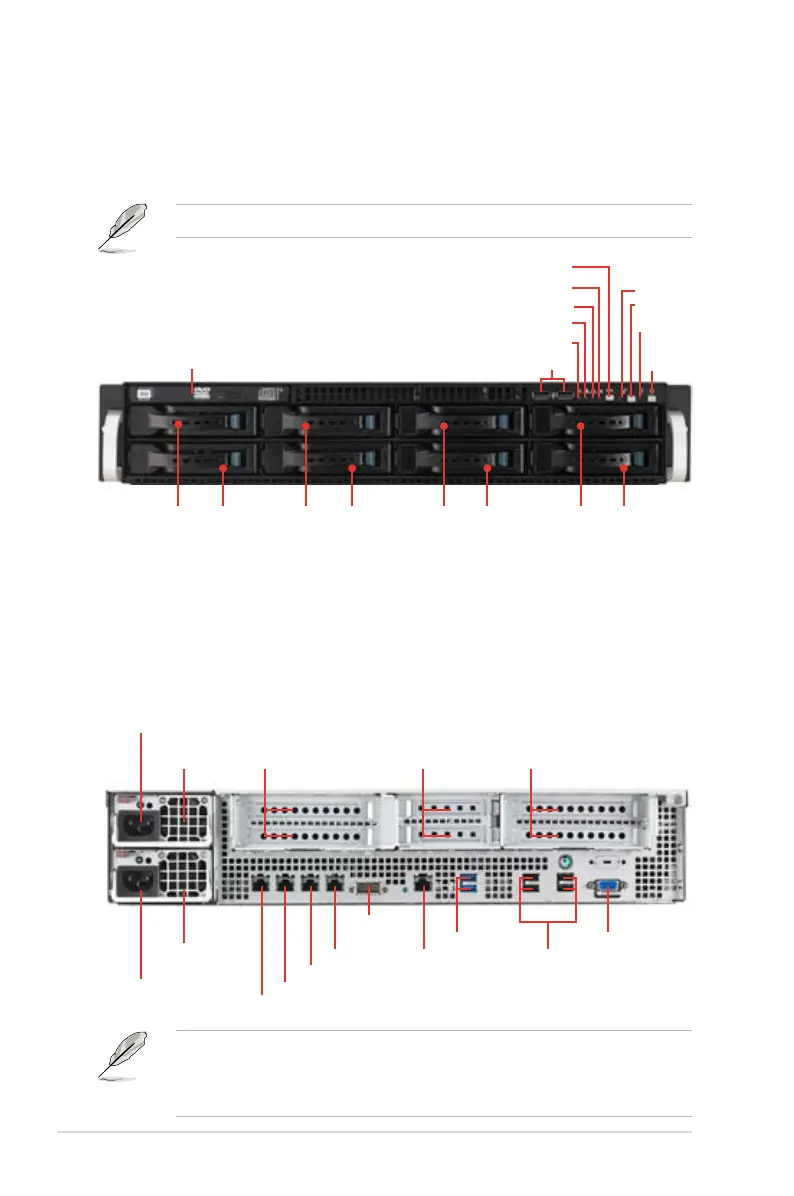
1.4 Front panel features
The barebone server displays a simple yet stylish front panel with easily accessible
features. The power and reset buttons, LED indicators, optical drive, and two USB
ports are located on the front panel.
• The rear I/O ports do not appear on the rear panel if motherboard is not
present.
• *The port is for ASUS ASMB6-iKVM controller card only.
1.5 Rear panel features
The rear panel includes the expansion slots, system power socket, and rear fans.
The middle part includes the I/O shield with openings for the rear panel connectors
on the motherboard.
Refer to section 1.7.1 Front panel LEDs for the LED descriptions.
ODD dummy cover
USB ports
P o w e r
button
Power LED
LAN2 LED
HDD Access LED
LAN1 LED
Message LED
Location switch
Reset button
Location LED
HDD 1 HDD 5 HDD 2 HDD 6 HDD 3 HDD 7 HDD 4 HDD 8
Redundant
power supply
Power cord
connector
LAN port 1
2 Full-length /
Full-height
Expansion slot
2 Full-length /
Full-height
Expansion slot
Power cord
connector
Redundant
power supply
LAN port 2
LAN port 3
LAN port 4
InfiniBand
port
LAN port 5*
USB 3.0 ports
VGA port
USB 2.0 ports
2 Half-length /
Low-prole
Expansion slot


 To Next Page
 Loading...










