Chapter 2: Hardware Information
2-10
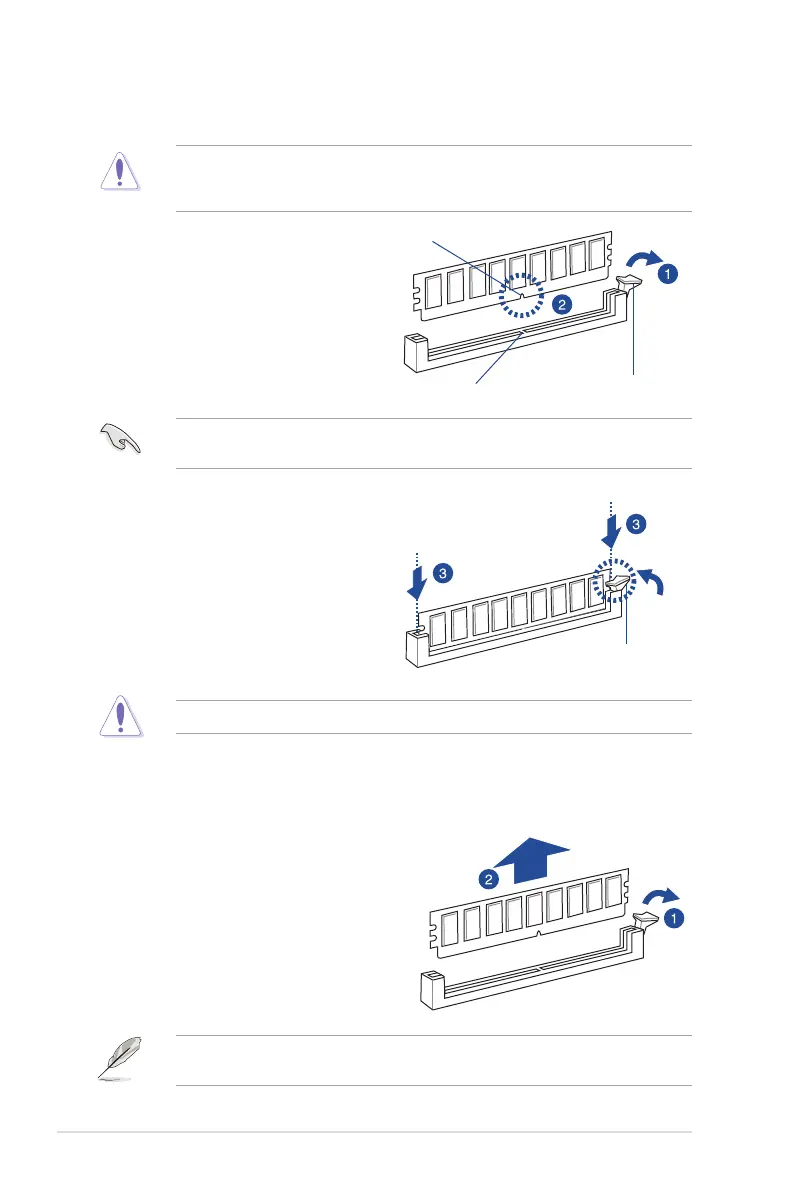
2.3.3 Installing a DIMM on a single clip DIMM socket
EnsuretounplugthepowersupplybeforeaddingorremovingDIMMsorothersystem
components.Failuretodosomaycauseseveredamagetoboththemotherboardandthe
components.
3. Hold the DIMM by both of its ends
then insert the DIMM vertically into the
socket.Applyforcetobothendsofthe
DIMM simultaneously until the retaining
clipsnapsbackintoplaceandthe
DIMM cannot be pushed in any further
to ensure proper sitting of the DIMM.
Locked Retaining Clip
1. UnlockaDIMMsocketbypressingthe
retaining clip outward.
2. AlignaDIMMonthesocketsuchthat
the notch on the DIMM matches the
DIMMslotkeyonthesocket.
Unlocked retaining clip
DIMM notch
DIMM slot key
1. Press the retaining clip outward to
unlocktheDIMM.
2. RemovetheDIMMfromthesocket.
Removing a DIMM from a single clip DIMM socket
SupporttheDIMMlightlywithyourngerswhenpressingtheretainingclips.TheDIMM
mightgetdamagedwhenitipsoutwithextraforce.
AlwaysinserttheDIMMintothesocketverticallytopreventDIMMnotchdamage.
ADIMMiskeyedwithanotchsothatittsinonlyonedirection.DONOTforceaDIMMinto
asocketinthewrongdirectiontoavoiddamagingtheDIMM.













 To Next Page