Chapter 2: Hardware Information
2-12
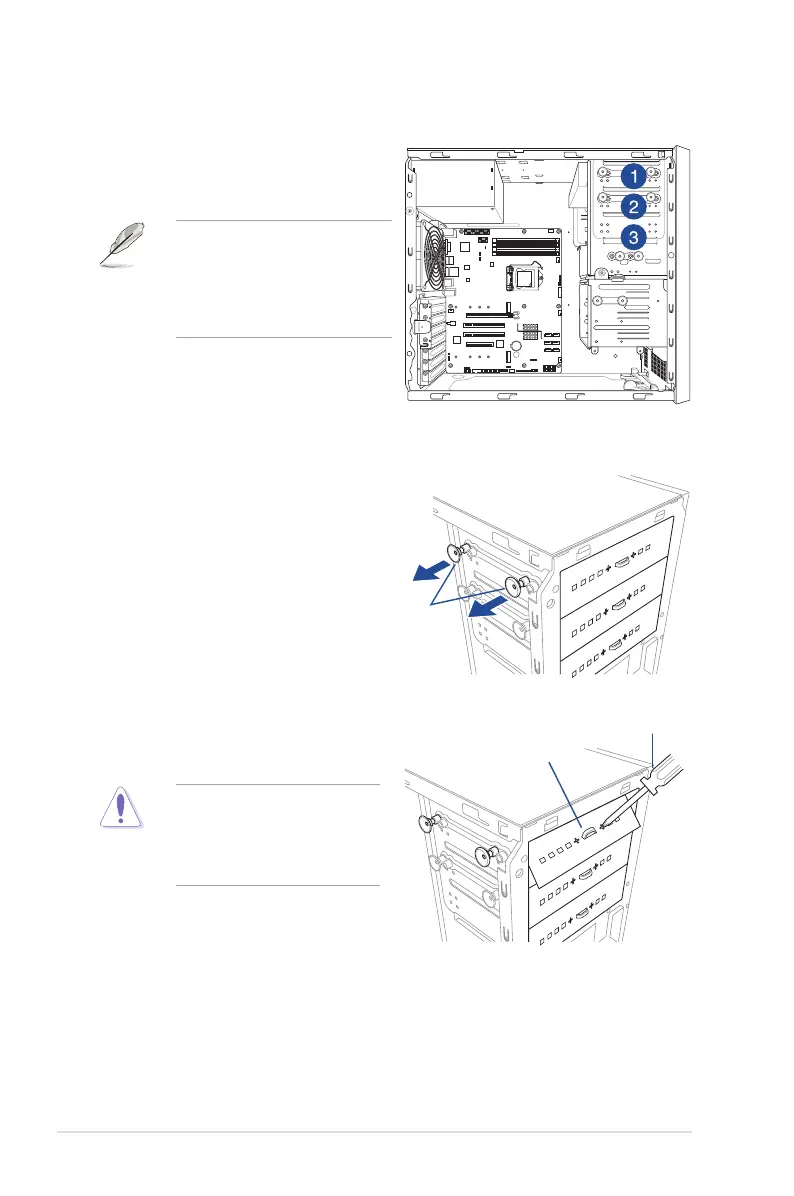
2.5 5.25-inch drives
Installing a 5.25-inch drive
To install a 5.25-inch drive:
1. Remove the front panel cover. Refer to
the Removing the front panel cover
section for more information.
2. Pullthebaylocksoutward.
3. Remove the metal cover of the bay
you intend to use.
Takeextracarewhenremovingthe
metal cover. Use tools such as a
screw driver to bend and remove
the metal cover to avoid physical
injury.
This system comes with three 5.25-inch drive
bays located on the upper front section of the
chassis.
If your system came with an optical
drive, the optical drive occupies the
topmostbay(1).Thelowerbays(2
and3)areavailableforadditional
5.25-inchoptical,zip,oroppydisk
drives.
bay locks
screw driver
metal cover













 To Next Page