Chapter 2: Hardware Information
2-22
P11C-X/AUDIO
Intel
®
C242
Super
I/O
ASPEED
AST2510
ASM
1083
DDR4 DIMM_B2 (64bit, 288-pin module)
DDR4 DIMM_B1 (64bit, 288-pin module)
DDR4 DIMM_A2 (64bit, 288-pin module)
DDR4 DIMM_A1 (64bit, 288-pin module)
EATX12V1
EATXPWR1
SMBUS1
PCH_MFG1
ME_RCVR1
SATA1
SATA3
SATA5
BUZZ1
SATA2
SATA4
SATA6
PANEL1
AUX_PANEL1
HDLED1
CLRTC1
INTRUSION1
SGPIO1
VGA_SW1
LAN_SW1
USB3_34
USB78
VGA1
COM1
CPU_FAN1
FRNT_FAN4
FRNT_FAN1
FRNT_FAN2
TPM1
USB14
FRNT_FAN3
REAR_FAN1
LAN1
LAN2_USB3_56
KB_USB1011
USB31_12
PCI5
PCI4
PCIE3
PCIE6
CPU1
NGFF2
22422260228022110
NGFF1
22422260228022110
MLED1
PLED1
LOCLED1
SBPWR1
Lithium Cell
CMOS Power
Intel
®
I219LM
Intel
®
I210 AT
DIGI+
EPU
LPT1
PWR_SW1
AUDIO
AAFP
SPDIF_OUT
U2_CFG5
U2_CFG6
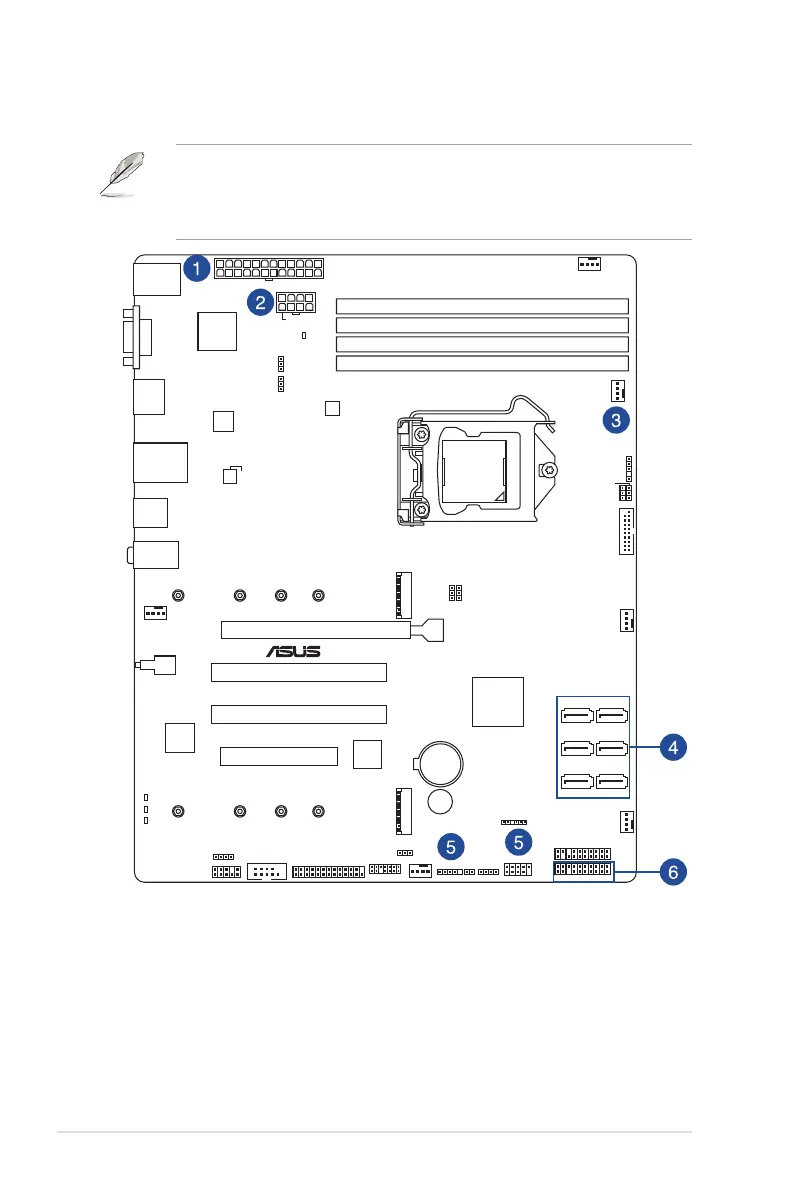
2.9 Cable connections
• Thebundledsystemcablesarepre-connectedbeforeshipment.Youdonotneedto
disconnect these cables unless you will remove pre-installed components to install
additional devices.
• RefertoChapter3fordetailedinformationontheconnectors.
Standard cables connected to the motherboard
1. 24-pinATXpowerconnector(frompowersupplytomotherboard)
2. 8-pinATX12Vpowerconnector(frompowersupplytomotherboard)
3. Systemfanconnector(frommotherboardtosystem)
4. SATAconnectors(systemdefault;frommotherboardtoSATAdevices)
5. USBconnectors(frommotherboardtofrontI/Oboard)
6. Systempanelconnector(frommotherboardtofrontI/Oboard)













 To Next Page