Chapter 2: Hardware Information
2-16
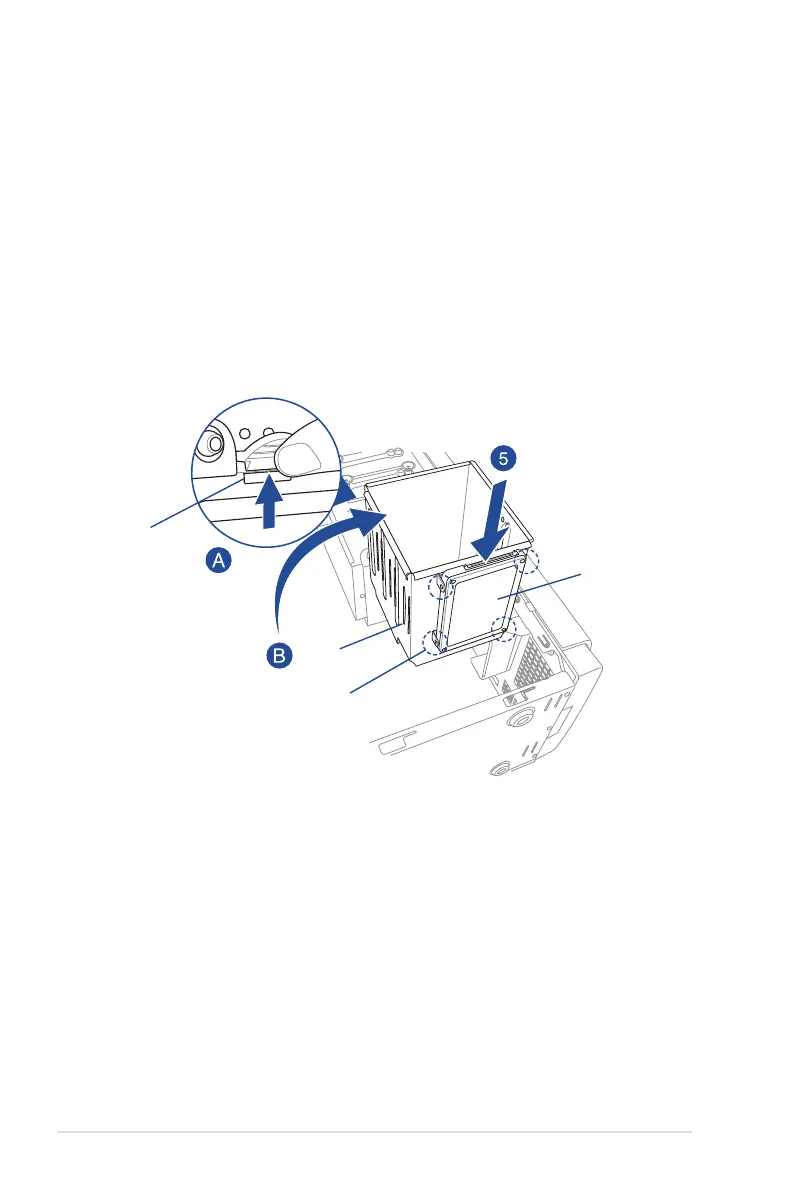
Installing 2.5-inch HDD/SSD
To install a 2.5-inch HDD/SSD:
1. Remove the side cover of the chassis. Refer to the Removing the side cover section
for more information.
2. Prepare the 2.5-inch HDD/SDD and the bundled set of screws.
3. Laythesystemonitssideonaatandstablesurface.
4. LocatetheHDDcagelock,pressitup(A),thenswingtheHDDcageoutwards(B).
5. Align and insert the 2.5-inch HDD/SSD into the drive bay as shown. Push it all the way
until its screw holes align with the holes on the drive bay.
HDD cage lock
HDD cage
matching screw holes
2.5-inch HDD/SSD













 To Next Page