Chapter 2: Hardware setup2-8
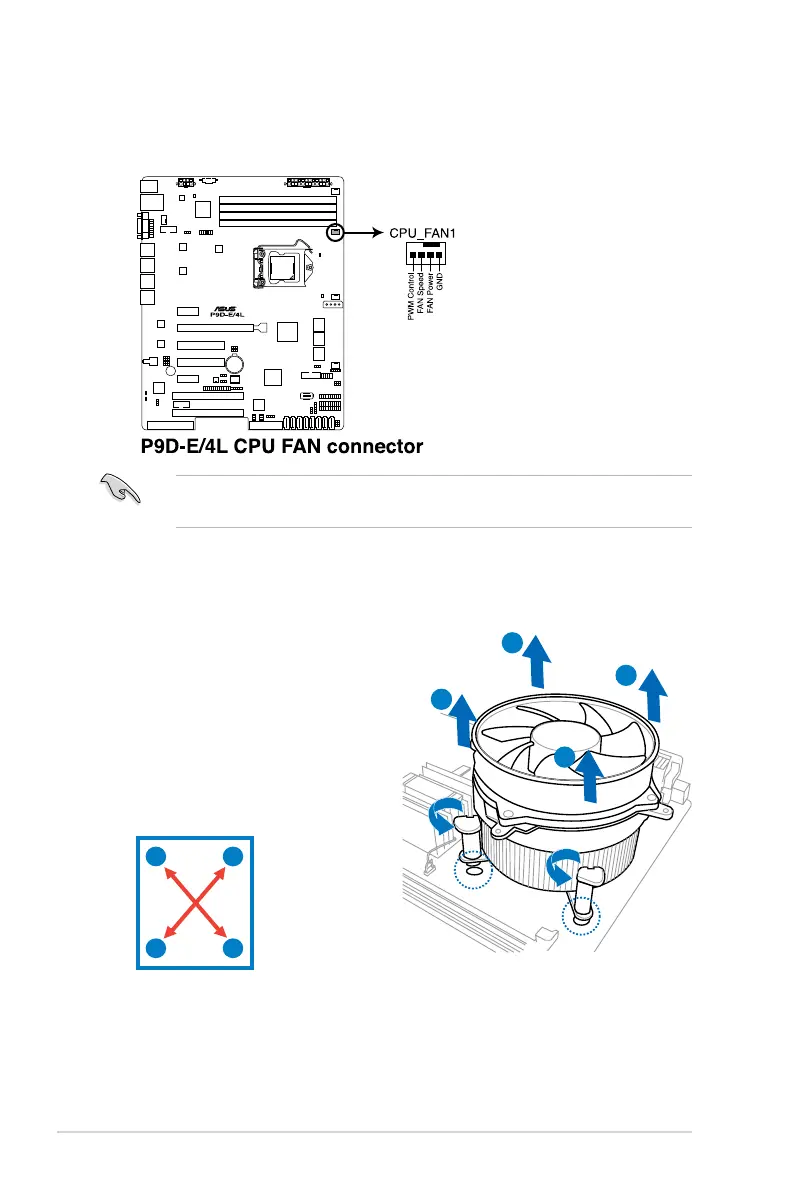
3. Connect the CPU fan cable to the connector on the motherboard labeled
CPU_FAN1.
DO NOT forget to connect the CPU fan connector! Hardware monitoring errors
can occur if you fail to plug this connector.
2.2.3 Uninstalling the CPU heatsink and fan
A
A
B
B
A
A
B
B
4. Carefully remove the heatsink and fan assembly from the motherboard.
To uninstall the CPU heatsink and fan:
1. Disconnect the CPU fan cable from
the connector on the motherboard.
2. Rotate each fastener
counterclockwise.
3. Pull up two fasteners at a time in a
diagonal sequence to disengage the
heatsink and fan assembly from the
motherboard.













 To Next Page