Chapter 2: Hardware setup2-20
2.7 Expansion cards
This system is designed with expansion card locks on the rear panel for you to
install or remove expansion cards faster.
Unplug the power cord before installing or removing expansion cards. Failure
to do so may cause severe damage to the motherboard and other system
components!
2.7.1 Installing an expansion card
1. Before installing the expansion card, read the documentation that came with
it and make the necessary hardware settings for the card.
2. Lay the system on its side on a flat, stable surface.
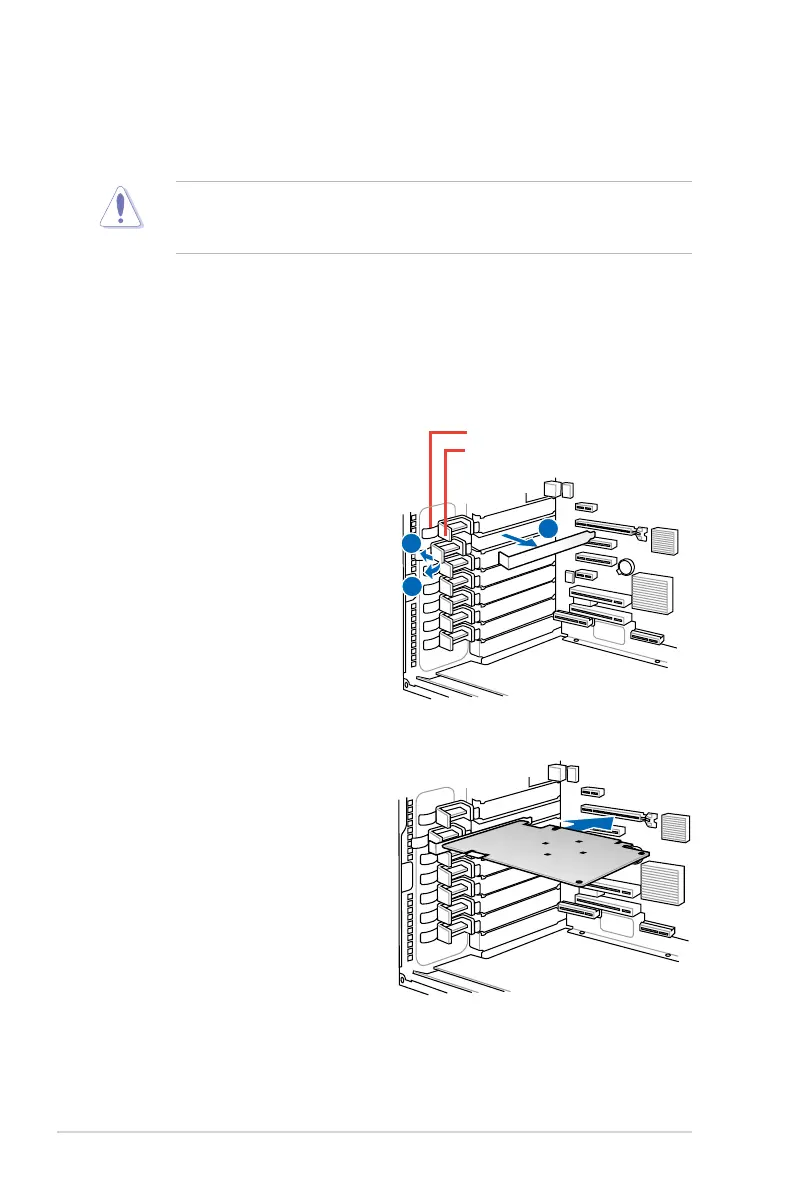
5. Remove the metal slot cover
opposite the slot where you wish
to install an expansion card.
6. Align the PCI card’s golden contact
points with the slot, and then press
firmly until the card is completely
seated on the slot.
3. Push back the expansion card
lock latch.
4. Pull the latch of the expansion
card lock to release the metal slot
cover.
expansion card lock latches
expansion card locks













 To Next Page