Home
Asus
Server
TS300-E8-PS4
Page 56 (3.4 Mounting the server to the rack)
Asus TS300-E8-PS4 - 3.4 Mounting the server to the rack
170 pages
Manual
Save Page as PDF
To Next Page
To Next Page
To Previous Page
To Previous Page
Loading...
Chapter 3: Installation options
3-4
3.4
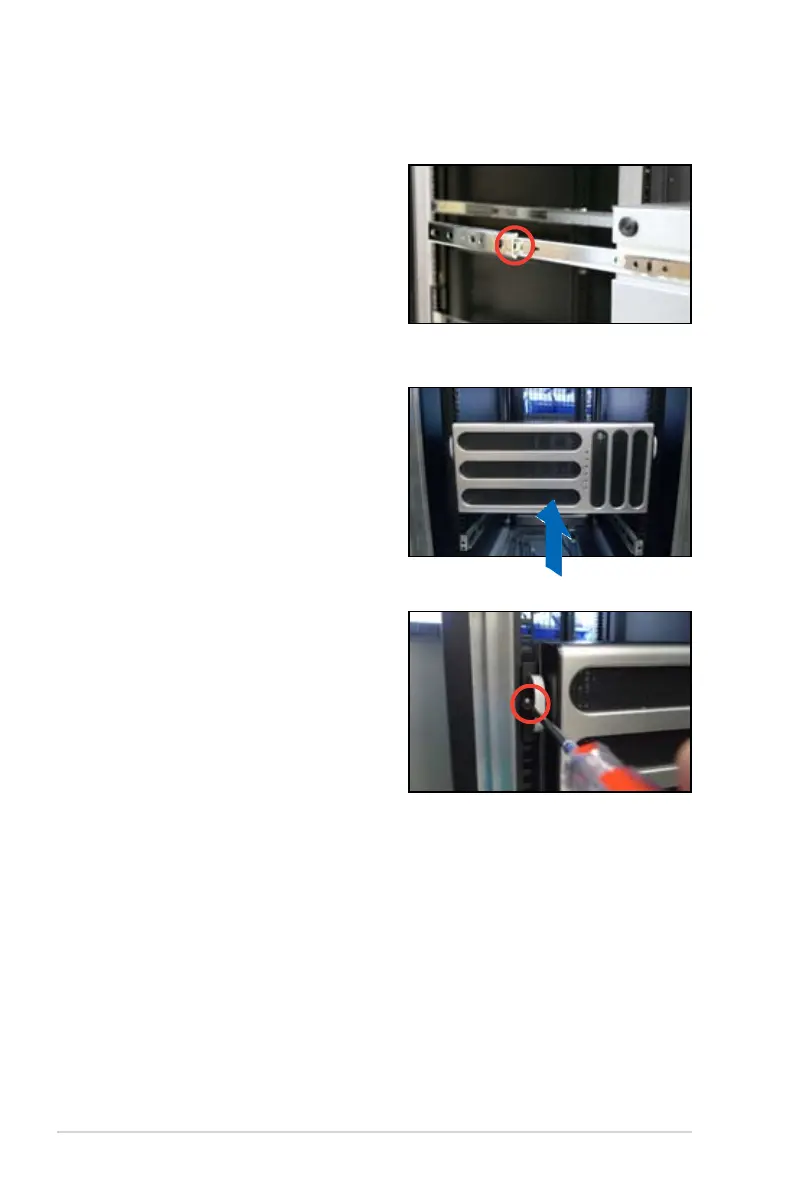
Mounting the server to the rack
T
o mount the server to the rack
1.
Align the server rails with the rack
rails.
2.
Push the server all the way into the
rack.
3.
Secure the server to the rack.
55
57
Table of Contents
Main Page
Default Chapter
1
User Guide
1
Table of Contents
3
Contents
4
Canadian Department of Communications Statement
8
Federal Communications Commission Statement
8
Notices
8
Electrical Safety
9
Operation Safety
9
Safety Information
9
About this Guide
11
Chapter 1: Product Introduction
14
System Package Contents
14
Serial Number Label
14
System Specifications
15
Front Panel Features
17
Rear Panel Features
18
Internal Features
19
LED Information
20
Front Panel Leds
20
Rear Panel Leds
21
Chapter 2: Hardware Setup
24
Chassis Cover
24
Removing the Side Cover
24
Reinstalling the Side Cover
25
Central Processing Unit (CPU)
26
Installing the CPU
26
Installing the CPU Heatsink
29
Uninstalling the CPU Heatsink and Fan
30
System Memory
31
Overview
31
Memory Configurations
31
Installing a DIMM on a Single Clip DIMM Socket
32
Front Panel Assembly
33
Removing the Front Panel Assembly
33
Reinstalling the Front Panel Assembly
33
Inch Drives
34
SATA/SAS Hard Disk Drives
35
Installing the HDD Module Cage
35
Installing the Second HDD Module Cage (Optional)
37
Removing the HDD Module Cage
39
Installing a Hot-Swap SATA/SAS Hard Disk Drive
39
Removing and Reinstalling the Backplane
41
Expansion Cards
42
Installing an Expansion Card
42
Installing ASUS PIKE RAID Card
44
Installing ASMB7 Management Board
45
Configuring an Expansion Card
46
Cable Connections
47
Motherboard Connections
47
SATA/SAS Backplane Connections
48
Back Side
49
Removable Components
50
System Fan
50
Chassis Footpads
51
Chapter 3: Installation Options
54
Preparing the System for Rack Mounting
54
Attaching the Inner Rail to the Server
54
Attaching the Rails to the Rack
55
Mounting the Server to the Rack
56
Chapter 4 : Motherboard Info
58
Motherboard Overview
58
Placement Direction
58
Screw Holes
58
Motherboard Layout
59
Layout Contents
60
Expansion Slots
62
PCI Express X16 Slot (X16 Link)
62
PCI Express X8 Slot (X8 Link)
62
PCI Express X1 Slot (X1 Link)
62
PCI Slot
62
PIKE Slot
63
Onboard Leds
64
Jumpers
67
Connectors
72
Rear Panel Connectors
72
Internal Connectors
73
Chapter 5: BIOS Setup
84
Managing and Updating Your BIOS
84
ASUS Crashfree BIOS 3 Utility
84
ASUS Ezflash Utility
85
BUPDATER Utility
86
BIOS Setup Program
88
BIOS Menu Screen
89
Menu Bar
89
Menu Items
90
Submenu Items
90
Navigation Keys
90
General Help
90
Configuration Fields
90
Pop-Up Window
90
Scroll Bar
90
Main Menu
91
System Date
91
System Time
91
Advanced Menu
92
CPU Configuration
93
PCH-IO Configuration
96
SATA Configuration
97
System Agent (SA) Configuration
98
5.4.5 PCI Subsystem Settings
100
5.4.6 Usb Configuration
102
Tpm
103
ACPI Settings
103
WHEA Support
104
NCT6779D Super IO Configuration
104
Intel Server Platform Services
105
Onboard LAN Configuration
106
MIO Card Configuration
106
Serial Port Console Redirection
107
Runtime Error Logging Support
109
Apm
109
Network Stack
110
Intel RC Drivers Version Detail
110
Event Logs Menu
111
Boot Menu
112
Monitor Menu
115
Security
116
User Password
117
Tool Menu
119
Exit Menu
119
Restore Defaults
120
Chapter 6: RAID Configuration
122
Setting up RAID
122
RAID Definitions
122
Installing Hard Disk Drives
123
Setting Jumpers
123
Setting the RAID Mode in BIOS
123
RAID Configuration Utilities
123
Option Rom Utility
124
Creating a RAID Set
125
Deleting a RAID Set
127
Resetting Disks to Non-RAID
128
Rebuilding the RAID
129
Setting the Boot Array in the BIOS Setup Utility
131
Intel ® Rapid Storage Technology Enterprise
132
(Windows)
132
Creating a RAID Set
133
Changing a Volume Type
135
Deleting a Volume
136
Preferences
137
Chapter 7: Driver Installation
140
RAID Driver Installation
140
Creating a RAID Driver Disk
140
Installing the RAID Controller Driver
142
Management Applications and Utilities Installation
144
Running the Support DVD
144
Installing the LAN Driver
152
Installing the VGA Driver
157
Installing the Intel ® C22X MEI NULL HECI Driver
160
Installing the Intel ® I210 Gigabit Adapter Driver
162
ASUS Contact Information
167
Technical Support
168
Other manuals for Asus TS300-E8-PS4
Configuration Guide
22 pages
Related product manuals
Asus TS mini
114 pages
Asus TS110-E8-PI4
146 pages
Asus TS700-X7/PS4
200 pages
Asus TS100-E10-PI4
138 pages
Asus TS700-E9 Series
178 pages
Asus K31AN
70 pages
Asus VivoPC
42 pages
Asus ESC4000 G4S
202 pages
Asus RS920-E7/RS8
200 pages
Asus RS720Q-E9-RS8
154 pages
Asus ESC4000 DHD G4
178 pages
Asus Z11PA-D8 Series
158 pages













 To Next Page