A68(W) IP Phone User Manual
ATCOM TECHNOLOGY CO., LIMITED www.atcom.cn83
If set this parameter as “On”, the phone will do some check for
upgrading after “Interval(minutes)”,and it will upgrade automatically
once the conditions are met
If set this parameter as “On”, the phone will do the check for upgrading
at a certain time in every week
The time range that the phone do the check for upgrading every week,
and it’s configurable once the Repeatedly is “On”
The day of week that the phone do the check for upgrading every week,
and it’s configurable once the Repeatedly is “On”
4.4、Export & Import configuration file
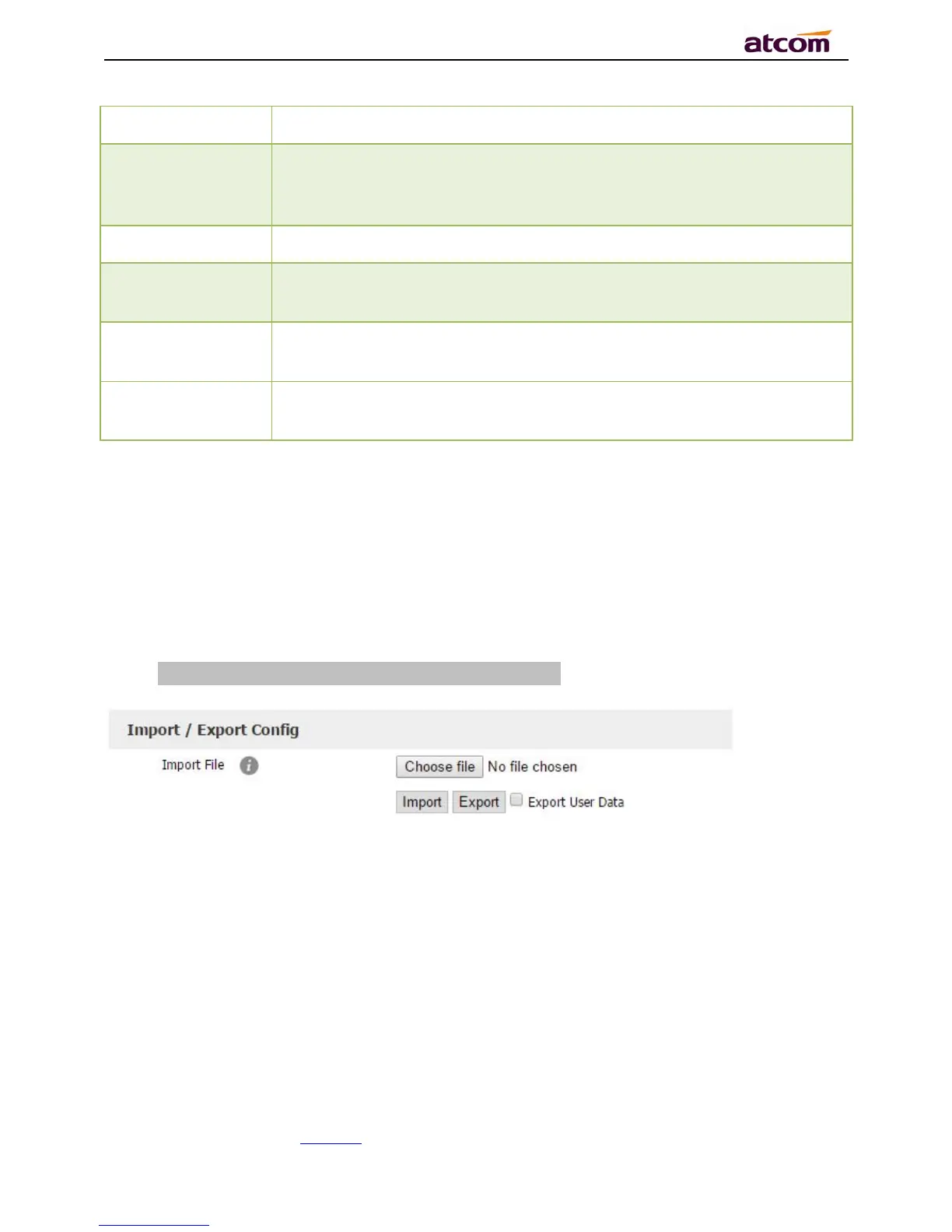
If user wants to set the same configuration on multiple phones, there is an easy way that
export the configuration file from one phone and then import this file into other phones. This
operation can be completed via Web only.
Note:This operation is available for the same models only.
4.4.1、Export configuration file
There is two ways to export the configuration files,
Don’t check the “Export User Data” and click “Export” directly, it will export the template of
the configuration file;
Check the “Export User Data” and then click “Export”, it will export a configuration file that
carries with user’s configured data.



 To Next Page