A68(W) IP Phone User Manual
ATCOM TECHNOLOGY CO., LIMITED www.atcom.cn89
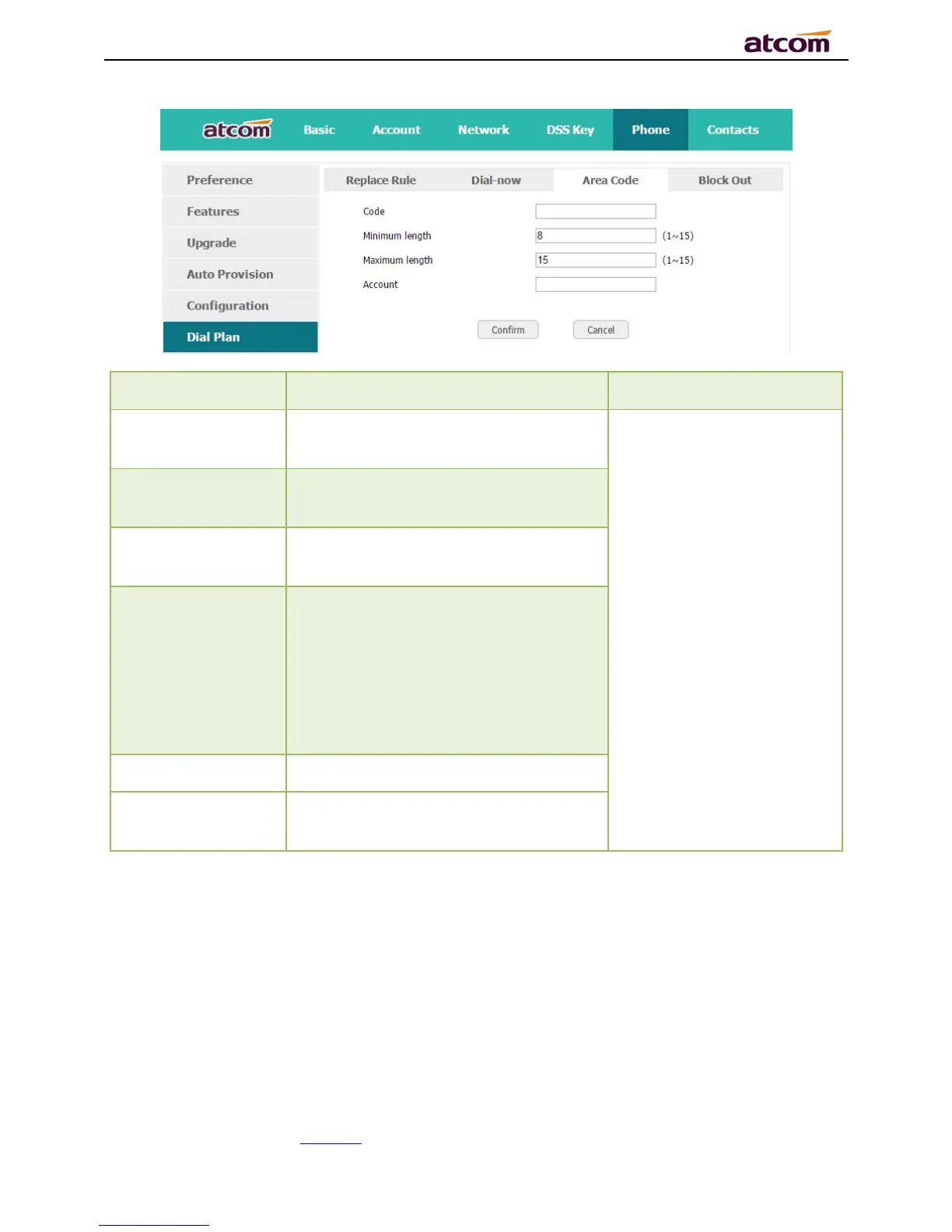
The area code dialed before the
number
Set “Account” as “5”,
Set “Minimum length” as
“5”.
It means when dialing
83018618 with the 5
th
account, the phone will dial
0086577 before it.
Note:If the length of
the number input in the
dial UI is not between
minimum length and the
maximum length, area
code will not take effect
The minimum length of the number
input to active the area code dial plan
The maximum length of the number
input to active the area code dial plan
The account to apply this dial plan,
blank or 1 to 6 is valid. Number 1 to 6
means account 1 to 6. If you want to
apply this rule to account 1、3 and
4,just type in 1,3,4;And if keep it as
blank, it means applying this dial plan
to all accounts
Recover all input fields to the state
that saved at latest time
4.6.4、Block Out
Dial plan “Block out” is used to prohibit the phone number outgoing call from some accounts.



 To Next Page