AT-610
User Manual
ATCOM TECHNOLOGY CO. , LIMITED
3) Press “ Vol+ ” or “ Vol- “ browse out coming call records.
4) Choose the received call record, press “ Redial ” button to call this
number.
I f there is no record, the LCD screen display “ List is Empty ” .
8
8
8
8 、 C
C
C
C all
all
all
all pickup
pickup
pickup
pickup
Call pickup is simulate d from “ Pickup ” function process es from IPPBX . W hen A
call B with no reply after ring tone s , C could pick up the call from A for B by
inputting the prefix and B
’
s phone No.
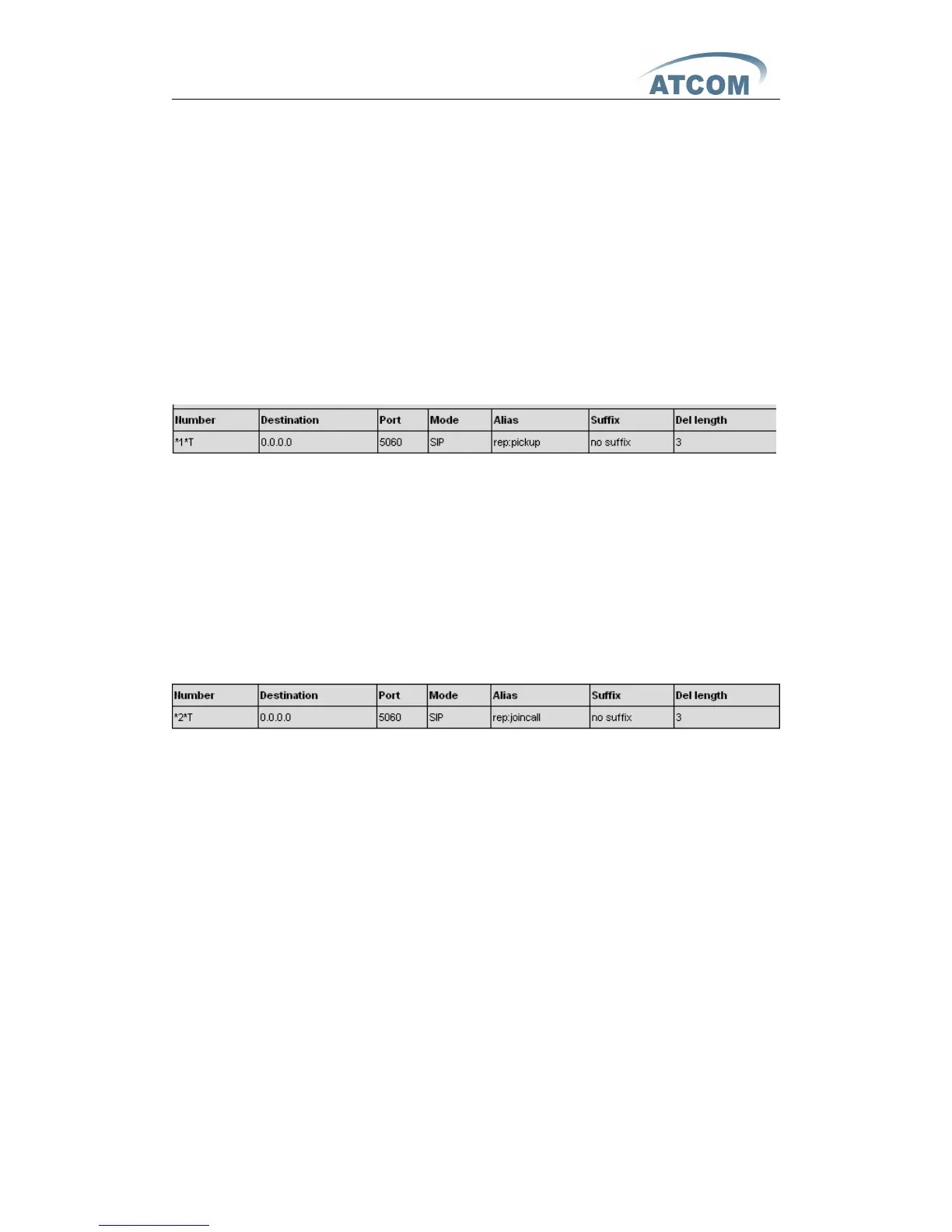
C need ed to set the dial peer with prefix code as follow :
To
refer *1* as the set prefix c od e , C could get the call from A to B by dialing
*1*+B,
*1* prefix could be freely set as long as no confliction with other dialing rules.
9
9
9
9
、
J
J
J
J oin
oin
oin
oin call
call
call
call
“
A
” could join in the conference call , by input a prefix plus a phone No. which is
already in the conference.
A requested to set the prefix code for dial peer as follow :
To
refer *2* as the set prefix code ,
“
A
” could join in the conference by dial *2*
plus the call N o . Which is already in the conference .
*2* prefix could be freely set as long as no confliction with other dialing rules .
10
10
10
10 、 R
R
R
R edial/
edial/
edial/
edial/ U
U
U
U nredial
nredial
nredial
nredial
In order to b eing efficien tly to contact the busy line, A could use Redial to
call B the busy line with setting prefix. When B is free A could get through the
call as usual . When B is busy, A could hang the phone with checking B
’
s situation
with every 60S by the set of prefix.
IP Phone of User A would ring and prompt pick ing up handset if B is
available. It would call B automatically once A picking up handset. The call
would get through as soon as had set being picked up at B. A could dial the
predecessor which set already add number of B to cancel the call before the
phone automatic redialing if A is not available suddenly or don ’ t want to call B



 To Next Page