AT-610
User Manual
ATCOM TECHNOLOGY CO. , LIMITED
6th
6th
6th
6th 、 Web
Web
Web
Web settings
settings
settings
settings
Enter
AT-
610 IP addresses in the web browser to go to the log on page, and key
in the username and password to access
AT-
610 setting page.
Default username and password is:
Administrator:
Administrator:
Administrator:
Administrator: Username: admin
admin
admin
admin P assword: admin
admin
admin
admin
Guest
Guest
Guest
Guest :
:
:
: Username: guest
guest
guest
guest Password : guest
guest
guest
guest
1
1
1
1 、 Current
Current
Current
Current state
state
state
state
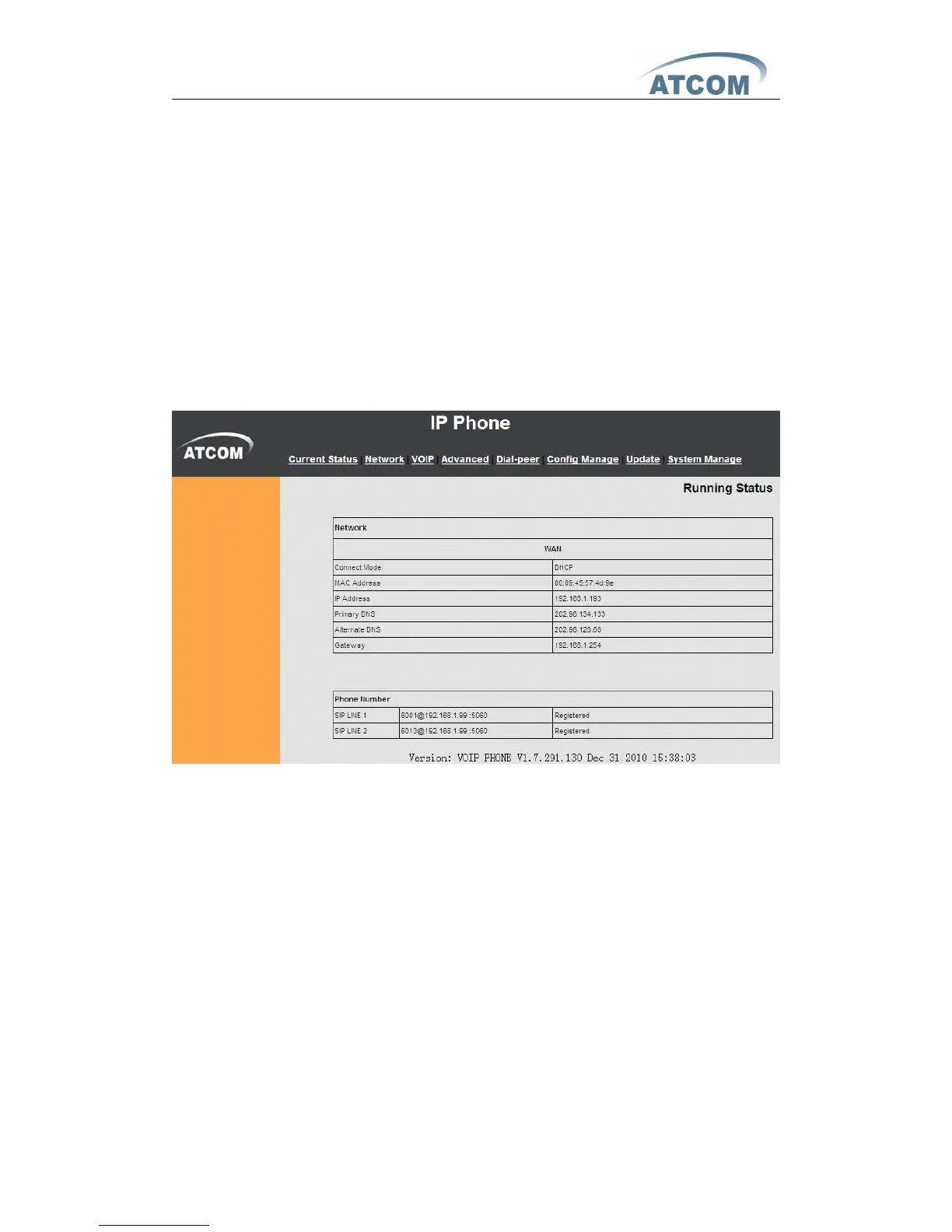
This page shows the IP phone working status.
The network part shows the connection status of WAN and LAN.
Phone Number part shows the phone number and register status for Line1 、
Line2 and IAX2 .
The Version shows the current firmware version.
2
2
2
2
、
Network
Network
Network
Network
There are 3 ways to connect to the internet DHCP, Static and PPPoE, please
choose one according to your own situation .
A 、 DHCP , the IP phone will get IP address from DHCP server , you do not
have to fill in the date of IP address , net mask etc , just choose DHCP and
submit . Please refer to the below picture



 To Next Page