AT-610
User Manual
ATCOM TECHNOLOGY CO. , LIMITED
Media Key: voice stream encryption Key .
4
4
4
4 、 Advance
Advance
Advance
Advance
4.1.
4.1.
4.1.
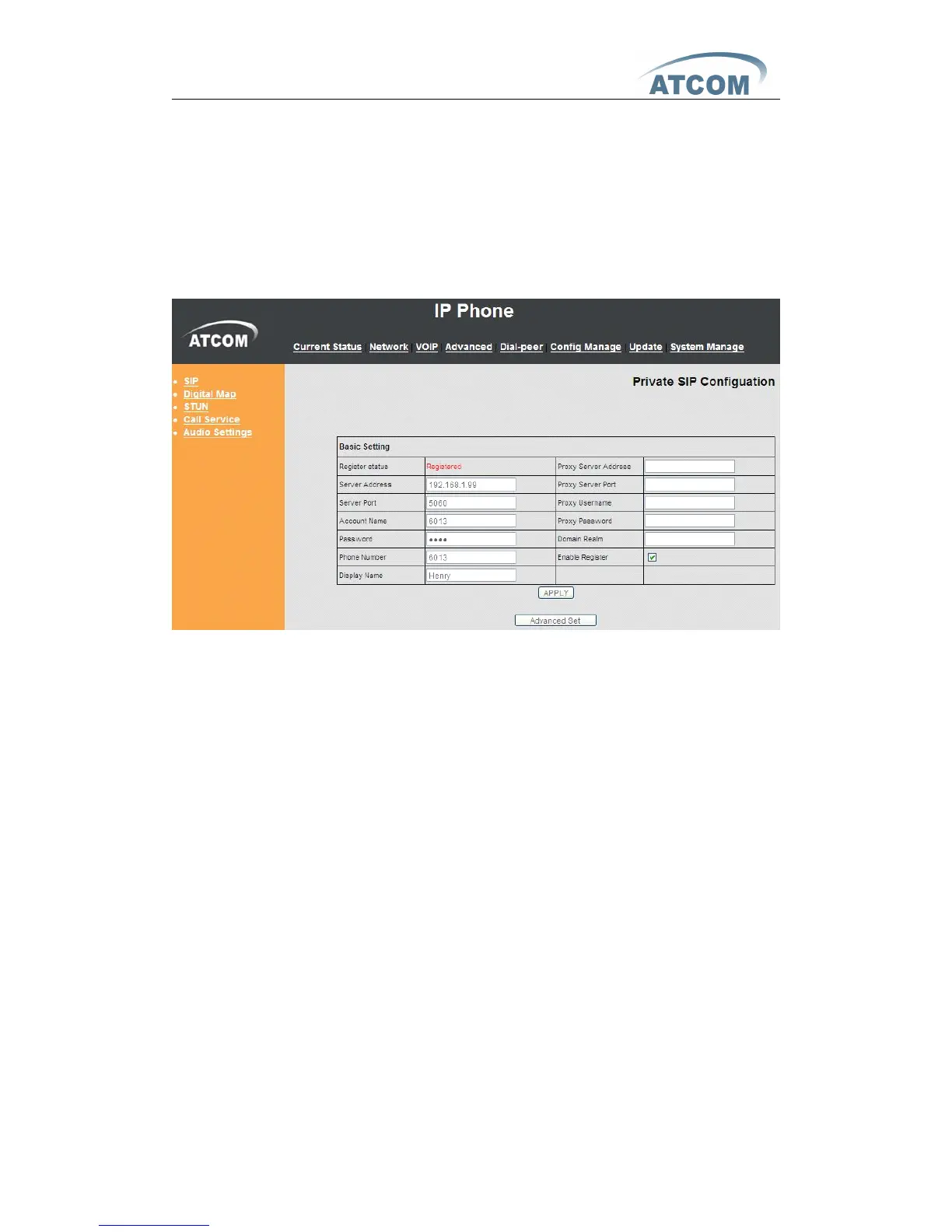
4.1. SIP
SIP
SIP
SIP
Register Status: SIP server registration status, if succeed display
Registered , or else display Unregistered .
Server Address: SIP server address, support both IP address and domain
name .
Server Port: SIP server port, default is 5060 .
Account Name : SIP account name .
Phone Number : SIP account phone number, if leave it as blank, no
registration information will be sent out .
Display Name : Show the display name that you want to display on the phone
of callee. Support number and letter input .
Proxy Server Address : Normally the Proxy server is the same as SIP server.
If they are different then fill in the correct information that provided by ISP .
Proxy Server Port: Set your SIP server port.
Proxy Username: Input your SIP register account name.
Proxy Password: Input your SIP register password.
Domain Realm: config SIP local domain. If the server does not have special
requirements for the local domain of SIP terminal, the local domain can be the
same as SIP server domain. The user can also leave it as blank; the system will
take SIP server domain as the domain realm.
Enable Register: Enable or disable registration .



 To Next Page