• Wi-Fi privacy separation:
If turned on, connected devices cannot communicate with each other.
• Maximum Wi-Fi connections:
The default maximum Wi-Fi connection is 15. You can set it to any number between 1 and 15.
LAN Settings
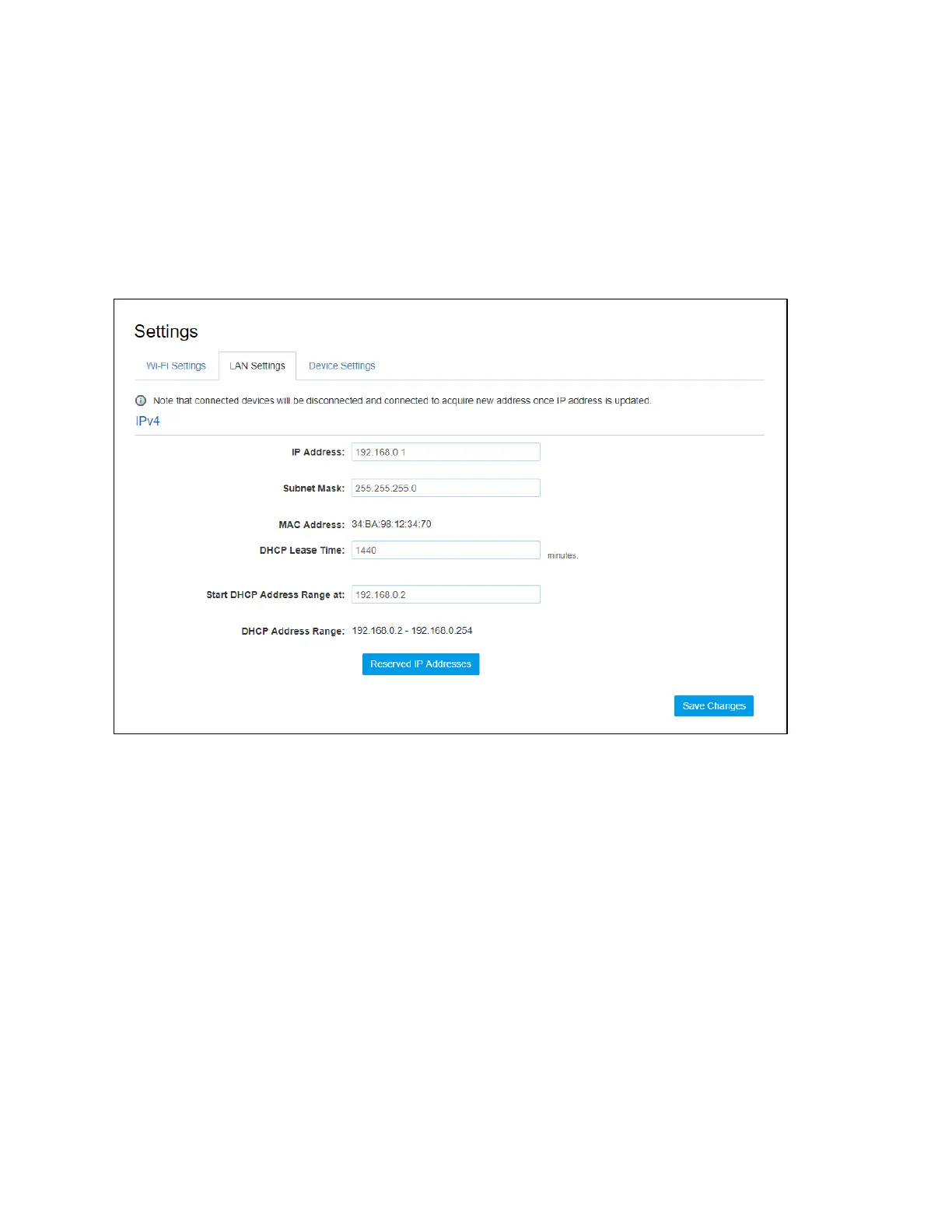
From the Online Portal, click Settings > LAN Settings to display the Hotspot WIFI.
Information shown in the following figure.
• IP Address:
Enter the IP address of your W01 Arch Hotspot (factory default: 192.168.0.1).
• Subnet Mask:
An address code that determines the size of the network. Normally use 255.255.255.0 as the
subnet mask.
• MAC Address:
It is written to the device at the time of manufacture.
• DHCP lease time:
The Lease Time is the amount of time a network user will be allowed connection to the router with
their current dynamic IP address. Enter the amount of time in minutes and the user will be "leased"
this dynamic IP address. After the time is up, the user will be assigned a new dynamic IP address
automatically.
• Start DHCP address range at:
Specify an IP address for the DHCP server to start with when assigning IP address. The default start
address is 192.168.0.2.
• Reserve IP Address:


 To Next Page