1. Introduction
9
Note: The shape of these connectors has been specifically modified so that
only KVM cables designed to work with this switch can plug in (see
Cables, page 4 for details). Do NOT attempt to use ordinary 15-pin
VGA connector cables to link these ports to the computers.
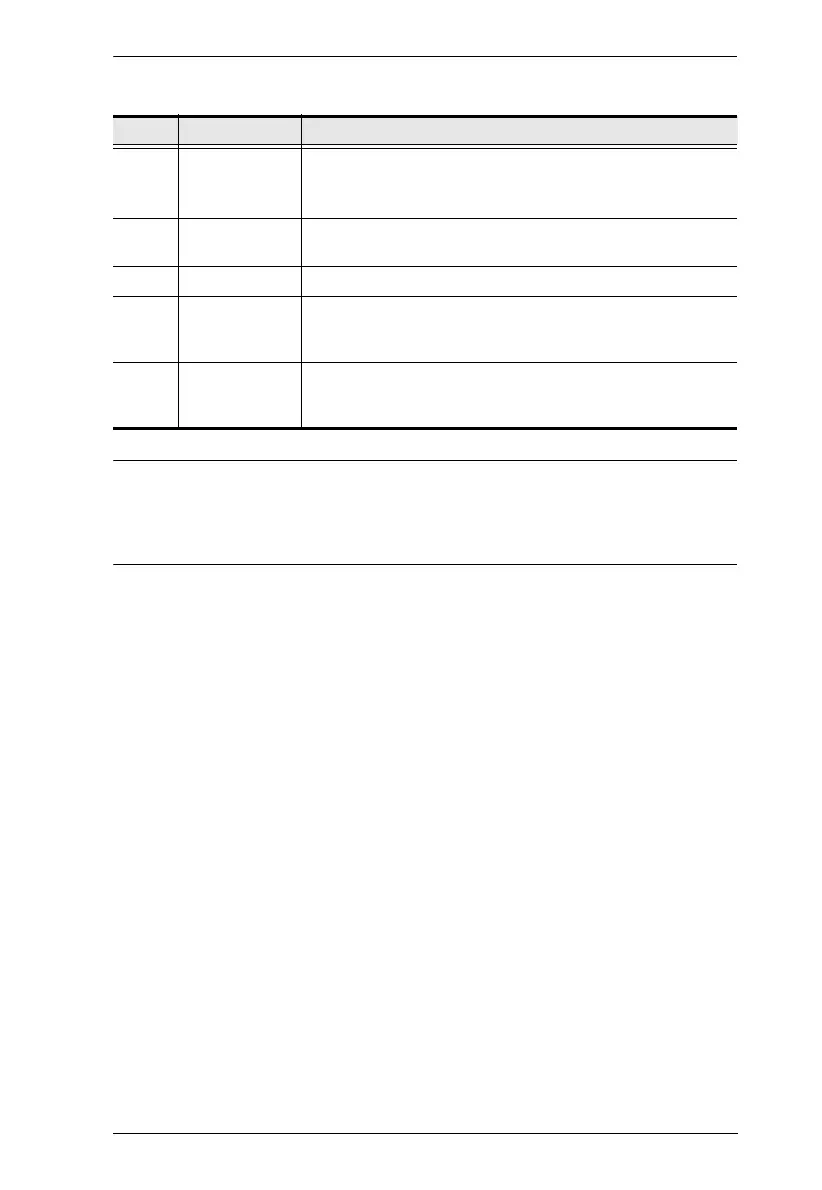
No. Component Description
1 Firmware
Upgrade Port
The Firmware Upgrade Cable that transfers the firmware
upgrade data to the CS1732
B / CS1734B plugs in here. See
The Firmware Upgrade Utility, page 37 for details.
2 USB 2.0
Peripheral Port
USB 2.0 peripherals (printers, scanners, etc.) can plug into
this port.
3 Power Jack The power adapter cable plugs into this jack.
4 Console Port
Section
The cables from your USB keyboard and mouse, monitor,
microphone and speakers plug in here. Each connector is
marked with an appropriate icon to indicate itself.
5 KVM Port
Section
The cables that link the switch to your computers plug in
here. Each KVM port is comprised of a microphone jack,
speaker jack, and KVM data connector.



 To Next Page
 Loading...










