3 Regulation system
3.1 User interface
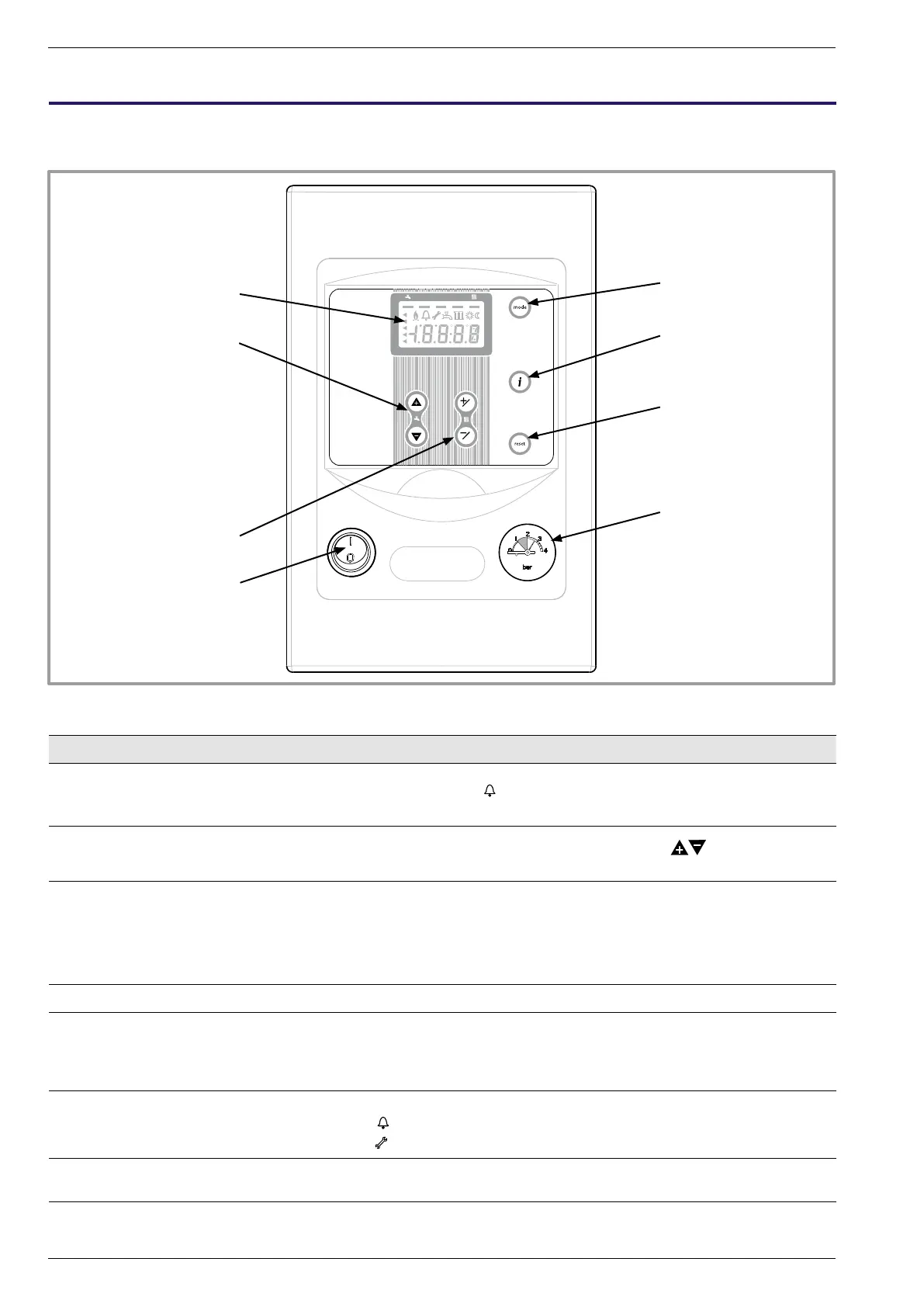
gure 32 - User interface
Ref. Function - Denitions
1 • Digital display - Operating control, readout of the current temperature, of the heating mode
and of any faults
.
- View the settings.
2 • Adjust comfort DHW setting
• Cycles through information
- Adjust comfort DHW temperature setting using the
buttons.
- Cycles through settings (after pressing and holding +/OK for 3 seconds).
3 • Adjust comfort heating setting
• Conrm settings
• Cancel settings
- Adjust comfort heating temperature setting using the +/OK and -/ESC
buttons.
- Enter (+/OK) selected menu.
- Conrm (+/OK) adjustment of settings in programming mode.
- Exit/cancel (-/ESC) in programming mode.
4 • I/0 - On/Off button for the hydraulic module (and the heat pump).
5 • Mode - Select heating and/or DHW mode(s).
- Manual start button in DHW comfort mode : Hold down the DHW key for 3
seconds. Switch from "reduced" to "nominal" until the next time the DHW
timer switches over..
6 • Information - Various data (see page 37).
-
Reading error codesr (see page 48).
-
Information concerning maintenance, special mode.
7 • RESET button
(Hold down the "RESET" key for 3 sec)
- Reinitialising the parameters and cancelling error messages.
Do not use during normal operation
8 • Manometer - Heating hydraulic circuit pressure.
OK
ESC
2 1
1
2
3
4
5
6
7
8
Installation and operation manual "1397 - EN"
Heat pump split single service alféa Evolution
- 30 -




 To Next Page