3.4 Parametering the setting
3.4.1 General
Only the parameters accessible to levels:
U – End user
I – Commissioning level
are described in this document.
The access levels are specied in the second column of
the table by means of the letters U and I.
The advanced settings can only be accessed using
supplementary interfaces such as the (optional) room
control unit.
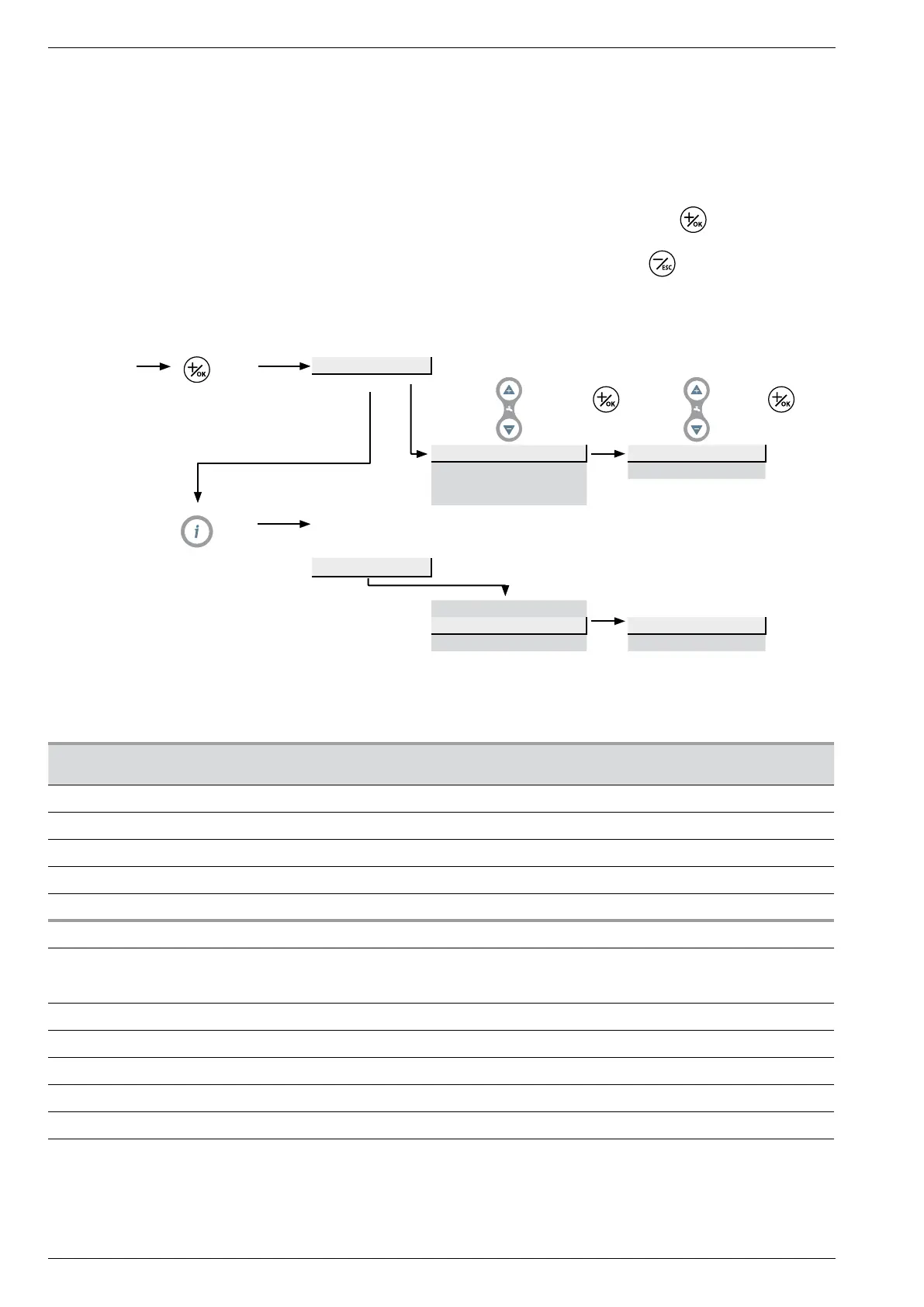
3.4.2 Setting parameters
- Choose the desired level (U or I).
- Scroll the menu list (n°...).
- Choose the desired menu.
- Adjust the parameter.
- Check the setting by pressing
.
- To return the menu, press
.
- If no setting is made for 8 minutes, the screen returns
automatically to the basic display.
3.4.3 List of function lines (settings, diagnosis, status)
Line Function Setting range
or display
Setting
increment
Basic
setting
Time and date
50 U Hours / minutes 00:00... 23:59 1 1:00
51 U Day / month 01.01... 31.12 1 1.01
52 U Year 2004... 2099 1 2004
57 I Software version 0...99.9 1 -
Heating time program
58 U Pre-selection (day / week) 1-7 : Mon-Sun, 1-5 : Mon-Fri,
6-7 : Sat-Sun, 1 : Monday, ... ,
6 : Sathurdayi, 7 : Sunday
1-7
59 U 1st phase On (start) 00:00... 24:00 10 min 6:00
60 U 1st phase Off (end) 00:00... 24:00 10 min 22:00
61 U 2nd phase On (start) 00:00... 24:00 10 min --:--
62 U 2nd phase Off (end) 00:00... 24:00 10 min --:--
63 U 3rd phase On (start) 00:00... 24:00 10 min --:--
64 U 3rd phase Off (end) 00:00... 24:00 10 min --:--
Basic
display
Press
3 sec
User interface
Hours / minutes n°50 Hours 1...24 h
Day / Month n°51 Minutes 0...60 min
Year n°52
Press
3 sec
display
"On"
Installer
Hours / minutes n°50
Day / Month n°51
Day 1...7
Year n°52 Month 1...12
Installation and operation manual "1397 - EN"
Heat pump split single service alféa Evolution
- 34 -




 To Next Page