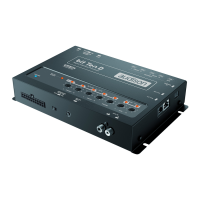
1. Using the DRC, selecting the OPTICAL 1/2 input.
2. Using the OPTICAL 2 SEL terminal to select the OPTICAL 2 INPUT.
This command is activated by connecting the terminal to + 12V.
How to select OPTICAL input:
5.3 DIGITAL OPTICAL INPUT SIGNALS
WARNING: the digital input accepts up to 192 kHz / 24 bit stereo PCM signals. So DOLBY DIGITAL (AC3)
multi-channel signals coming from audio/video sources (such as the audio of a film in DVD) or DTS can
not be reproduced. The output of these devices will therefore have to be set in STEREO mode for the
signal to be reproduced.
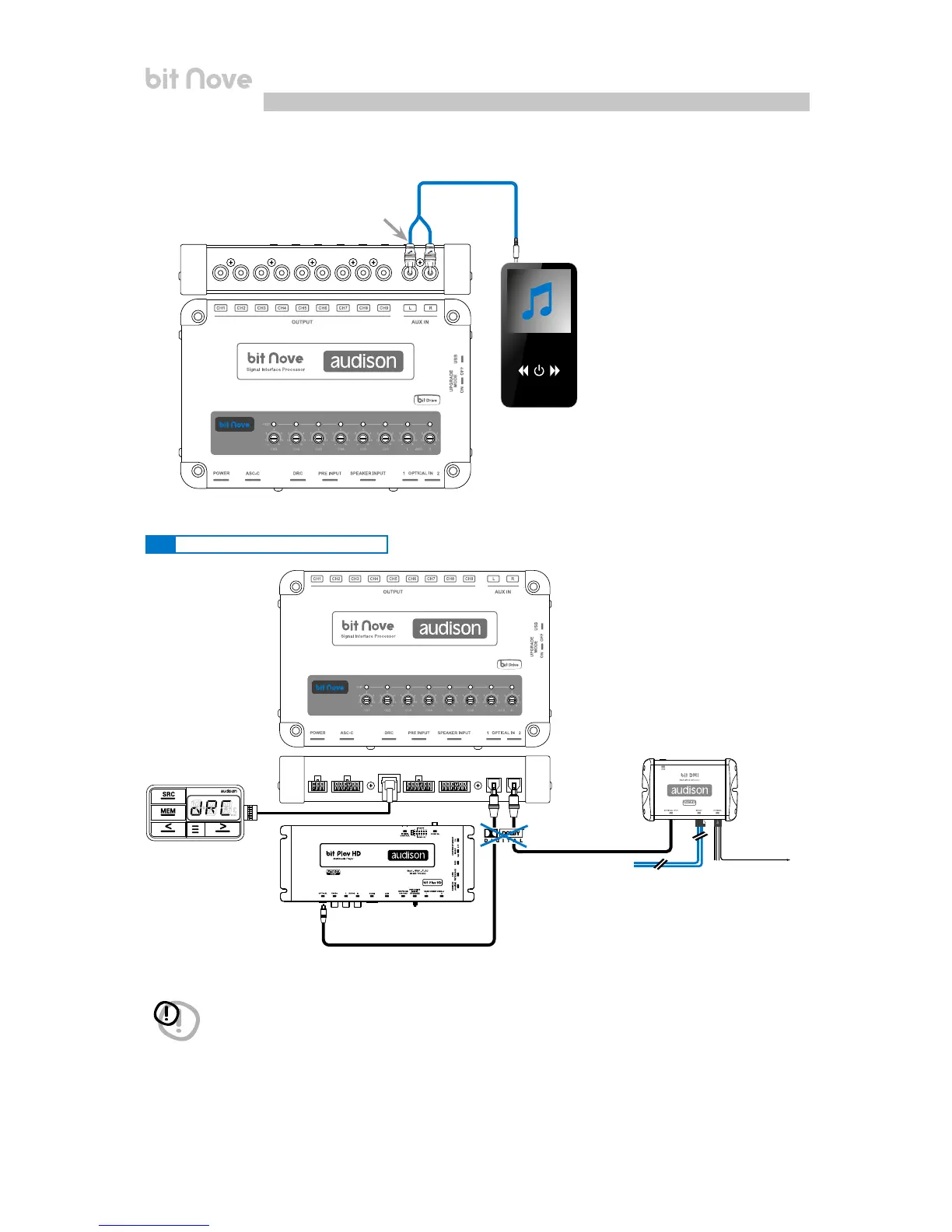
9. AUX, ANALOG STEREO SIGNAL
Optical cable
Optical cable
OPTICAL
OUT
OPTICAL
OUT
TOSLINK
CONNECTOR
bit Play HD
bit DMI
DRC AB (optional)
(not supplied)
(not supplied)
REM OUT
to
OPTICAL
2 SEL
Auxiliary
Stereo
Source
Input sensitivity
0.2 ÷ 4 VRMS
5


 To Next Page