5. CONNECTIONS
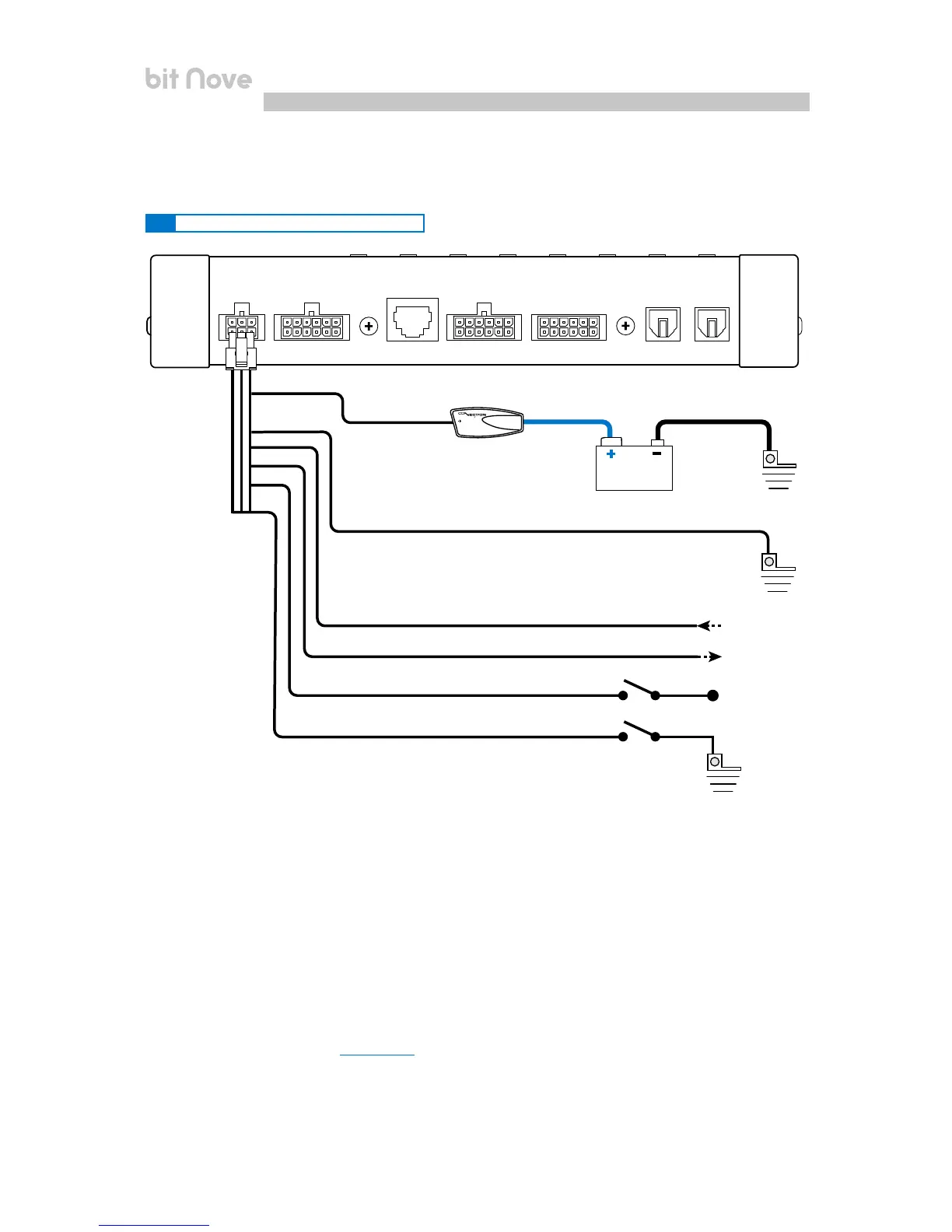
5.1 POWER SUPPLY AND REMOTE TURN ON
bit Nove is on when the logo is lit blue. It can be turned on/off using the following methods:
1. By pressing on the main DRC SRC key. By holding down the DRC SRC key (OFF).
In this case, no other Remote In connections are needed, but they can co-exist.
2. By connecting the REMOTE IN terminal with a Remote Out signal coming from an after market audio source.
3. Through the Hi Level MASTER (IN 1 - IN 2) input. The AUTO TURN ON (ART) function is activated by connecting
the output of an amplified source to the INPUT IN 1 - IN 2 input channel. This function can be enabled/disabled
using the bit Nove PC software
(see sec. 7.3.4.6).
Turn bit Nove on and off
Fuse Holder
suggested fuse
3A Delayed
(Not supplied)
+12V
Ground
Ground
POWER
Yellow
Black
Red
Blue
Brown
Pink
GROUND
REM IN from HEAD UNIT
+ 12 V
REM OUT to Amplifier REMOTE IN
OPTICAL 2 SEL
MEM D SEL
Battery
Ground
5


 To Next Page