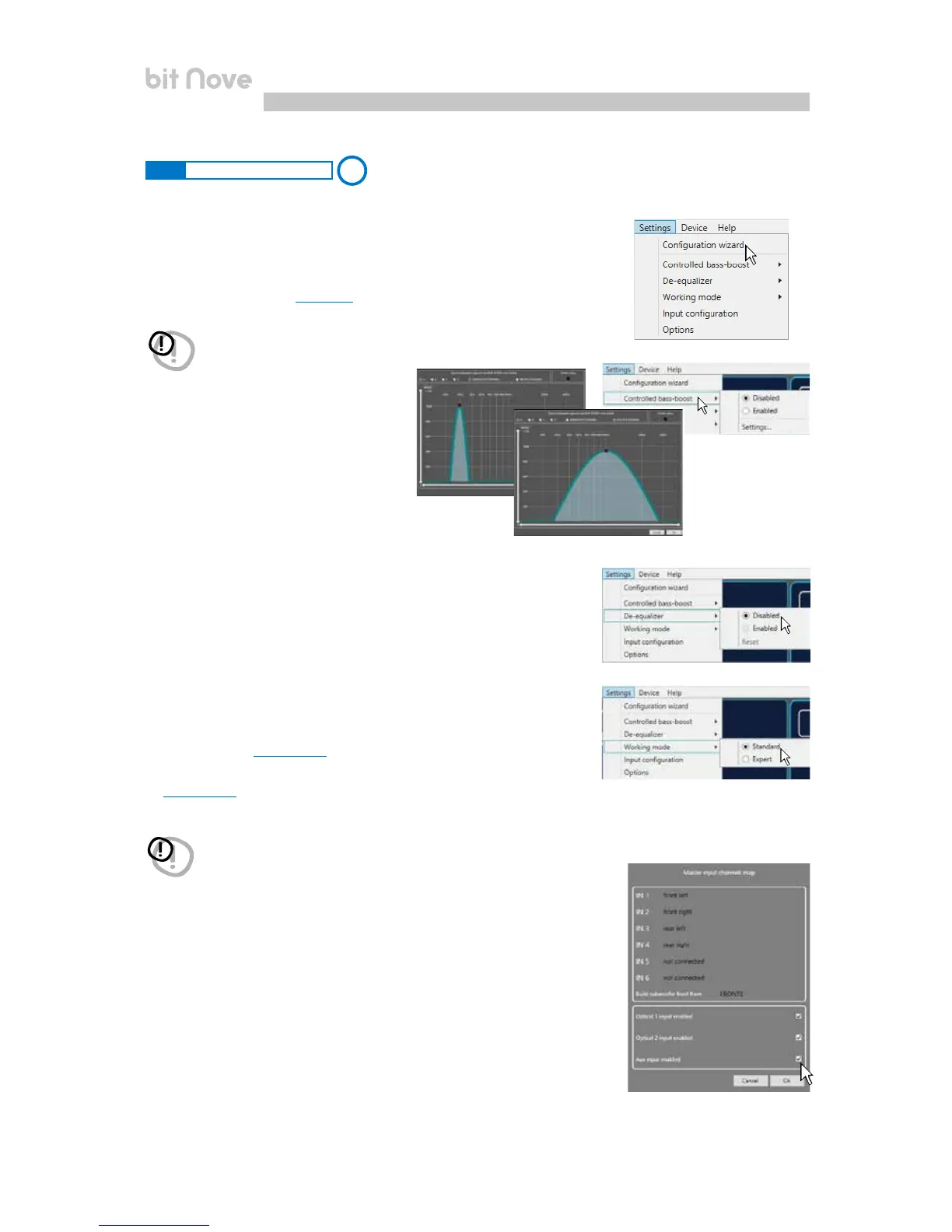
By clicking on this item, a drop-down menu appears with the
entries shown in the image:
7.3.4 SETTINGS MAIN MENU
1. I/O Configuration Wizard: sets up the system,
and puts the bit Nove in the conditions needed to be able to
perform this operation
(see sec. 7.2).
4. Working Mode: the software can work in two modes, acting on the
crossover filter section.
Standard: simplified mode with some restrictions easing the use
of the software
(see sec. 7.3.10).
Expert: there are no restrictions in the use of software functions
(see sec. 7.3.10).
3. De-Equalizer: if activated (Enabled), this function enables the
de-equalization curve calculated during the Configuration
Wizard. If the function is deactivated (Disabled) no
source de-equalization curve is applied.
The Reset command deletes the de-equalization curve
calculated during the Configuration Wizard.
5. Input configuration: shows the specialization assigned to the inputs
on bit Nove during the Configuration wizard.
WARNING: switching from one mode to another resets the configuration
of the filters to their original Default setting.
WARNING: whenever performing the I/O Configuration Wizard, the values
set in the Options menu are set to the default values.
4
2. Controlled bass-boost: if enabled, through
this function you can operate on the
equalization of sub channel and woofers.
By clicking on Settings you can choose
the parametric equalizer pole where you can
operate and vary the “Q” factor by acting
on the wheel of the mouse if it features that
function. When heavy equalization is set,
the software will activate through soft clipping eliminating
the subsequent distortions. This function can also be enabled
and disabled via DRC MP.
1
2
3
4
5
6
Bass boost Sub Woofer
Bass boost Woofer
7


 To Next Page