POWER and CONTROL CABLE
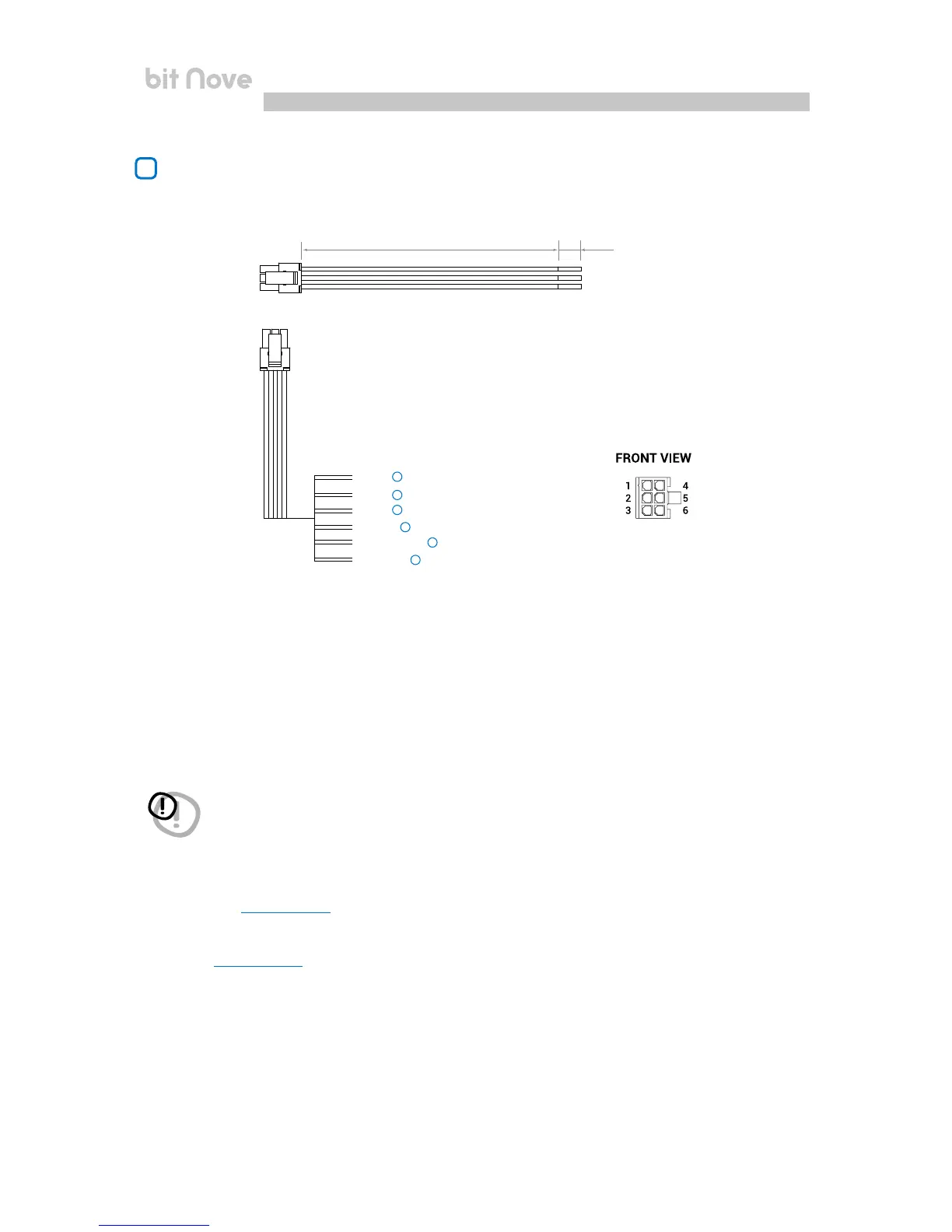
The bit Nove is equipped with a 6-pole multipolar connector to manage the power supply and the different
control connections.
A) + BATT (11-15 VDC): terminal to connect the power supply positive pole to the bit Nove.
B) – BATT (Ground): terminal to connect the processor’s power supply negative pole. Connect the negative battery
cable or a cable connected to the car’s chassis.
To fix the ground connection (-) correctly use a screw already available on the vehicle’s chassis; remove any paint
or grease residue if necessary, ensuring that there is a continuity between the negative terminal (-) of the battery
and the fixing point. If possible, connect all audio components grounds to the same point as this solution is
necessary to reduce the majority of parasitic noises which may arise during reproduction.
C) REM IN: terminal to turn on the bit Nove via the Remote Out output of the audio signal source. The applied voltage
must be between 7 and 14.5 VDC. If you are using a source with BTL amplified outputs, the bit Nove can turn on
automatically
(see section 7.3.4.6), so you will not need to connect the REM IN terminal.
D) REM OUT: output terminal for the remote turn on of other devices/amplifiers connected to the bit Nove. The processor
takes 2 seconds to provide the REM OUT to the output, but you can manually set this delay with the
software
(see section 7.3.4.6). This output has a current capacity of 150 mA and can drive an automotive relay.
E) OPTICAL 2 SELECT: function to select the OPTICAL IN 2 input. This command is enabled by connecting the terminal at + 12V.
F) SEL MEM D: function to enable the manual selection of the processor’s preset D. This command is enabled by connecting
the terminal to ground.
200 mm 10 mm
Yellow
+ BATT
- BATT
REM IN
REM OUT
SEL OPTICAL 2
SEL MEM D
Red
Brown
Black
Blue
Pink
A
B
C
D
E
F
WARNING: observing the polarity of the connection as indicated on the terminals is essential. An incorrect connection may
cause damage to the bit Nove. After switch on, wait at least 10 seconds before turning the processor on.
2
4


 To Next Page