6-EN
E. Power Supply Connections and System Start Up
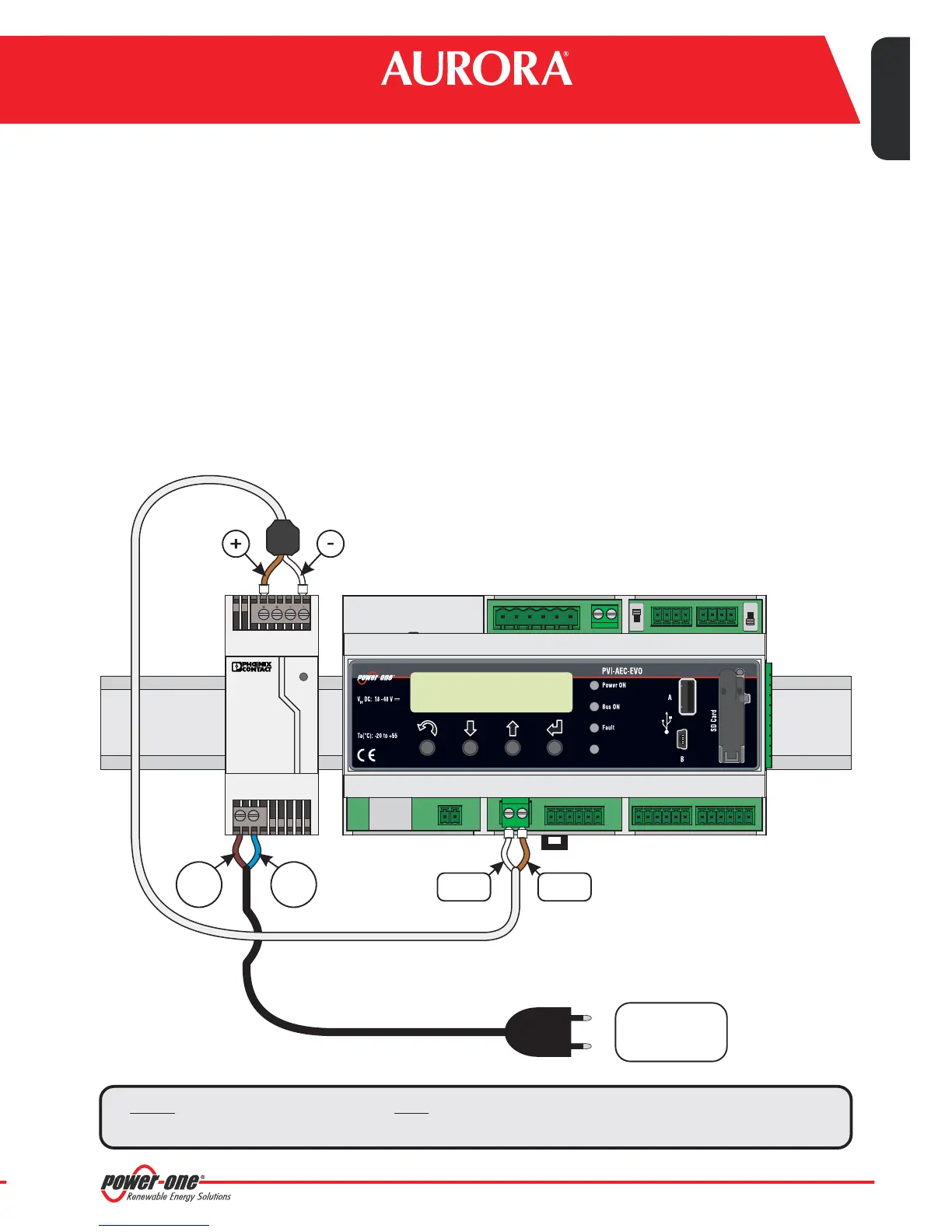
1. Connect the power supply to the power supply network (100/240V 50/60Hz): the "Power" led on the power
supply will light up steadily.Check that the output voltage of the power supply is 24Vdc.Disconnect the power
supplyfromthe powersupply network.
2. Connect the output of the power supply to the power supply terminal block of the PVI-AEC-EVOrespecting the
polarity andusingthe wiringprovided.
3. Connect the power supply to the power supply network:After a first starting phase (lasting about 30 seconds)
during which the system is not able to receive any input from the user,the green "PowerOn" led will remain lit.
The message“PVI-AEC-EVO...." (in the first of the two lines) and date/time (in the second of the two lines) will
bedisplayed.
DC
OK
STEP POWER
L(+) N(-)
Input AC
100-240V
--++
Output DC
24V 0.75A
+Vcc-Vcc
L(+) N(-)
50-60 Hz
100-240 V~
12
Monitoring System
EN - ENGLISH
can be used only to
Note: The system must be supplied with power supply and wiring provided; otherwise the CE
conformitywillnotbelongervalid.
ONLY
4
GITAL I/O
DIn 2
DIn 3
DIn 4
DIn_RTN
DIn 5 / CONT 2
DIn 6 / CONT 1
S1
120
RS485/2
Ω TERM.
J9
EXPANSION
BUS


 To Next Page