14-EN
w:
yed for each of the
ENTER
NEXT
DIGIT
0010
Monitoring System
EN - ENGLISH
gue“Power-one”.
endix1.
Pyranometer 0-
I. System Configuration for connection to the LAN
Network (Ethernet Port)
The connection to the PC of PVI-AEC-EVO can be made through direct connection via Ethernet cable,or connecting
bothdevicesto alocalnetworkLAN (viarouter,hubor switch).
Incase of directconnection,itis enoughto connect thetwodevices betweenthem througha Ethernetcable andset
thenetworkparametersof PVI-AEC-EVOand ofthePC tomakesurethey arecompatiblebetweenthem.
Incaseofconnectiontoapre-existinglocalnetworkLAN,itisnecessarytoassigntoPVI-AEC-EVOthenetworkparameters
which have to be compatible with the local network to which the PVI-AEC-EVO is connected. Make reference to the
networkadministratortoobtainthecorrectparametersofthenetwork.
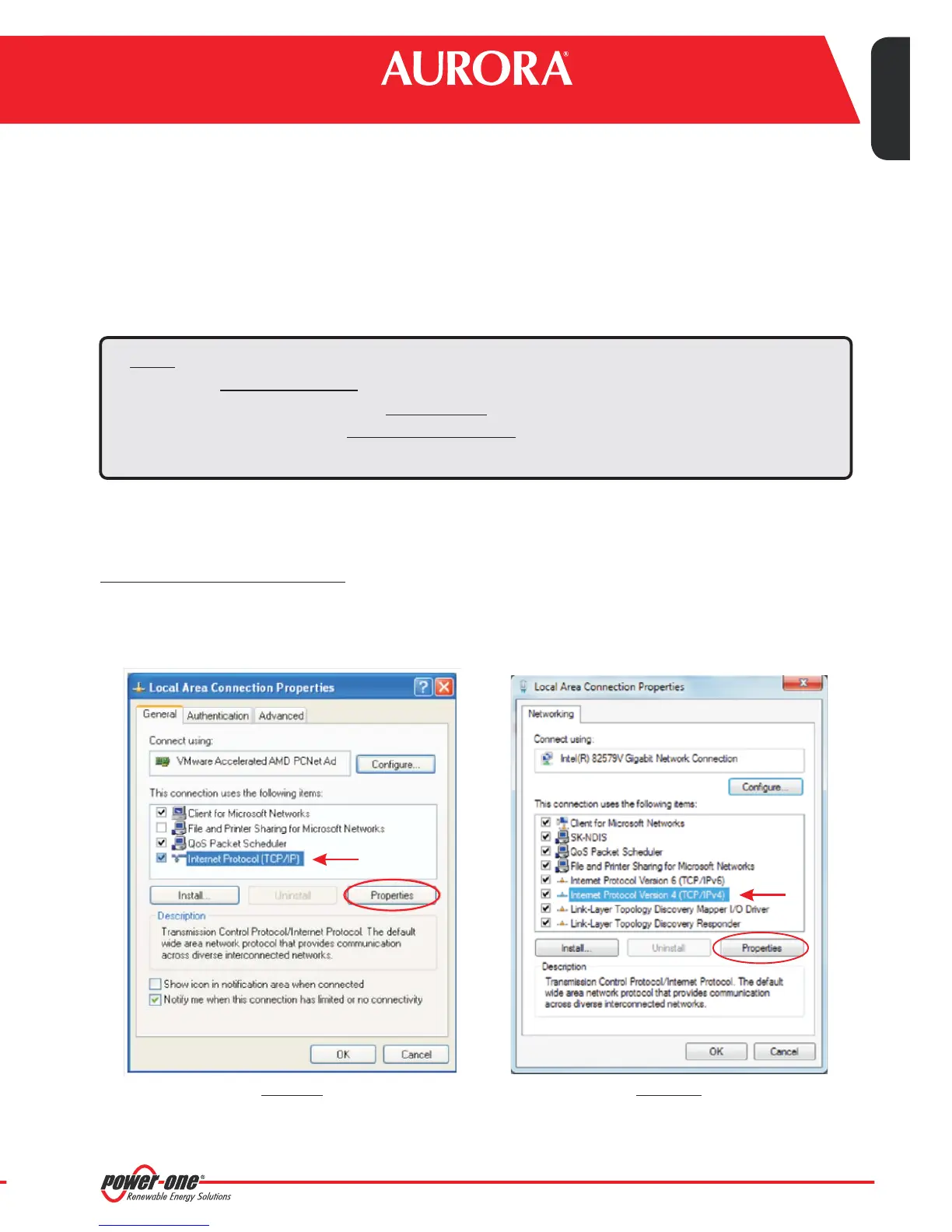
In order to change pc network parameters, please select and then click on
: the new window will show the network connections; with the right button of your mouse click on
andselect ;asshown inthefollowingfigure.
CHANGEOFPCNETWORKPARAMETERS
“Start” “Control Panel”, “Network
Connections”
“LocalAreaConnection” “Properties”
Select (or in Windows 7/8) and click on“Internet Protocol (TCP/IP)” “Internet Protocol Version 4 (TCP/IPv4)”
“Properties”.
Note: The IP address of the PC and the IP address of the PVI-AEC-EVO must belong to the same group but
they ,forinstance:
20.200.200.
20.200.200.
mustnotbeidentical
PC IP ADDRESS:
PVI-AEC-EVO IP ADDRESS:
1
24
The subnet mask must be the same for both devices,for instance: 255.0.0.0
Windows XP Windows 7/8
OPERATIVE
RANGE
0-1200 W/m
2
0-1200 W/m
2
-20 to +80 °C
-50 to +50 °C
-50 to +150 °C
-50 to +50 °C
0-50m/s
0 - 360°
0-1300 W/m
2
E
0-1300 W/m
-25 to +90 °C
2
0-1300 W/m
2
CATALOGUE)


 To Next Page