CHANGETHEPVI-AE
:inordertochanget
1.
2.
3. Access the me
4. At the end of
t
makethesetti
Poweronthes
Enterthe mai
n
Subnet mask,G
systemforcon
PVI-AEC-E
12.00.00
>NETWORK
SET DAT
A
>settings
change p
>IP metho
ip setti
>IP SETTI
SUBNET M
>SUBNET M
ip gatew
>IP gatew
ip metho
15-EN
PVI-AEC-EVO / PVI-AEC-EVO LIGHT
QUICK INSTALLATION GUIDE
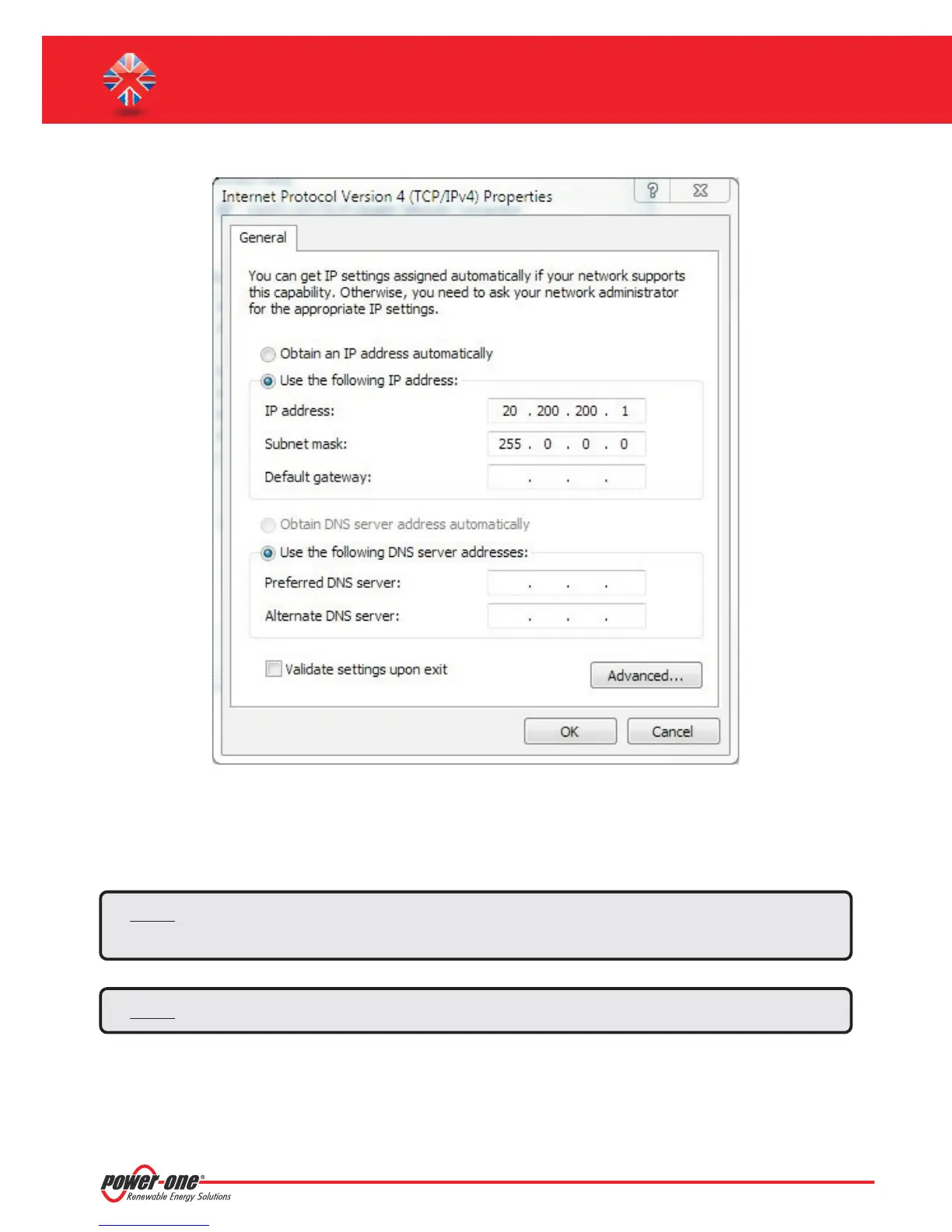
Select the option and insert the network parameters (IP address, Subnet Mask,
Gateway)compatiblewiththe networkparametersset inthe PVI-AEC-EVO.
DNSparametersfields canbe letempty.
“Use the following IP address”
Note: In case of direct connection between PVI-AEC-EVO and PC we suggest not to set “Gateway”
parameters.
Note: Thistypeofprocedureistobeconsideredonlyanexampleforthemostpopularoperatingsystems.


 To Next Page