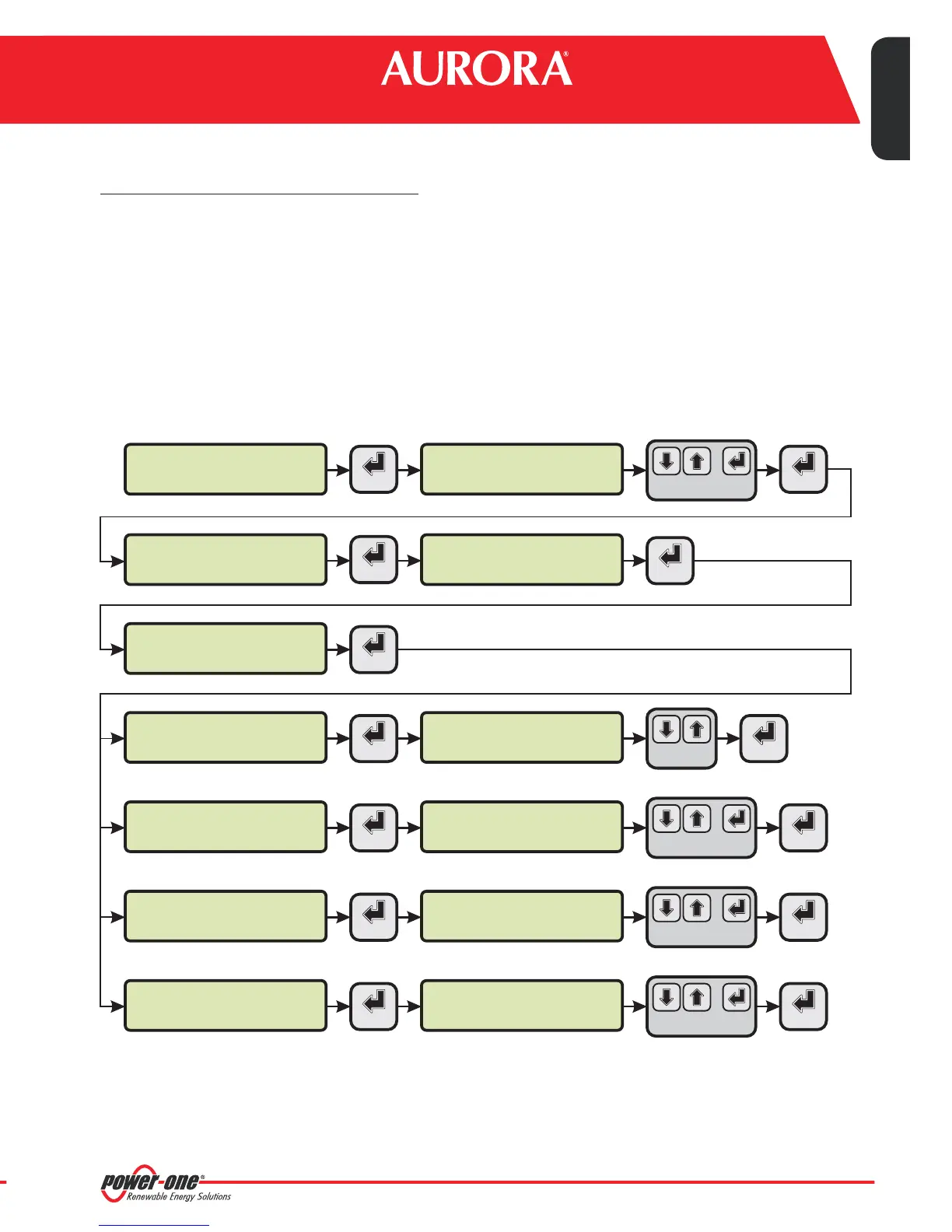
CHANGETHEPVI-AEC-EVONETWORKPARAMETERS
:inordertochangethePVI-AEC-EVOnetworkparameters,please followtheprocedurebelow:
1.
2.
3. Access the menu .
4. At the end of the setting operations, return to the main screen, then switch off and switch on the system to
makethesettings takeeffect.
Poweron thesystemand waitforthe start upphase tocomplete(Ref.Par.'E’).
Enterthemain menuas administrator(Ref.Par.'C’).
The parameters for connection to the LAN network (IP address,
Subnet mask,Gateway) may be modified using the items of the menu.This allows to configure the
systemforconnection totheLAN networkand/or fordirectconnectiontoa PC.
“SET TINGS” > “NETWORK ”
"NET WORK"
PVI-AEC-EVO ......
12.00.00 01/01/11
>datalogger
io settings
>IP method
manual
menu pin
0***
>NETWORK
SET DATA
>settings
change password
>IP method
ip setting
ENTER ENTER
ENTER
ENTER
ENTER
ENTER ENTER
CHANGE VALUE
NEXT
DIGIT
SET PIN TO 0010
>IP SETTING
XXX.XXX.XXX.XXX
>IP SETTING
SUBNET MASK
ENTER ENTER
CHANGE VALUE
NEXT
DIGIT
>subnet mask
XXX.XXX.XXX.XXX
>SUBNET MASK
ip gateway
ENTER ENTER
CHANGE VALUE
NEXT
DIGIT
>IP gateway
XXX.XXX.XXX.XXX
>IP gateway
ip method
ENTER ENTER
CHANGE VALUE
NEXT
DIGIT
CHANGE
METHOD
16-EN
Monitoring System
EN - ENGLISH
ress, Subnet Mask,
o set “Gateway”
ratingsystems.


 To Next Page