53
NOTE
This function is not available under One Wheel mode.
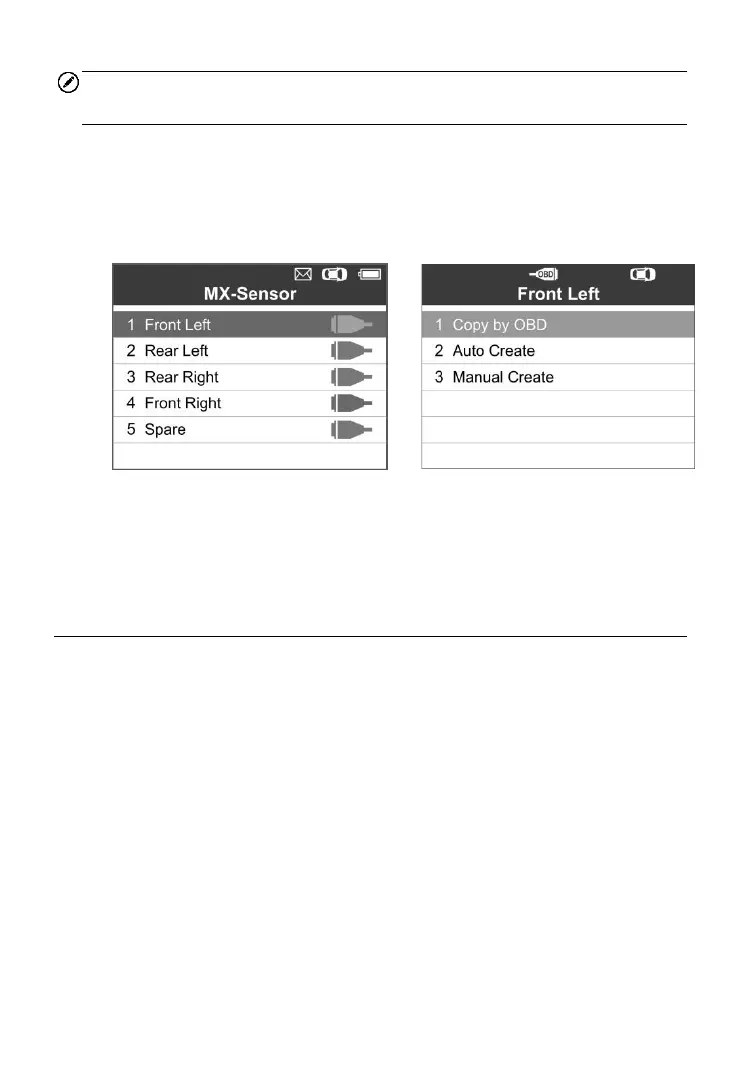
1) Follow the steps in Auto Create to select MX-Sensor to enter the
Programming function. The OBD mark will appear on the right side of
the screen (Figure 5-27). After selecting the specific wheel and
pressing the Y button, the “Copy by OBD” option is available on the
function menu (Figure 5-28).
2) Select Copy by OBD, insert the correct MX-Sensor into the sensor slot,
and then press the Y button to start programming the saved sensor
information to the MX-Sensor.
Copy by Activation
This function allows user to bypass OBD II and automatically write in the
retrieved original sensor data to the MX-Sensor. It is used after the original
sensor is triggered.
All Wheels Mode
1) From the activation screen, select the specific wheel position and press
the TEST button to trigger the original sensor. When the information is
retrieved, a series of beep sound will be heard.



 To Next Page