3 End User Operation
3.2 Status Screen
3.2.1 Status
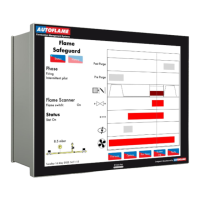
Figure 3.2.1.i Status
Press on the boiler load detector or the boiler image in the Home screen (Figure 3.1.i) to display the
Status screen, which gives the following information:
Burner rating
Current fuel selected and type
Burner starts and run hours
Current firing rate
Control method – internal PID control, external modulation or DTI/remote firing rate
Actual temperature/pressure reading from load detector
Current setpoint – required, reduced, DTI or external
Stat status – running interlock T53/ internal stat
Burner switch on/off offset
Reduced setpoint
Indication if MM is firing to meet required or reduced setpoint (red = active, grey = inactive)
Arrows for adjusting setpoint
Press the arrows to change the required or reduced setpoints. If these arrows are not
displayed, then either the user setpoint change has been disabled (option 15), the DTI is controlling the
setpoint (option 16), external setpoint is enabled (parameter 72), or OTC is enabled (option 80).
Note: Use parameters 29 and 30 to adjust the load detector reading if required.
22.05.2017 Mk8 MM End User Guide Page 13

 To Next Page
 Loading...