3 End User Operation
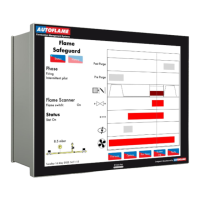
3.2.5 Status – Hand Mode
Figure 3.2.5.i Status – Hand Mode
Press and hold for 3 seconds in the Status screen in Figure 3.2.1.i to put the MM into hand
mode, where the firing rate can be driving up or down by using the arrows.
Alternatively, the MM can be put into hand mode by an input on terminal 94.
If low flame hold or hand mode is selected on the MM screen, this will override an input made on
terminal 94 or 95.
Note: If using intelligent boiler sequencing, then putting the MM into hand mode will remove the MM
from the sequence loop. It will resume sequencing once hand mode is deselected and after the next
scan time elapses.
Note: If low flame hold and hand mode are both selected, then hand mode takes priority.
Note: If a firing rate limit is set (option 66), then the firing cannot be driven past this in hand mode.
22.05.2017 Mk8 MM End User Guide Page 17

 To Next Page
 Loading...