3 End User Operation
3.4 Flame Safeguard Screen
3.4.1 Flame Safeguard
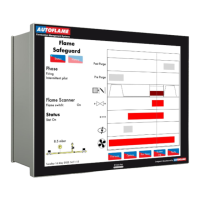
Figure 3.4.1.i Flame Safeguard
Press on the flame scanner in the Home scree in Figure 3.1.i to view the Flame Safeguard screen,
which shows the current firing phase of the MM, pilot type and flame scanner signal strength.
Throughout the entire burner start-up and firing sequence, the vertical dotted line will move horizontally
showing which phase the burner is at currently. The rows refer to:
Post purge
Pre purge
Air damper position
Main fuel valve
Pilot fuel valve
Ignition
Blower motor
Note: If a flame switch is used for flame detection, then flame switch show as either on (flame
detected) or off (no flame detected).
Please refer to section XX for the start-up sequence of the burner.
22.05.2017 Mk8 MM End User Guide Page 21

 To Next Page
 Loading...