Diamond PD Power Drive : Instruction Manual
Dominator EasyRoller Instruction Manual
15
© Copyright 2018
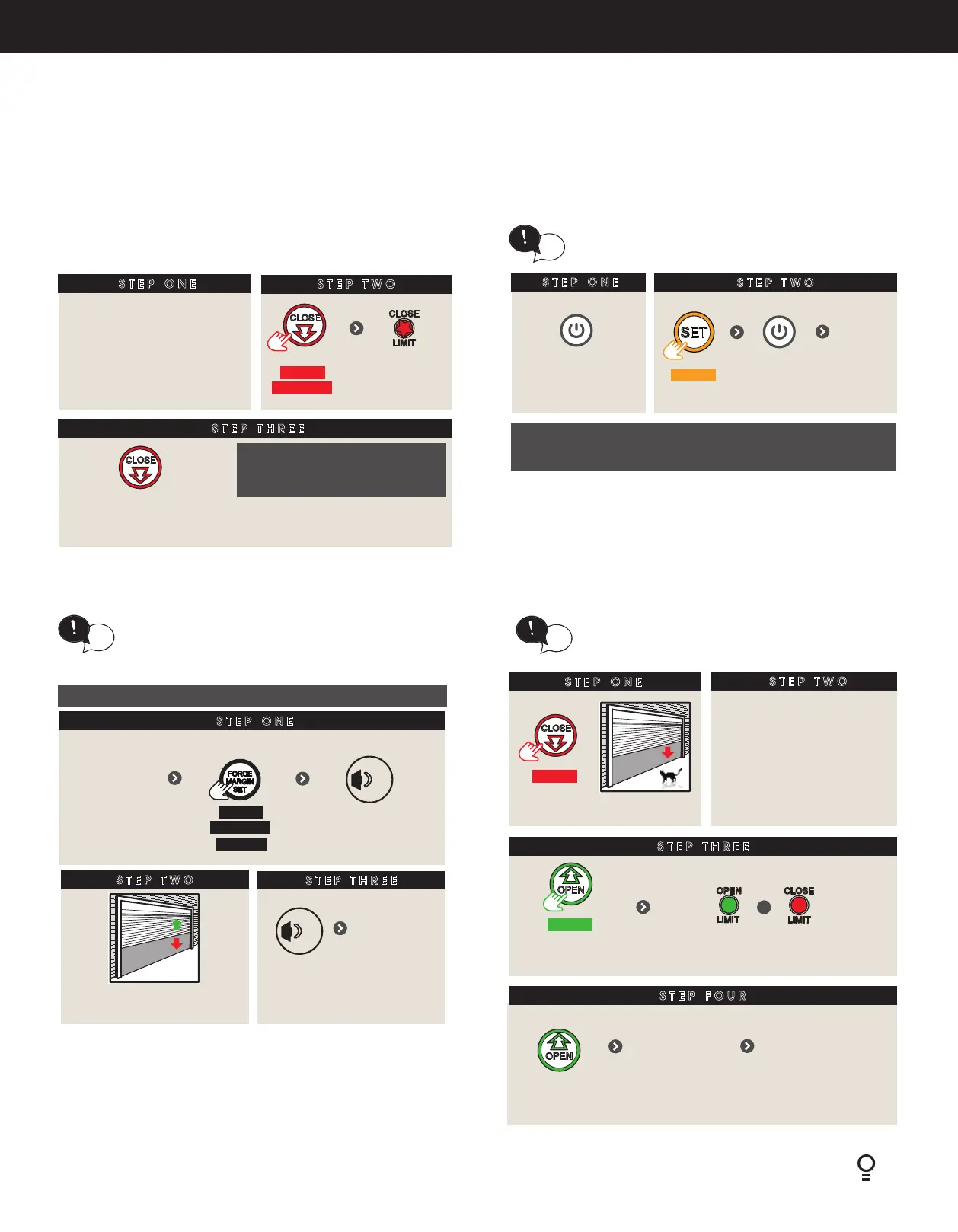
6.7.3 Clearing the Door Limit Positions
6.7.6 Setting the PET Mode position
STEP ONE
STEP TWO
STEP THREE
Remove controls cover
CLEARING THE DOOR LIMIT POSITIONS
HOLD
for 6 sec
Till LED
ashes quickly
Release
NOTE: No action taken within
30 secs, the opener returns to
original settings.
Now set Close & Open limits
NOTE: If unhappy with the travel limit settting, restart this
procedure by clearing the door limit positions as per below
first.
STEP ONE
STEP TWO
Remove
controls cover
HOLD
for 6 secs
Door will open and close
several times
Re-proling is a simple way of re-learning the travel
characteristics of a previously setup Limit Switch
travel. Re-proling is used when travel characteristic
change due to mechanical adjustments.
tip
To initiate a re-prole: LIMITS must already be set.
opener
beeps once
RELEASE
STEP THREE
opener
beeps once
Then ret
controls cover
STEP ONE
STEP TWO
HOLD
This will cause all control memory to be set to factory defaults
EXCLUDING: transmitters, history log and cycle counters.
If limits are already set, clear limits rst by following
Clearing the door limit positions and then follow
below.
tip
Switch power OFF
Switch power
ON
till all
LED’s off
then
Release
To clear the controller:
When activated, PET mode drives the door to a
preset position from the close position, therefore
allowing a pet or parcel to go under the door.
tip
SETTING THE PET MODE POSITION
STEP ONE
HOLD
Close to
desired position
STEP TWO
Remove controls cover
STEP THREE
STEP FOUR
Proceed to Storing
the transmitter
Code to code a
remote button to
PET Mode
Ret controls
cover
HOLD
for 6 secs
+
till both LED’s
are lit
Release
6.7.4 Controller Memory Reset
6.7.5 Re-profiling the Door
6.7. Setting the Travel Limits


 To Next Page