31
fi g
The NeoSlider™ provides a transmitter listing facility
which enables the user to fi nd a transmitter location
within the memory. Once located, a stored transmitter
can be replaced, deleted, edited, copied or, if the
location is empty, a new transmitter can be coded.
Method 1 - Go to the start of the list
Step 1. Accessing the list menu
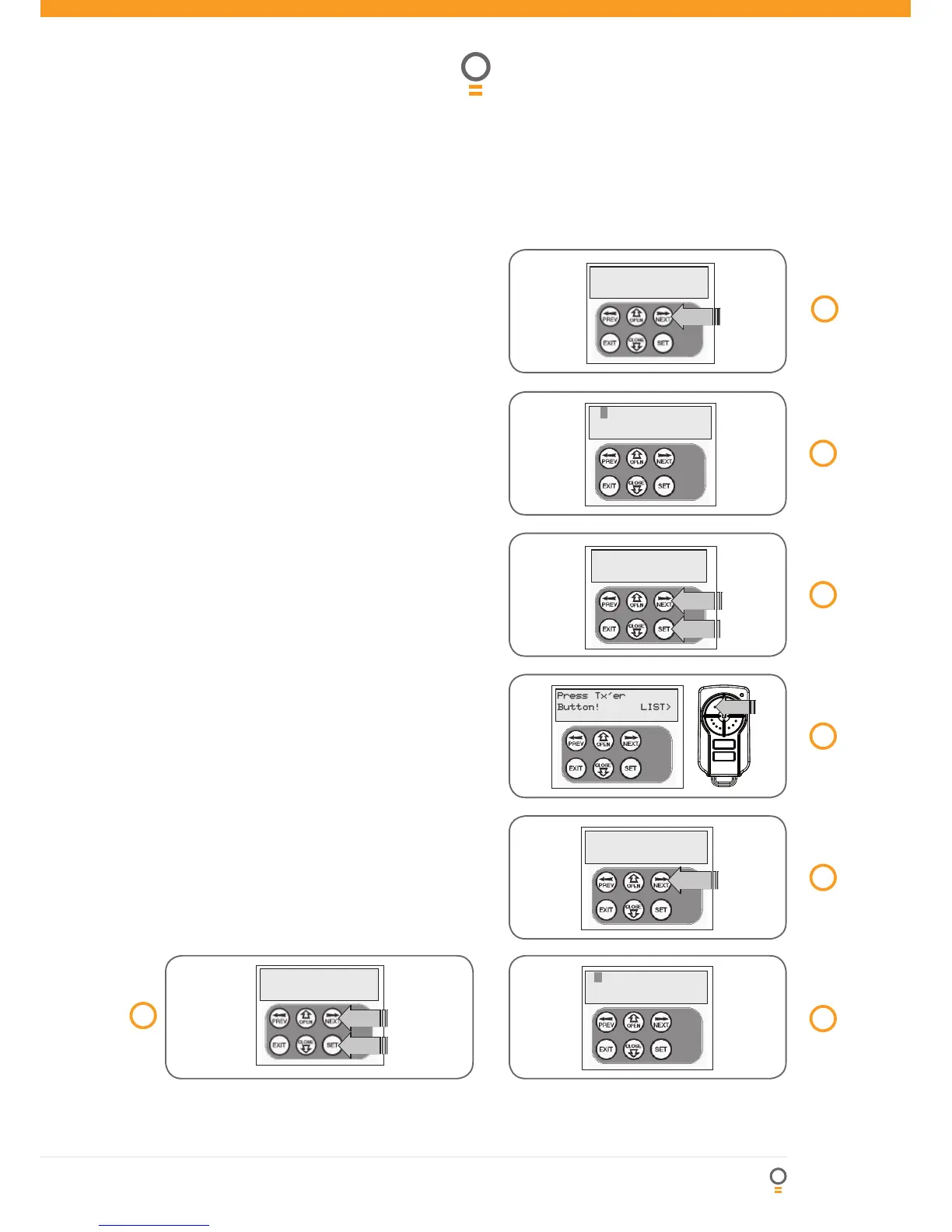
1. Press NEXT to navigate to Menu 1 (Fig. 31).
2. Press SET to enter the transmitter edit procedure.
3. Press NEXT to enter transmitter list and edit mode
(Fig. 32). The display will change as shown in (Fig.
33). This method is used if the transmitter is not
available.
Method 2 - Use transmitter to go direct to list
Step 1. Accessing the list menu
1. Press NEXT to navigate to Menu 1 (Fig. 34).
2. Press SET to enter the transmitter edit procedure.
3. Press transmitter once (Fig. 35).
4. Press NEXT to view transmitter parameters (Fig. 36).
Used for quick navigation if the transmitter is
available.
NOTE: “VIEW>” will not be shown if the transmitter is
not stored.
Once the list is displayed, it can be sorted by stored
number, ID Label or Serial Number. Use NEXT or PREV
button to select sorting method (Fig. 37).
NOTE: When sorting by ID label or S/N, only stored
transmitters locations are displayed.
37
fi g



 To Next Page