SMARTTOOL – BEST PROGRAMMER SMART KEY HONDA, YAMAHA, SUZUKI AND PIAGGIO
26
http://autoshopvn.com
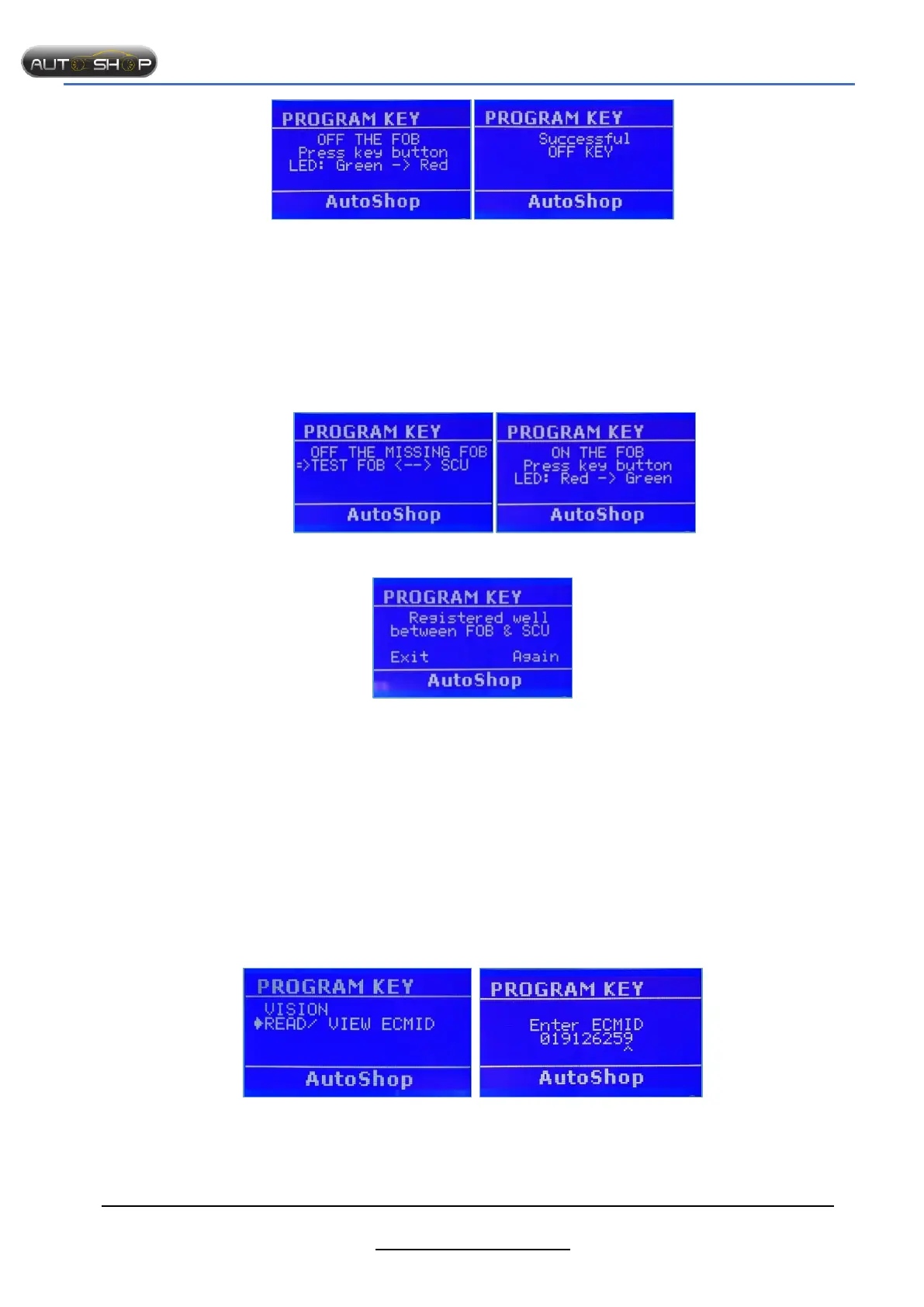
Step 3: Turn OFF FOB and press enter Successfully!!!
2.5.6 Test SCU FOB
Purpose: After registering FOB, we should test sync between SCU and FOB.
Preparation:
SMTF00- SMART TOOL.
SMTF02- Cable for HONDA AIRBLADE/ VARIO/ CLICK
SMTF08- KEY ADAPTER.
SCU (smart key control unit).
The steps taken on the Smart Tool:
Step 1: Select “FOBSCU Step 2: Turn on the FOB
Registered well
Notes: Turn OFF all unused FOB and leave 2-3m away.
2.5.7 Scan/view ECMID
Purpose
Scan/ view ECMID from ECM
Preparation
SMTF00- SMART TOOL.
SMTF08- KEY ADAPTER.
ECM Enginer
ECM reading cable.
Steps taken on the Smart Tool
Select ”PROGRAM KEY” “HONDA”
Step 1: Select “READ/VIEW ECMID” Step 2: Enter ECMID


 To Next Page