10
PAD MENU DESCRIPTION
-WAVE A/B
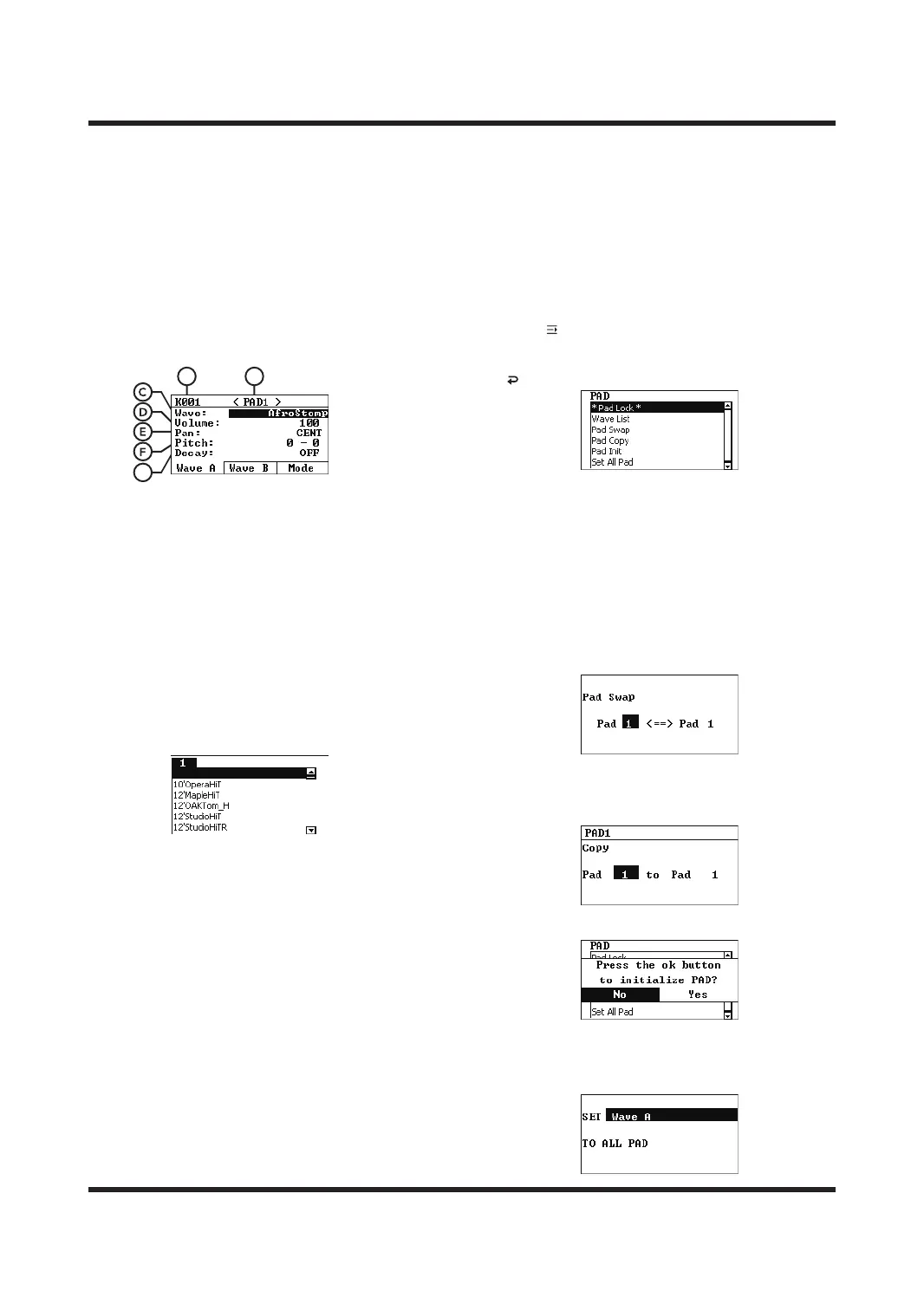
This menu can edit the pad sound, volume, AB
layer sound and other settings of the current
sound kit. The trigger can be set the working mode
of the A and B layers (the trigger type can be set
on the PAD Mode page).
Press [F1]/[F2] to switch the Wave A/B page, use
[+]/[-] to select the parameter type, and use [-]/[+]
or SCROLL WHEEL to modify the parameters.
A. Number of sound kit
It indicates the sound kit number currently
being edited. Please select the sound kits
that you want to edit on the HOME page.
B. TRIGGER
It indicates the trigger currently being edited.
Trigger(play) the pad that you want to edit or
use [<]/[>] to switch.
C. Wave
Indicates the sound that will be played after the
pad is triggered. Use the [-]/[+] or the SCROLL
WHEEL to enter the sound list, and after
selecting a sound, press [OK] to confirm.
D. Volume
The volume of the sound when it is played.
E. Pan
It controls the triggered sound to be output
from the left/right channel.
L16 = left channel output only.
CENT= balanced the left and right channel output.
R16 = right channel output only.
Value range: L16-CENT-R16, default is CENT.
F. Pitch
It indicates the pitch of the current triggered
sound.
The left value is semitone, value range: ±12,
default is 0;
The right value is cent, value range: ±50,
default is 0.
G. Decay
It indicates the decay speed of the current
triggered sound. The larger the value, the faster
the decay. OFF means turning o the decay
function.
Value range: OFF or 1-4, the default is OFF.
QUICK MENU USAGE GUIDE
Press [ ] button to enter the menu, use the [
<
]
/[
<
]
buttons to select a shortcut function, press [OK]
to enter or execute an operation, and press the
[ ] to return to the previous level.
Pad Lock
Press [OK] to turn on/o the trigger lock function.
After turning it on, the trigger only supports to use
[<]/[>] to switch the pad trigger. The "*" symbol
indicates that it is turned on.
Wave List
Preview the sound list.
Pad Swap
This function can exchange the PAD setting
parameters of two pads.
Pad Copy
With this function you can copy the PAD setting
parameters of the selected pad trigger to another
pad trigger.
Pad Init
Initializes the trigger PAD settings.
Set All Pad
Copies the PAD settings selected before opening
the shortcut menu to all pad triggers in the current
sound kits.
BA
G



 To Next Page