9
USER GUIDANCE
To prevent damage to your hearing, speakers, and
other audio equipment, reduce the volume and
have the power o before connecting to any other
equipment. Please make sure you are using the
headphone output for headphones and the main
output when connecting to amplifiers or mixers.
QUICK USE
Connect the power supply, audio equipment, etc.,
according to the panel instructions. Press the
[Power] Button to turn on the UNIT. After entering
the home page, you can use the [SCROLL WHEEL]
or [-]/[+] buttons to switch sound kits.
Use drumsticks to hit the pads to play. After the
performance, long press the Power Button to turn
o the machine.
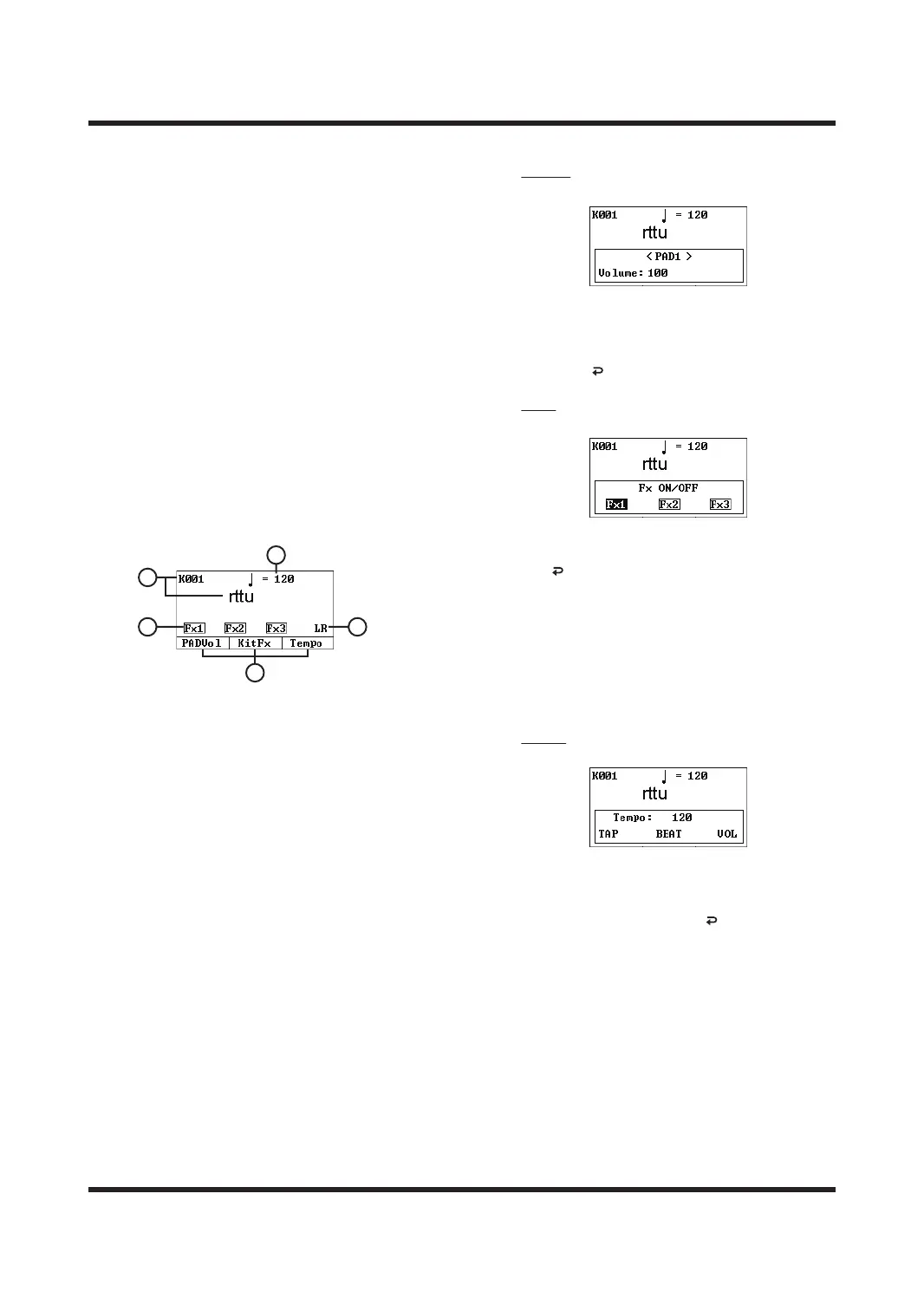
HOMEPAGE DESCRIPTION
A. Sound kit name & Sound kit numbers
Use SCROLL WHEEL or [-]/[+] buttons to switch
between dierent sound kits. There are 100 sound
kits in total.
B. Metronome tempo
It shows the current metronome tempo. In this
HOME page, you can press [F3] button to enter
into the metronome setting page for the current
sound kits.
C. The Left/Right level bars
They represents the current L and R channel levels
(Master output) respectively.
D. FX 1/2/3 eects status bar
It shows the eect switch status of the current
sound kits. Black background means turning
on. You can use [F2] button to turn on/o the
eect of current sound kits.
E. The quick function bar
Press the corresponding buttons at the bottom
of the screen and enter into the corresponding
operation settings on the screen.
PADVol
Pad Trigger Volume Setting.
Press [<]/[>] buttons or hit the pad to select it,
then use SCROLL WHEEL or [-]/[+] buttons to
modify the volume output of the selected
trigger.
Press the [ ] key to save and exit.
KitFx
The eect settings for sound kits.
Use [F1]/[F2]/[F3] buttons to turn on/o the
corresponding sound kits eects, and press
the [ ] button to save and exit.
Tips:
1. Before enabling, you need to change to the
KIT SET-Output page to set the eect
playback path of each trigger.
2. After the master eect is turned on, it will
take eect in a superimposed manner.
For more details, please see the interface
description of SYSTEM-MASTER EFFECT.
Tempo
Metronome Settings.
Use the [F1]/[F2]/[F3] buttons to select the
parameter type, and then use the [+]/[-] buttons
or SCROLL WHEEL to modify the parameter
value, and at last press the [ ] to save and exit.
TAP: Metronome speed, value range is 20-240.
Press [F1] several times continuously, the value
will depends on combo speed of the pressing.
BEAT: The number of metronome beats, ranging
from 1 to 16.
VOL: The Volume of the metronome, the value
range is 0-100.
A
D
E
C
B



 To Next Page