11
PAD MENU DESCRIPTION
-MODE (PAD/TRIG)
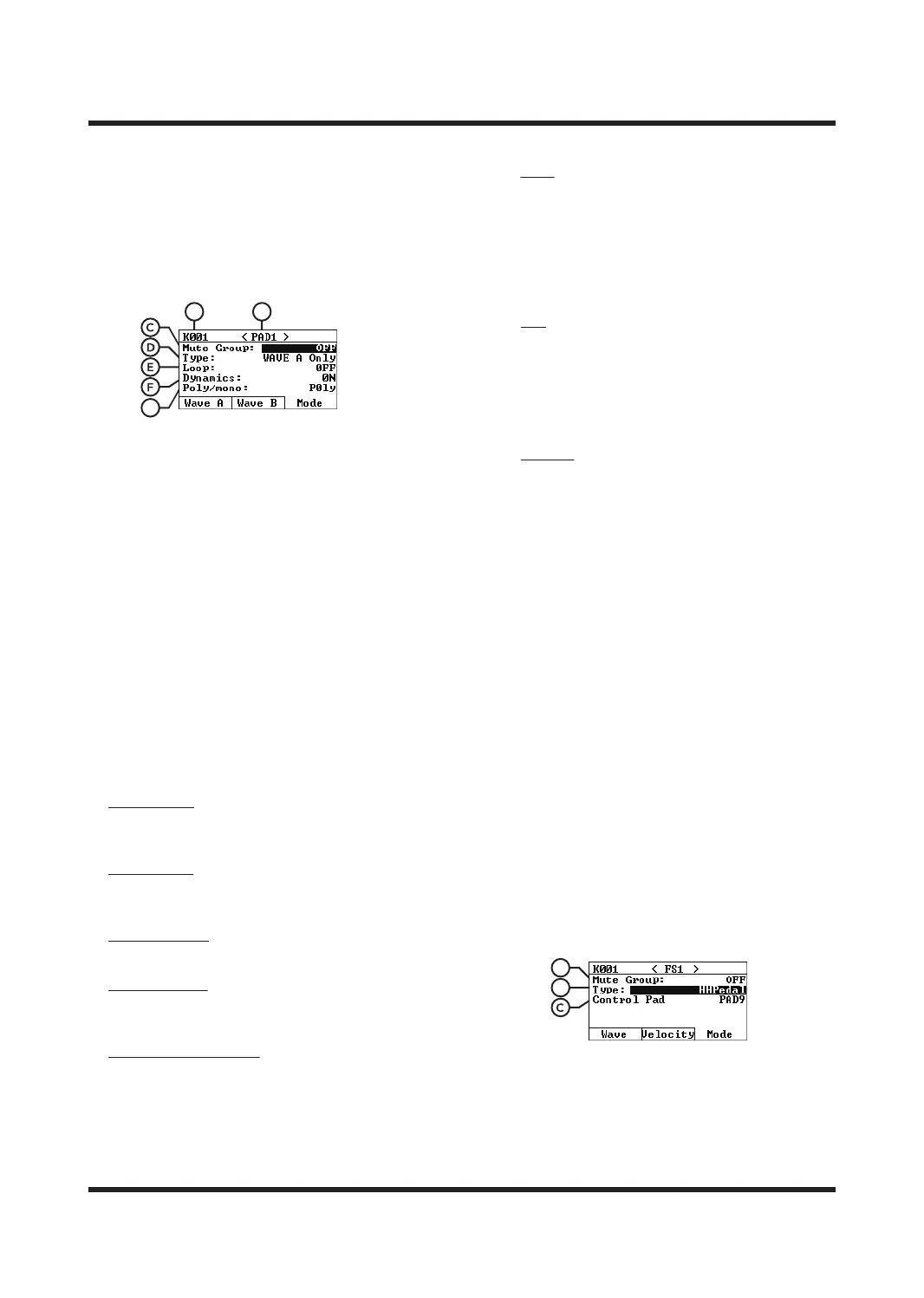
In the PAD menu, press [F3] to switch to the Mode
page, use [
<
]/[
<
] to select the parameter type,
and use [-]/[+] or the SCROLL WHEEL to modify
the parameter value.
A. Number of Sound kits
It indicates the number of the sound kits
currently being edited. Please select the sound
kits you want to edit on the HOME page.
B. TRIGGER
It indicates the trigger currently being edited.
Trigger(play) the pad that you want to edit or
use [<]/[>] to switch.
C. Mute Group
Setting this number will make the pads belong
to the same mute group. When the pads of the
same group are triggered one after another, the
sound of the first pad will stop immediately and
the sound of the last pad will be played
immediately.
D. Type
The type of pad trigger. Depending on the
selected type, the pad will play dierently.
Wave A Only
Only the sound selected by Wave A will be
played.
Wave B Only
Only the sound selected by Wave A will be
played.
Simultaneously
Plays Wave A and Wave B at the same time.
Velocity Divide
Velocity Divide mode, plays Wave A or Wave B
depending on the velocity of player.
Round Robin Alternate
At this mode, play Wave A or Wave B alternately.
E. Loop/Trig/Velocity
Provides dierent options depending on the
type of trigger selected.
Loop
Loop playback, when the PAD trigger type is
Wave A/B Only, you can select x2, x4, x8, Infinite
or OFF.
OFF: Do not loop; x2: Loop twice;
x4: Loop 4 times; x8: Loop 8 times;
Infinite: Infinite loop, each trigger of pad will
turn the loop on or o.
Trig
When Shot is selected, Wave A and B will play
simultaneously when pad triggered. When Alt
is select, Wave A and B will play simultaneously
when the first hitting, and the sound will be
stopped after the second hitting. This operations
can be repeated.
Velocity
Hitting strength layer. The larger the value, the
greater the strength required to trigger Wave B.
Range: 0-127
F. Dynamics
Strength detection switch. When turned OFF,
the pad will output the sound at the maximum
force; when turned ON, the pad will output the
corresponding sound according to the trigger
force.
G. Poly/mono
Poly is selected, when the same pad is hit
continuously, the sound will be played in a
superimposed form. Mono is selected, when the
same pad is hit continuously, the next pad will
immediately pause the previous pad sound and
play its own sound again.
PAD MENU DESCRIPTION
-MODE (FS)
After connecting the external pedal, select FS1 or
FS2 to choose the setting for FS1 Jack or for FS2
Jack, and then after switch the Type to HH Pedal,
you can link a PAD for the pedal controls. You can
also change the following parameters.
A. Mute Group
Setting pad with the same number will belong
to the same mute group. When pads of the
same group are triggered one after another, the
first triggered pad sound will stop immediately
and the last triggered sound will play
immediately.
BA
G
B
A



 To Next Page