14
KIT SET MENU
DESCRIPTION-MIDI
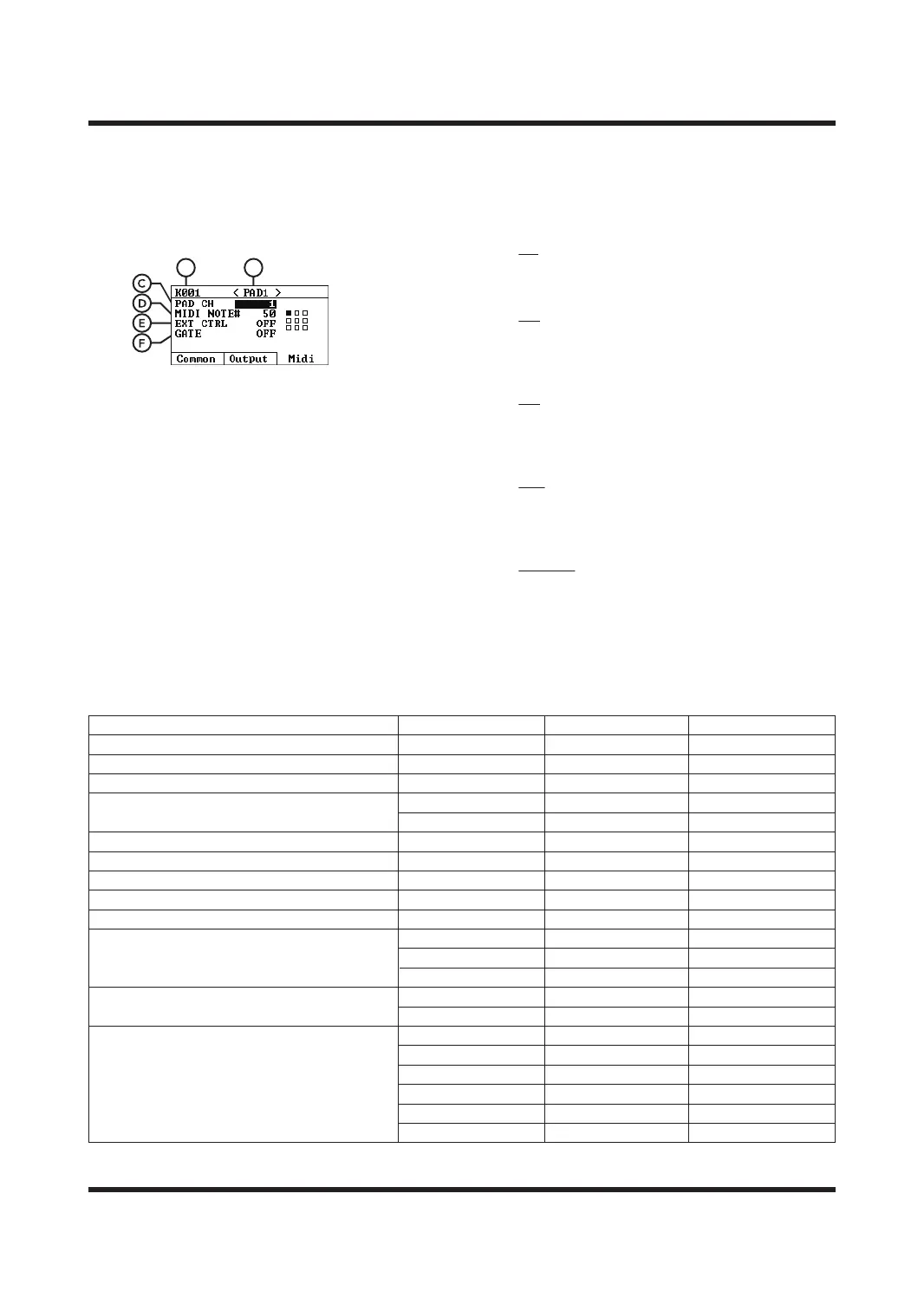
On the KIT SET page, press the [F3] button to enter
the kit MIDI setting page.
A. The sound kits
The number indicates the number of the sound
kits currently being edited. Please select the
sound kits you want to edit on the HOME
page.
B. Trigger
It indicates the currently selected trigger.
Use the [<]/[>] keys to switch.
C. PAD CH trigger
MIDI output channel 1-16 or GLOBAL (use global
setting) By default, the global setting MIDI
channel is used, and it can also be set individually.
D. MIDI NOTE#
Current trigger MIDI code, which can also be
modified by yourself.
E. EXT CTRL
If this parameter is set to ON in SYSTEM-MIDI, all
triggers will only output MIDI codes and will not
be aected by the following settings.
On
Only outputs MIDI codes for external use,
without playing the sound;
O
Outputs MIDI codes while playing the sound.
F. GATE
O
Default mode, trigger the pad to output the Note
On command, and then output the Note O
command after a delay of 0.5 seconds;
ALT
The first trigger outputs Note On, and the second
trigger outputs Note O command triggers the
above operation again;
0.1s-8.0s
Trigger the pad to output the Note On command,
and output after a corresponding delay Note
O command.
MIDI IMPLEMENTATION CHART
Function
Basic Channel
Mode
Note Number
Velocity
Note On
Note O
After Touch
Pitch Bend
Control
System Real Time
Aux Message
Mode 3 : OMNI OFF, POLY
O : Yes
X : No
Program Change : True Number
System Exclusive
: Song Position
System Common : Song Select
: Tune Request
: Clock
: Commands
: All Sound O
: Reset All Controllers
: Local On/O
: All Notes O
: Active Sensing
: System Reset
Transmitted
10
Mode 3
0-127,OFF
O 99H, v = 1–127
O 89H, v = 0
X
X
O
O
O
X
X
X
X
X
X
X
X
X
O
X
O
X
Recognized
1-16, OFF
Mode 3
0-127,OFF
O
O
X
X
O
O
O
X
X
X
X
X
X
X
X
X
Remarks
Memorized
Memorized
BA



 To Next Page