18
You can set the metronome sound to be output
from the headphones only or from both the Master
and headphone jacks.
AUDIO IN/OUT
This menu is used to adjust the volume of external
input audio.
Audio In Volume
Line in interface volume input adjustment.
BT Audio Volume
Bluetooth audio volume input adjustment.
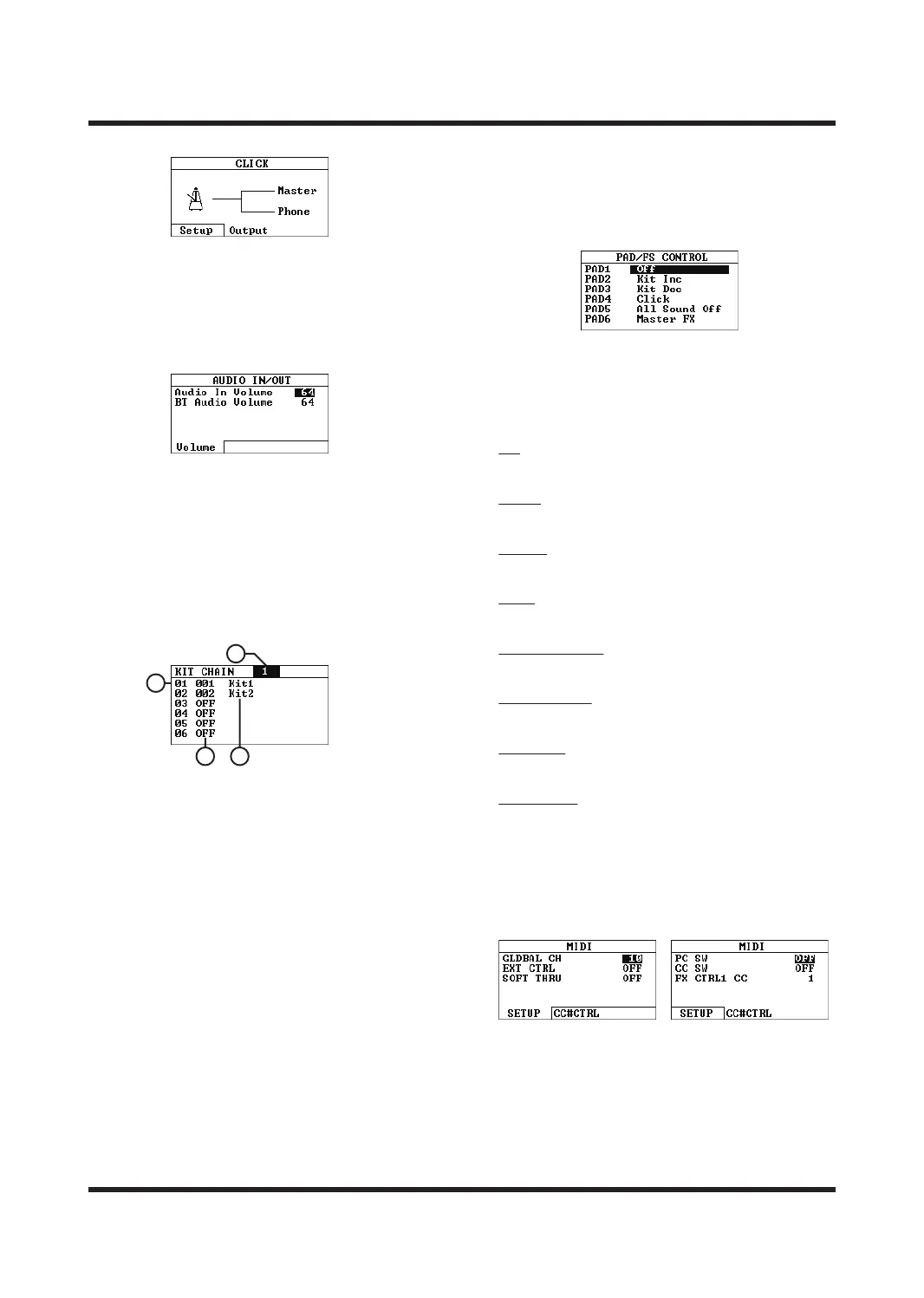
KIT CHAIN
This menu is used to customize the kit list.
Use the [
<
]/[
<
] buttons to select a drum kit chain
number or kit number.
A. KIT CHAIN
Drum kit chain number, supports up to eight
drum kit chains. After selecting, return to the
HOME page to automatically turn on the KIT
CHAIN function, and select OFF to turn o the
function.
B. Sound kits list
Customize the tone group switching order. Each
sound kits chain supports up to 20 custom tone
groups.
C. Customize the tone group
You can sort the tone groups according to your
needs and use the [+]/[-] buttons or SCROLL
WHEEL to switch the tone groups.
D. Voice group name
Indicates the name of the selected voice group.
PAD/FS CTRL
This menu can set the trigger as a special function
switch. Use the [
<
]/[
<
] buttons or the trigger you
want to set to switch; Use the [+]/[-] buttons or
SCROLL WHEEL to select the special function type;
This setting will override the original function
definition of the sound kit and take eect on all
sound kits. After enabling the special function,
the tri-color light of the corresponding trigger will
always remain white.
O
Do not enable special features.
Kit Inc
Switches to the previous sound bank.
Kit Dec
Switches to the next kit.
Click
To turn the metronome on/o.
Tap Tempo Sets
The metronome tempo based on the trigger interval.
All Sound O
Turn o all sounds.
Master FX
Turns the Master Eect on/o.
Kit FX 1/2/3
Quickly turn on/o eects 1/2/3.
MIDI
Global MIDI setting menu, use [F1] and [F2] to
switch pages; use the [
<
]/[
<
] buttons to select the
parameter type; use the [+]/[-] buttons or SCROLL
WHEEL to modify the value.
GLOBAL CH
Sets the global output/input MIDI channel.
A
B
D
C



 To Next Page