12
B. Type
The trigger type for external parts such as pad,
cymbal, pedal and etc. Depending on the
selected type, FS1/FS2 will play dierently.
Wave A Only
Pressing the pedal plays the sound of Wave A.
HH Pedal
The current Pedal will control the sound of the
selected pad (Control Pad). At the same time,
the pages will switch to Wave and Velocity
instead of Wave A and Wave B, in which the
sound and velocity range can be modified.
C. Control Pad
The pad controlled by the current pedal. After
the pad selected, the original pad settings will
be temporarily invalid, and the settings in Wave
and Velocity below will be used.
Wave
When the Wave is in HH Pedal type, press the [F1]
button to switch to the Wave page. This menu can
adjust the pedal in dierent velocity ranges. The
linked trigger will play the sound of the range.
HH Pedal is the sound played when the pedal is
pressed.
HH Wave 1 corresponds to Velocity 1;
HH Wave 2 corresponds to Velocity 2;
HH Wave 3 corresponds to Velocity 3;
HH Wave 4 corresponds to Velocity 4;
HH Pedal is the pedal sound.
Velocity
When Velocity is in HH Pedal type, press the [F2]
button to switch to the Velocity page. This menu
can adjust the pedal velocity range.
KIT SET MENU
DESCRIPTION-COMMON
On the KIT SET page, the Common page is entered
by default. You can also press [F1] to switch to the
Common page, use the [
<
]/[
<
] buttons to select
the parameter type, and [-]/[+] or the SCROLL
WHEEL to modify the parameter value.
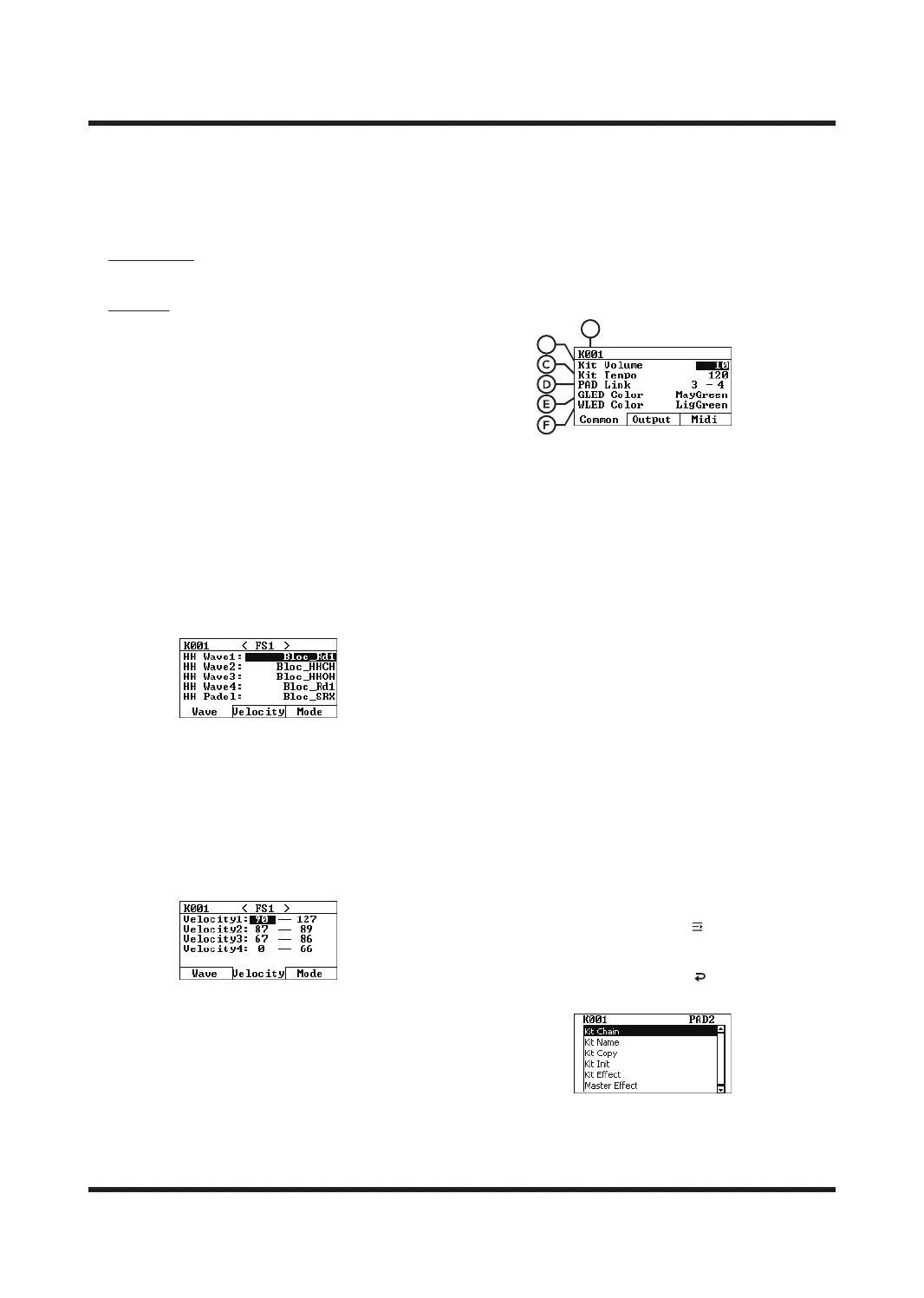
A. Number of Sound kits
It indicates the number of the sound kits
currently being edited. Please select the sound
kits you want to edit on the HOME page.
B. Kit Volume
The volume of the kit. Value range: 0-100.
C. Kit Tempo
The speed of the Kit Tempo sound kits,
value range: 20-240.
D. PAD Link
Sets the linked PAD of the current sound kits,
which can associate 2 Pads for synchronous
action (including 8 external triggers, 2 pedals
and 9 pads).
E. GLED Color
Sets the light color when the current sound
kits PAD is silent.
F. WLED Color
Set the lighting color when the pad of the
current sound kits is triggered.
Quick Menu Usage Guide
On the KIT SET page, press [ ] button to enter
the menu, use the [
<
]
/[
<
] buttons to select a
shortcut function, press [OK] to enter or execute
an operation, and press the [ ] to return to the
previous level.
B
A



 To Next Page