28 XR Series Installation and Technical Instructions
Wireless Communication
4.1 Wireless Set-up for All XR Models
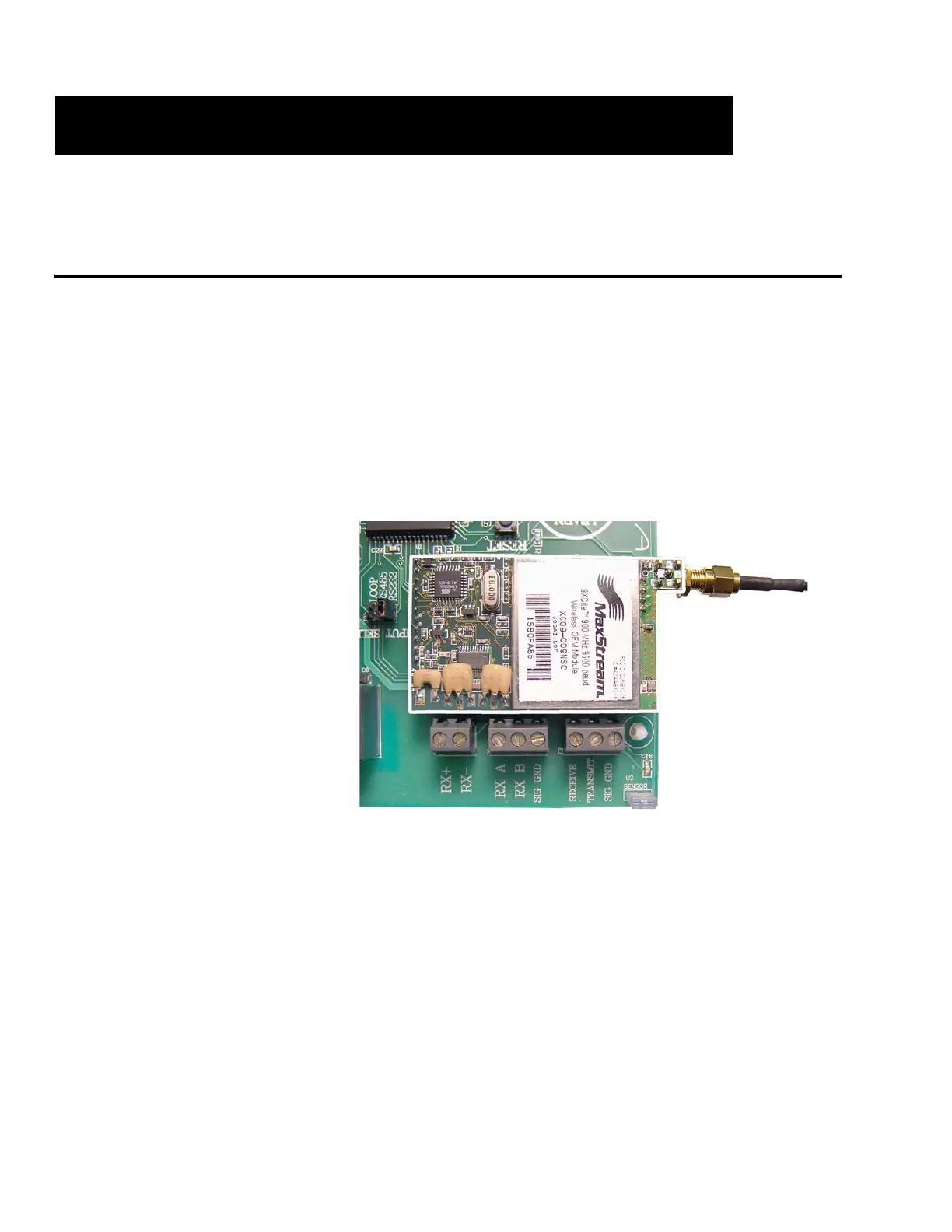
XR Remote Display 1. Install the radio module. Plug the module into terminals J10 and J11 on
the main PC board. See Figure 4.1.
2. Route the radio signal cable to the bottom of the electronics carriage
and secure the SMA terminal through the available hole. Connect the
external antenna to the SMA terminal.
3. Power up the XR. The XR is ready to receive radio signals.
4. If problems are experienced, ensure that the radio module is seated
properly on the PC board. Check for bent pins.
Figure 4.1 Radio Module (outlined in white) on controller board
Indicator 1. Connect the base station to the indicator (or other communicating
device) as directed in the XStream Start-Up Guide.
2. Ensure the indicator is set-up to output CONTINUOUSLY.
Note the indicator’s
communication settings, as the
base station’s settings may need
to be adjusted to match.
3. Connect the base station to scale indicator (or other appropriate
device) using a serial interface cable. Interface cables are Beldon
Type 8723.
Wireless Communication


 To Next Page
 Loading...