EN39EN 38
F - MAINTENANCE AND UPKEEP
Check the batteries of the remote controls x x x x
Check the motor support (deformation, etc.)
and the fasteners
x x x x
* do not use grease, as it tends to attract dust or dirt
** please note that adjustments made in summer may need to be changed according to the season (more wind in autumn, frost
in winter, etc.)
2 - OPERATING INDICATORS
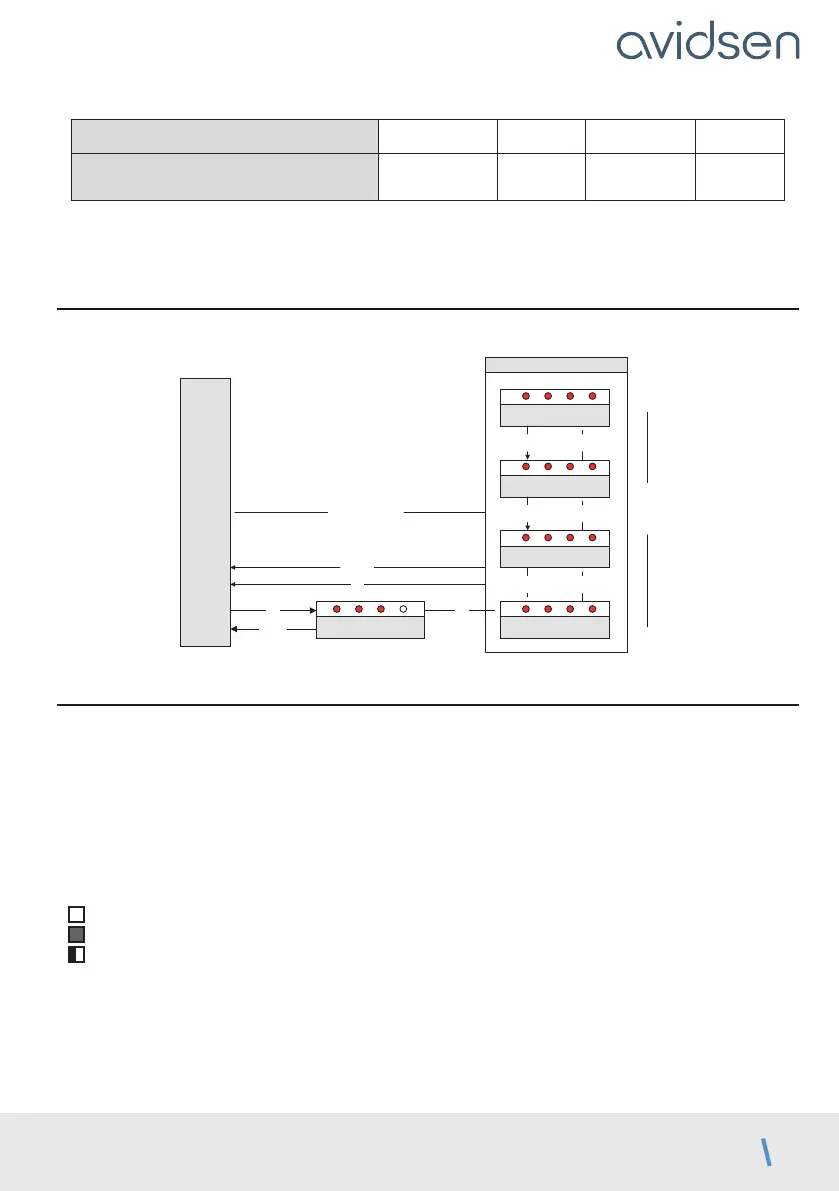
This system has two operating indicators: the battery charge level (optional) and the history of events.
OK
Charge batterie
PROG
OK
Code 1
PROG
– +
Code 2
Code 3
– +
Code 4
– +
OK 3s
efface historique
du plus
récent
au plus
ancien
MENU 0
(dernière
erreur)
L1 L2 L3 L4
L1 L2 L3 L4
L1 L2 L3 L4
L1 L2 L3 L4
historique des événements
L1
L2 L3
L4
OK
2.1 - HISTORY OF EVENTS AND ERROR CODES
• During operation, events may occur that may be malfunctions of the motor drive or consequences of user
actions.
• Each event has a different code.
• This code is displayed by a combination of red LEDs that are on, off or flashing on the MENU 0 display.
• When OK or PROG are pressed, this code is deleted. However, the last 4 codes generated are memorised,
and can be viewed in a history.
• To access them, press OK twice, then use the “+” and “–” buttons to scroll through the memorised codes.
To diagnose any problems, here is the list of codes and their meaning:
: LED off
: LED on
: Flashing LED light



 To Next Page