The Avigilon Single Door Controller (SDC), model OP-CR-SDC, is a key component of the Avigilon Alta access control system, designed for managing access to single doors, gates, or elevator floors. This installation guide provides comprehensive instructions for setting up and configuring the SDC, including network requirements, power specifications, mounting options, wiring configurations, provisioning, and troubleshooting.
Function Description
The SDC acts as a central control unit for a single access point, integrating with Avigilon Smart Readers and Pro Series Readers, as well as third-party Wiegand readers. It manages door peripherals such as locking hardware, Request to Exit (REX) mechanisms, and door contact sensors. The SDC communicates with the Avigilon Alta Control Center for centralized management and monitoring. It supports both Power-over-Ethernet (PoE/PoE+) and external 12-24VDC power supplies, with automatic switching to the higher voltage source if both are available. The device is designed to be provisioned and managed through the Avigilon Alta Control Center and the Open Admin mobile app, allowing for remote configuration and monitoring of access events.
Important Technical Specifications
- Power Requirements:
- Supply Requirement: PoE, PoE+, or external 12-24VDC.
- External Supply Rating: 12V @ 2A min. or 24V @ 1A min. (24V external supply required for 24V wet relay output).
- Output Ratings: Power Out can supply up to 100mA @ 12V or 50mA @ 24V.
- Reader Ports: 2, max power output 250mA @ 12V each.
- Relays: 2, max power output:
- PoE: Max 3W combined output (250mA @ 12V, 125mA @ 24V).
- PoE+: Max 9W combined output (750mA @ 12V, 375mA @ 24V).
- A certified external power source (compliant with LPS) must be used.
- Network Connectivity:
- Ethernet connection with DHCP.
- Supports Wi-Fi connections (2.4 GHz and 5 GHz).
- Outbound ports: TCP port 443, UDP port 123 (UDP port 53 for external DNS).
- Inbound TCP port 443 for Wi-Fi unlocking from mobile app.
- Reader Communication: RS-485 for Avigilon readers.
- Cable Length (Recommended Maximum):
- 300 ft (91 m) with CAT6.
- 500 ft (152 m) if two wire pairs are used for GND and VIN (power).
- Environmental: Temperature must not exceed -22°F to 140°F (-30°C to 60°C).
- Regulatory Compliance:
- UL 294: Level I for Attack, Endurance, Line Security, and Standby.
- FCC Part 15 compliant (Class A digital device).
- FCC ID: 2ABCB-RPICM4.
- Industry Canada (IC) compliant.
- IC Company Number: 25142.
- IC ID: 20953-RPICM4.
- Physical: Built-in tamper sensor on the front cover.
Usage Features
- Mounting Options: Can be installed on a standard US 1-gang box, a double gang box, or directly on drywall. The installation process involves attaching a backplate and then snapping the main housing and front cover into place.
- Wiring Configuration: Detailed wiring diagrams are provided for Avigilon readers, third-party Wiegand readers, fail-safe and fail-secure lock hardware, REX devices, and door contacts. Voltage switches allow selection of 12V or 24V for wet relay output.
- Provisioning: The SDC is provisioned by registering it in the Avigilon Alta Control Center and connecting it to the Open Admin app. This process ensures the device receives the latest firmware and is integrated into the access control system. Provisioning can be done for multiple SDCs using a quick start option or for individual SDCs.
- Network Settings Configuration: Network settings, including Wi-Fi and static IP addresses, can be configured through the Open Admin app. The SDC supports both DHCP and static IP configurations for Ethernet and Wi-Fi.
- Static Cloud IP: Optional feature for Enterprise plans, allowing connection to the Cloud using a static IP address and port on an allowlist. Requires the Static Cloud IP app to be installed in the App marketplace.
- REX Wiring Best Practices: Recommendations for wiring REX devices in series with mag locks or other fail-safe hardware to ensure free egress and prevent points of failure, especially when using Video Reader Pro and Video Intercom Reader Pro devices.
- Backup Battery Support: While not required, a backup battery is recommended for power outages. The guide provides an example of power requirements to help size the battery.
Maintenance Features
- Status LEDs: The SDC features a Status LED that indicates various operational states:
- Solid white: Provisioned and functioning normally.
- Solid cyan: Booting.
- Solid yellow: Restoring software (first power-on) or updating software (online for less than 24 hours).
- Solid blue: Unprovisioned, ready for provisioning.
- Solid purple: Connected to Open Admin app.
- Blinking purple: Ready to connect to Open Admin app.
- Blinking red: No internet connection.
- Solid red: Error state.
- Port LEDs: Eight port LEDs and two power LEDs provide status indications for Avigilon/Wiegand readers, sensors (REX and Contact Sensors), and lock hardware (relays).
- Solid: Normal operation (readers), Active (sensors), Energized (relays).
- Blinking: Error state (readers), EOL shorted or cut (sensors), Fault detection (relays).
- Troubleshooting: The guide provides solutions for common issues, such as a red Status LED (internet connection error or error state).
- Resetting SDCs:
- Soft Reset: Disconnect power for 10 seconds, then reconnect.
- Hard Reset: Disconnect power, press and hold the ADMIN button, reconnect power, continue holding for 15 seconds until the Status LED turns yellow, then release. A hard reset clears all data and requires reprovisioning.
- Tamper Alerts: The built-in tamper sensor reports events when the front cover is removed, which can be monitored via the Tamper Detector State Changed alert in the Avigilon Alta Control Center.
- Firmware Updates: The provisioning process ensures the SDC runs with the latest firmware.

 Need help?
 General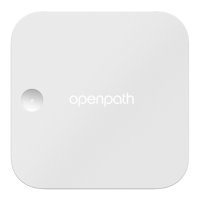

 To Next Page