l
Go to the Edit ACU page, and deselect the Enable Static Cloud IP toggle.
Normal cloud operation resumes after the Static Cloud IP connection is disabled.
Provision SDCs using Open Admin app
1. If powering using PoE, plug in Ethernet. If powering with an external power supply, plug in Ethernet and
connect power to POWER IN.
The Status LED is solid cyan .
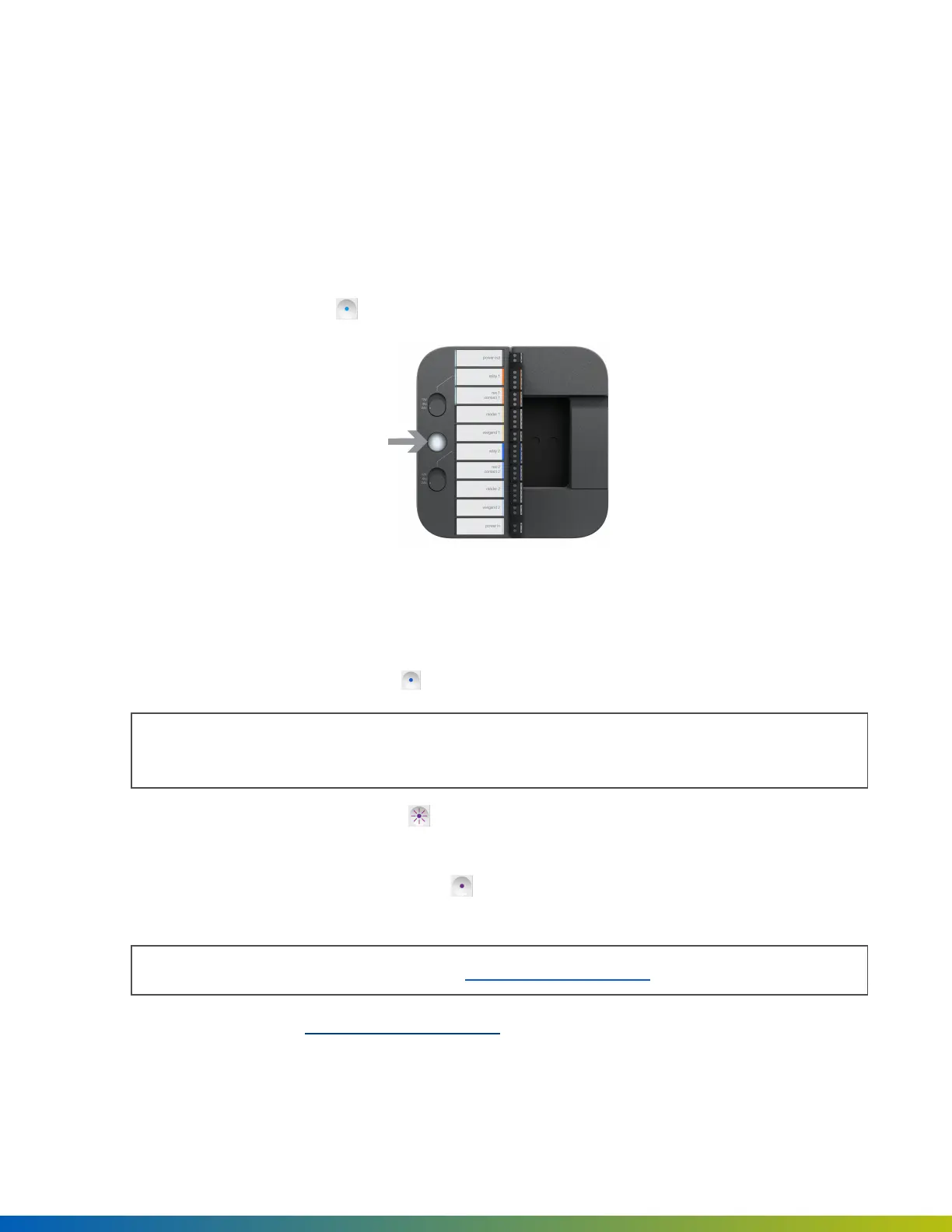
Figure 5 Status LED and SDC Admin button
2. In the Open Admin app, locate the org to which you're provisioning hardware, either on the list or using
search, and then tap on the org name.
3.
Wait until the Status LED is solid blue and then press the Admin button (see below) on the SDC.
Note: SDC will disconnect from the Open Admin app after 5 minutes of inactivity. Press the Admin
button again to reset the timer.
4.
When the Status LED is blinking purple , tap on the ACU ending in the last five digits of the serial
number in the Open Admin app.
5.
When the Status LED changes to solid purple , tap Test Internet Connection and wait for a green
YESto appear before proceeding to the next step.
Note: This checks if the ACU or SDC can ping https://api.openpath.com/.
If this step fails, refer to Troubleshooting on page22.
6. If the internet connection test is successful, tap Provision Device in the app.
Provisioning 19


 To Next Page