OWNER’S MANUAL
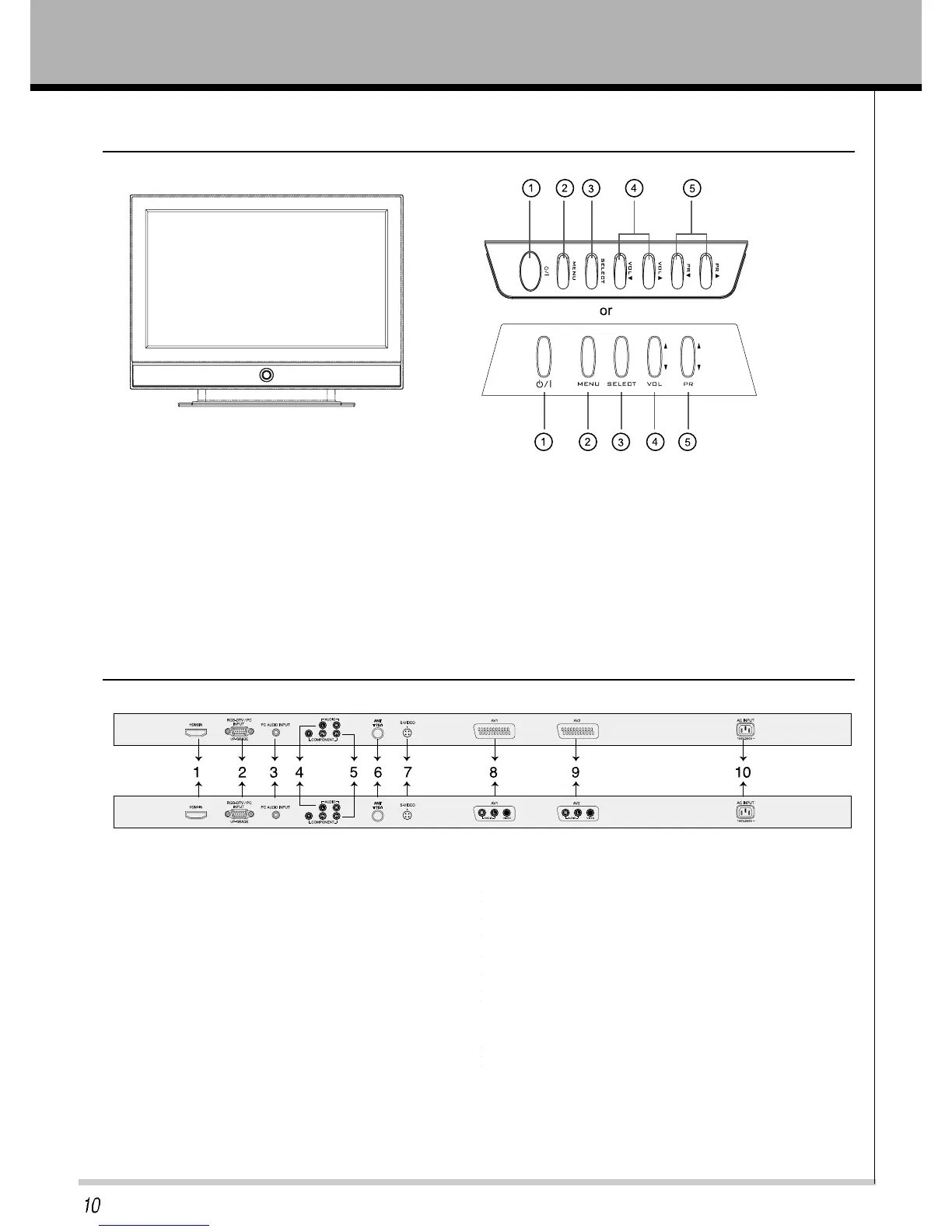
*FRONT AND SIDE VIEW
*Rear View
1. HDMI IN : High Definition Multimedia Interface input.
2. RGB-DTV/PC INPUT & UP-GRADE: PC or DTV Video
Source Input.
Up-grade from PC.
3. PC AUDIO INPUT : Connect the audio cable from the
PC to the PC AUDIO INPUT of the set.
4. L/R : Audio(L/R) Input in case of S-VIDEO or
COMPONENT mode.
5. Y,Pb,Pr : Component video signal input.
6. TUNER : RF antenna input.
7. S-VIDEO : Connect the output of the A/V Source to the
S-VIDEO input.
8. AV1 : Composite input of A/V Source.
9. AV2 : Composite input of A/V Source.
10. AC POWER : Power cord input.
*SCART
*RCA
1. POWER button : Switches TV set on or off.
2. MENU button : Displays a menu.
3. SELECT button : Selects the A/V source.
4. VOLUME (
▲ / ▼) : Adjusts the volume / Adjusts
menu settings.
5. PR (
▲ / ▼) : Selects a programme or menu item.



 To Next Page