OWNER’S MANUAL
Auto picture control
2
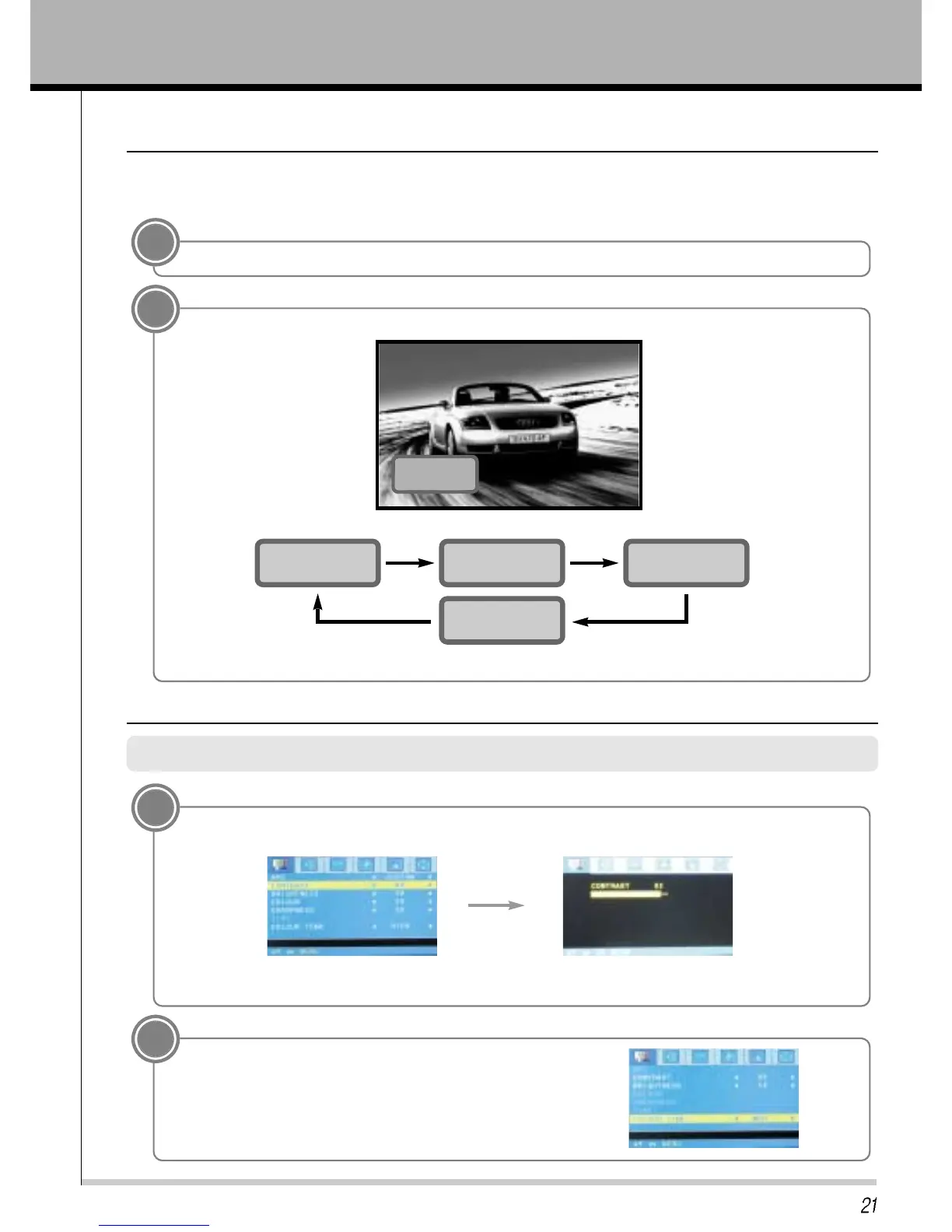
Press the APC buttons to select your desired picture condition.
Use APC to set the TV for the best picture appearance
APC (Auto Picture Control)
• You can also select STANDARD, SOFT, CUSTOM or STRONG in the PICTURE menu.
• Each press of APC button changes the screen display as shown below.
STANDARD
SOFT
STRONG
CUSTOM
1
Press the APC button.
CUSTOM
Press the MENU button and then press the VOL+/- button to select PICTURE menu.Press the PR - button.
Adjusting picture appearance
1
* Press the PR+/- button to select other items.
* Adjust BRIGHTNESS, COLOR, SHARPNESS and TINT in the same way.
2
Press the PR+/- button to select COLOR TEMP and then
press the VOL+ button to select the desired COLOR TEMP.
Press the ENTER button.
Press the PR+/- button to select Contrast and then press the VOL + button.
Use the VOL +/- button to make appropriate adjustments and then press the ENTER button.



 To Next Page