ChroMate
®
Microplate Reader Operator’s Manual Doc. 4300 Rev. Q 65
5.5 QC Tracking Menu
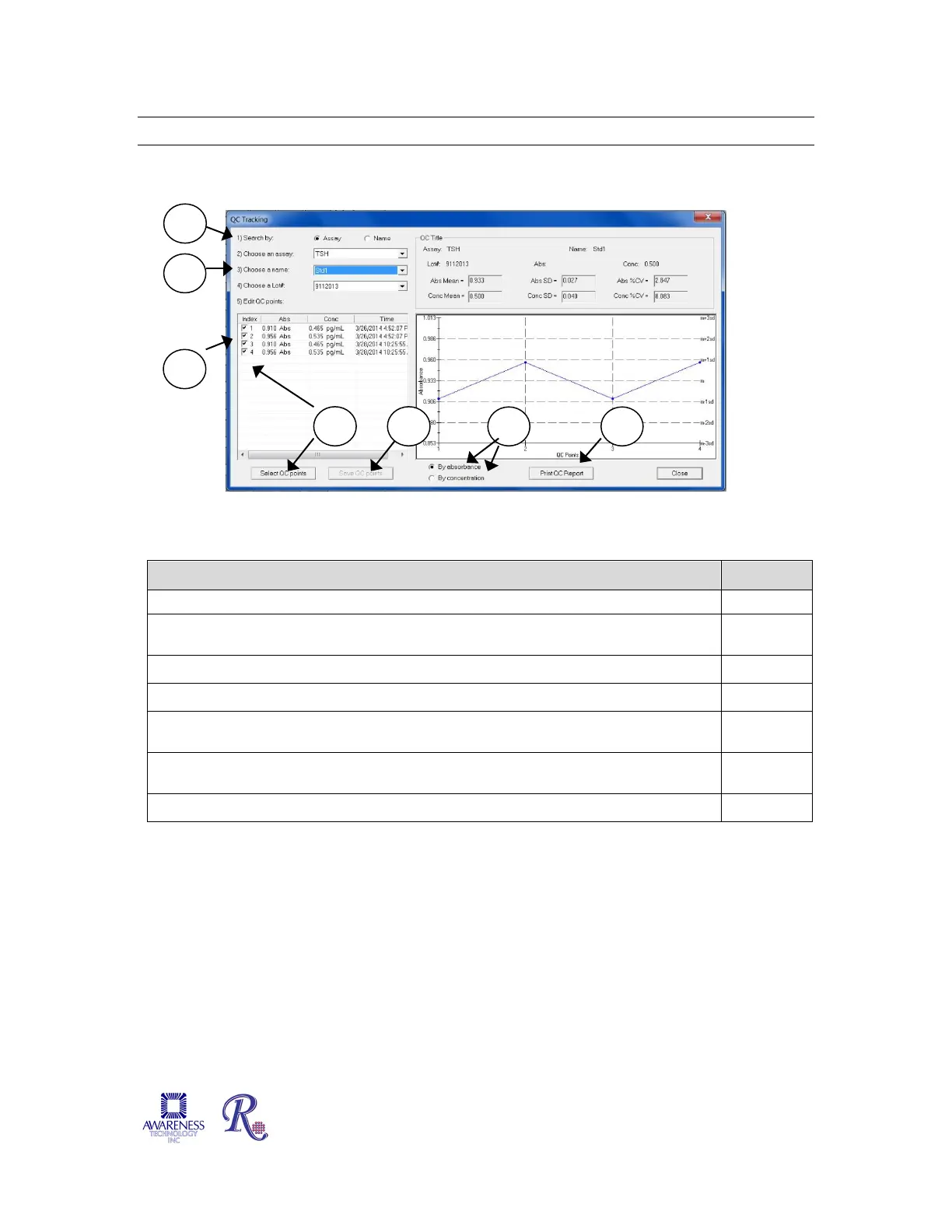
QC Tracking enables Controls and Calibrators to be tracked using a Levey-Jennings chart.
Figure 5.5-1 QC Tracking Example
Feature / Description: Steps:
Choose an Assay, choose a name, or choose a Lot # from the drop down
2
Edit QC points by clicking on an item in the list and highlighting it. 3
The curve may be viewed by Absorbance or Concentration results. 4
Data can be printed from this screen by pressing the Print QC Report button.
NOTE: Lot numbers are entered in the tab labeled Lot # Registration.
5
Edit by selecting the Select QC Points button or by un-checking the checkbox for
6
Select the Save QC Points button to save the QC points displayed. 7


 To Next Page