ChroMate
®
Microplate Reader Operator’s Manual Doc. 4300 Rev. Q 73
5.7.1.5 Report Output
Option Description
Interpretation – When
checked for a Report Type,
High, Low and Out
interpretations are listed in
this column.
Note When an assay has
had a dilution factor added,
the formula used can be
displayed by checking the
Note column for a Report
Type.
Ref The reference column
is used to report the
Normal range for results.
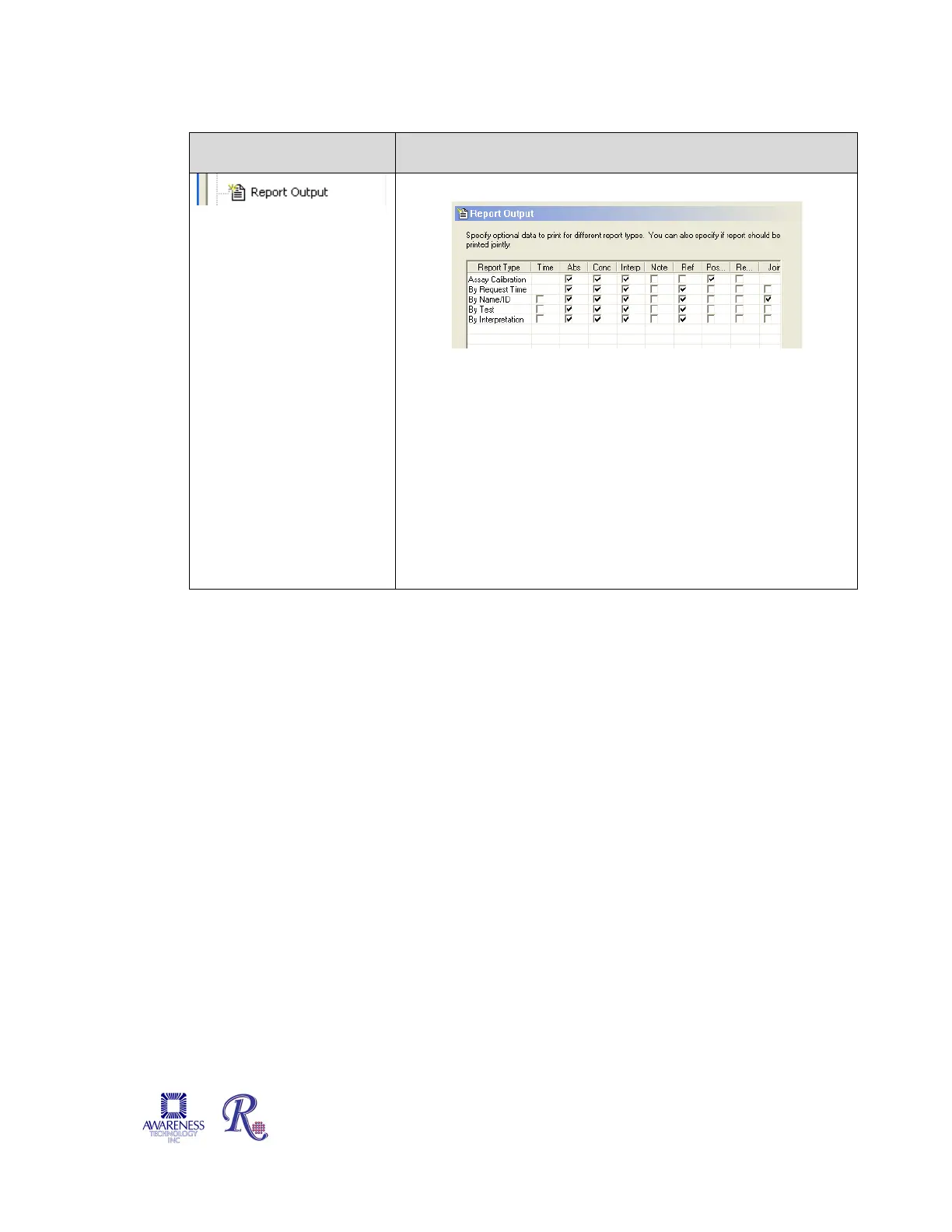
Specify the data to include for each Report Type.
Pos Position indicates where each Calibrator, Control or Sample
was located in the microplate
Read The Reading column, when selected for a Report Type,
will print the actual reading taken by the instrument.
Jointly The “Printed Jointly” option (accessed by scrolling all
the way to the right of the Report Type window, allows less
paper to be Instead of one test or patient per page, multiple
results will print on the allowable paper space.


 To Next Page