ChroMate
®
Microplate Reader Operator’s Manual Doc. 4300 Rev. Q 39
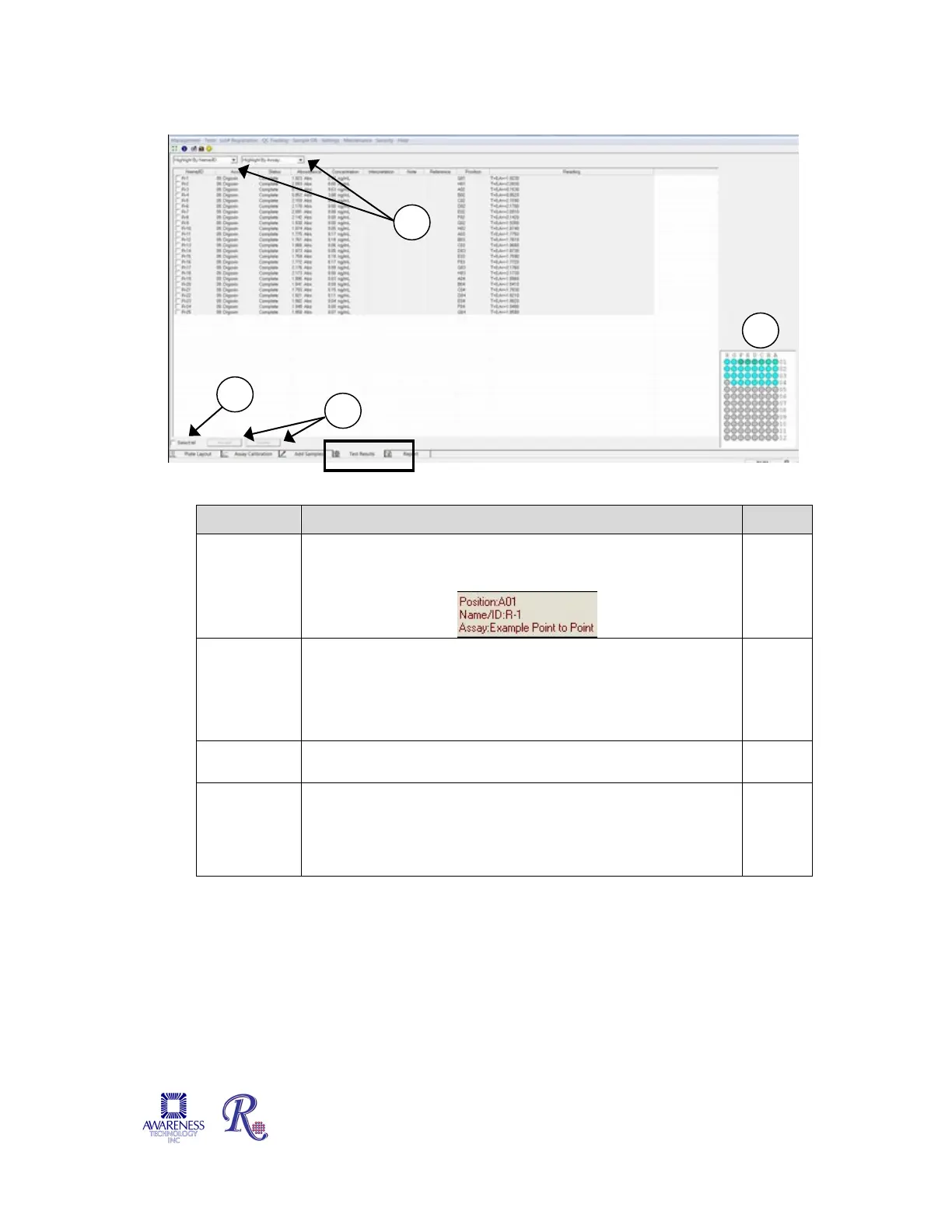
4.2.4 Test Results Tab
Figure 4.2.4-1 Test Results Tab
Feature: Description: Item #
Layout
Area
Indicates the location of patient samples, reagents, and
pertinent assays. For more information on a particular
substance, highlight it with the mouse cursor. For example:
1
List Use the ‘Highlight by Name/ID’ drop down menu to highlight
a patient, or use ‘Highlight by Assay’ drop down menu to
highlight by type of assay. A list of all of the assays will
display. The Current Step that is running displays to the right
of the drop down menus.
2
Select All The ‘Select All’ button selects all of the entries in the list.
Items may also be selected individually.
3
Action
buttons
Click ‘Accept’ to accept the results of the selected ID.
Press ‘Delete’ to discard the selected ID.
NOTE: Results must be accepted to allow them to be viewed
in the Report Tab.
4


 To Next Page