SURFACE|TALKBOX CONNECTIONS
OXYGEN 1000 & OXYGEN 2000 · User Manual · ENG
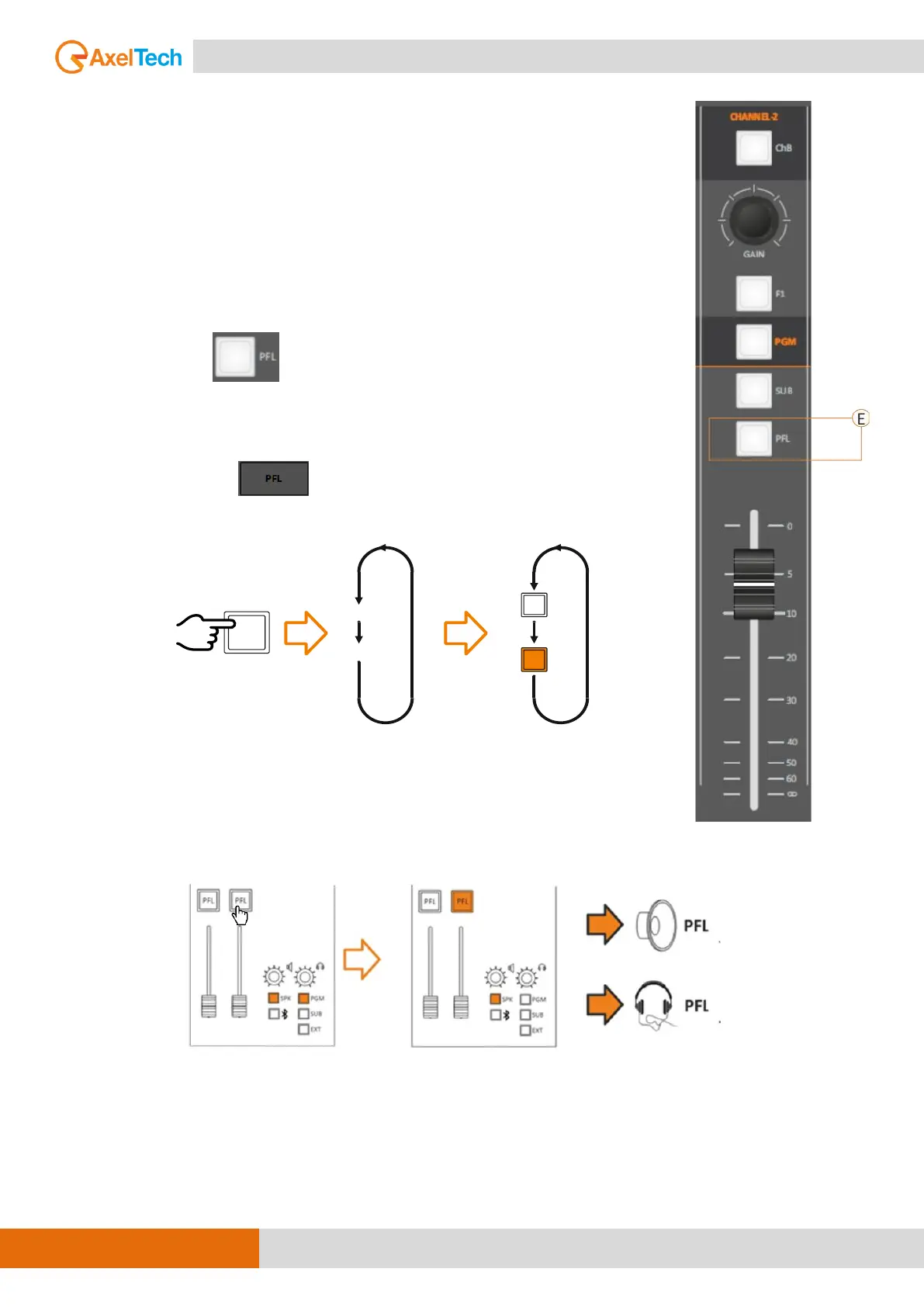
E. PFL
PFL button enables/disables the channel pre-listening.
When the PFL LED is ON, the pre-listening is enabled on that channel.
The 2 different status of this PFL button is always related with the channel (in
this example CHANNEL-2).
Changing the source, the PFL status will not change.
The PFL has the same workflow by the
- console surface button
and by the
- OXYGEN REMOTER button
By pressing an enabled PFL you will disable it from the MONITOR pre-
listening.
The PFL affects every headphone or speaker monitor previously set as +PFL
mode. like (SEL+PFL, 1SEL+PFL or 2SEL+PFL).
For example:
To active PFL in Control Room speakers (SPK-CRM), follow up this path to
change the mode to +PFL
MENU / AUDIO / OUTPUTS / MONITOR / SPEAKER / SPK-CRM / MODE
(1SEL+PFL, 2SEL+PFL)
PRESS
PFL OFF
PFL
PFL
SET
PFL ON
PFL



 To Next Page