17
AXIS 221 - Configuration
Overlay image/privacy mask requirements:
There are a number of limitations when using overlay images and privacy masks, such as
the size and positioning of images/masks. Please refer to the online help for more
information
.
Advanced Settings
These web pages include different settings for fine-tuning the video image.
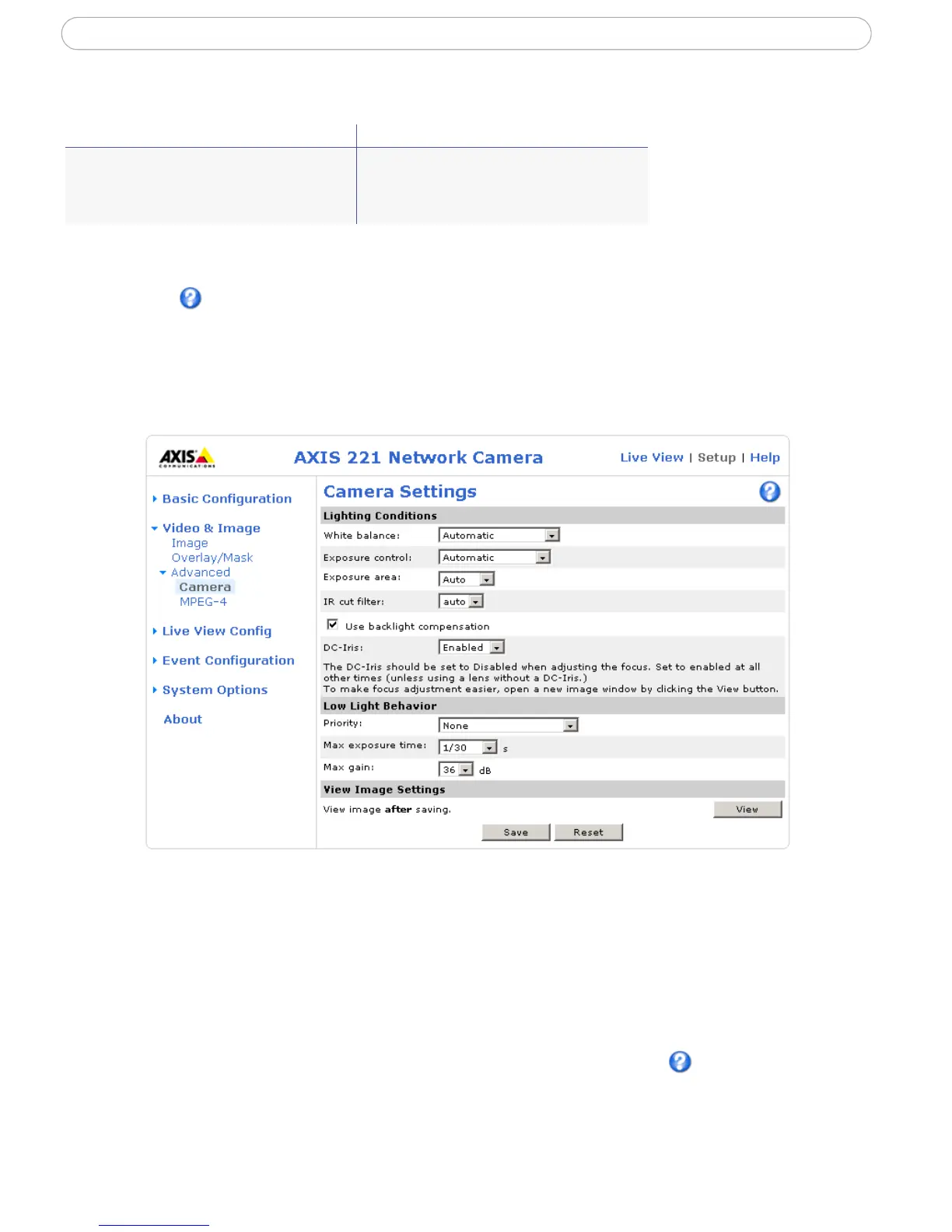
Camera Settings
To compensate for the Lighting conditions the white balance, the exposure control, the
exposure area and the IR cut filter can be adjusted. DC-Iris should always be enabled
except during focusing, or when using a non-DC-Iris lens.
The settings for Low-light behavior determine how the camera will behave at low light
levels. These settings all affect video image quality and are basically a measure of how
much noise to allow in the video images.
Please see the online help for further information on these settings.
Image Formats Image Size
• Windows 24-bit BMP (full color)
• Windows 4-bit BMP (16 colors)
• OS/2 4-bit BMP (16 colors)
The height and width of the overlay image in
pixels must be exactly divisible by 4.



 To Next Page